10 Best Ups Systems Of 2026
Ups Systems — Reviews, Recommendations & Updated Buying Guide November 2026


Tecnoware Power Systems Tecnoware UPS ERA PLUS DC
Why We Love It

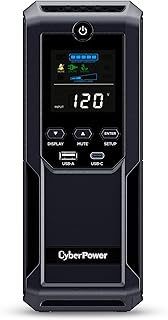
CyberPower CP1500AVRLCD3 Intelligent LCD UPS Battery Backup
Why We Love It

Tecnoware UPS EVO DSP PLUS 3
Why We Love It

Tecnoware UPS ERA PLUS 2600 TOGETHER ON
Why We Love It

Tecnoware Power Systems UPS ERA PLUS 2100 TOGETHER ON
Why We Love It

APC EASY UPS BV 1000VA
Why We Love It

Mercury Elite 2200 Smart UPS
Why We Love It

Eaton UPS 5E Gen2 900VA USB IEC
Why We Love It

MERCURY ELITE 3200VA SMART UPS
Why We Love It

APC Back UPS - BX750MI
Why We Love It
Quick Pick
10 Best Ups Systems Of 2026
Quick Pick
Tecnoware Power Systems Tecnoware UPS ERA PLUS DC 5VDC/9VDC/12VDC – Mini UPS for WIFI, Modem/Router, VOIP, Cameras - POE Function 24VDC/48VDC – Power 25W, Autonomy up to 240 minutes
CyberPower CP1500AVRLCD3 Intelligent LCD UPS Battery Backup, 1500VA/900W, 12 Outlets, 2 USB Ports, AVR, Mini Tower, UL Certified
tecnoware UPS EVO DSP PLUS 3,600 RACK TOWER - Power 3,600 VA PF 0,9. On Line Technology (VFI) DSP, 94% Efficiency, Input/output 230 / 230Vac 50 / 60Hz, IEC Output Sockets
Tecnoware UPS ERA PLUS 2600 TOGETHER ON - Power 2600 VA- IEC outputs - Autonomy up up to 50 min with 1 PC or 150 min with Modem Router
Tecnoware Power Systems UPS ERA PLUS 2100 TOGETHER ON - 2100 VA - IEC outputs - Autonomy up up to 40 min with 1 PC or 120 min with Modem Router, AVR Stabilization
APC EASY UPS BV 1000VA, AVR, Universal Outlet, 230V
Mercury Elite 2200 Smart UPS, 2200VA/1320W, Offline, LCD Display, USB Port, 4 Universal Sockets
Eaton UPS 5E Gen2 900VA USB IEC - Line-Interactive unterbrechungsfreie Stromversorgung - 5E900UI - 900VA (4 IEC-C13-Buchsen, leise, Black, Tower Form Factor, Software zum Herunterfahren)
MERCURY ELITE 3200VA SMART UPS, 3200VA/2000W, OFFLINE, LCDVERSION, WITH 4X12V/9AH BATTERY
APC Back UPS - BX750MI - UPS 750VA Battery Backup & Surge Protector, Backup Battery With AVR, Dataline Protection, Uniterruptible Power Supply BX750MI
Buying Guide: Ups Systems
📋 Table of Contents
1What battery capacity do I need for my setup?
Look for at least 500-1000VA for small devices like routers and modems, and 1000-2000VA or more for desktops or home servers. Higher VA ratings support more power-hungry equipment and longer backup times during outages.
2Should I choose a line-interactive or online UPS?
Line-interactive models are cost-effective and suitable for most home or small office use, while online UPS systems provide constant power conditioning and are better for mission-critical equipment like servers or medical devices.
3How many outlets do I actually need?
Choose a unit with at least 3-4 surge-protected outlets and 2-3 battery-backed outlets. Only plug essential devices into the battery section to preserve runtime and avoid overloading the system.
4What runtime can I realistically expect?
Runtime depends on load and battery size — expect 10-30 minutes for a desktop PC and 1-2 hours for low-power devices like a router. For longer outages, look for models with external battery expansion options.
5Are smart features worth the extra cost?
Smart UPS systems with USB or Ethernet connectivity can automatically shut down connected devices during extended outages, which is ideal for servers or NAS units. Basic models with manual shutdown are fine for most home users.
How we choose
Our editors are people who genuinely love testing and writing about products. We compare each product's real-world usability and strengths, then distill what matters most into our own "Why We Love It" points — so you get an honest, at-a-glance sense of what counts before you buy.