10 Best Ups Pc Of 2026
Ups Pc — Reviews, Recommendations & Updated Buying Guide November 2026


CyberPower CP1500PFCLCD PFC Sinewave UPS Battery Backup and
Why We Love It

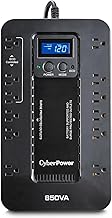
CyberPower EC850LCD Ecologic UPS Battery Backup and Surge
Why We Love It

CyberPower ST425 Standby UPS Battery Backup and Surge
Why We Love It

APC UPS Battery Backup & Surge Protector with USB Charger
Why We Love It

CyberPower ST625U Standby UPS Battery Backup and Surge
Why We Love It

CyberPower ST900U Standby UPS Battery Backup and Surge
Why We Love It
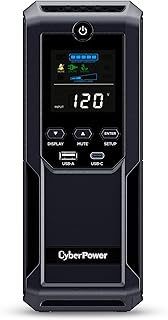
CyberPower CP1500AVRLCD3 Intelligent LCD UPS Battery Backup
Why We Love It

CyberPower CP1500PFCRM2U PFC Sinewave UPS Battery Backup and
Why We Love It

APC UPS 850VA/450W UPS Battery Backup & Surge Protector for
Why We Love It

CyberPower SL700U Standby UPS Battery Backup and Surge
Why We Love It
Quick Pick
10 Best Ups Pc Of 2026
Quick Pick
CyberPower CP1500PFCLCD PFC Sinewave UPS Battery Backup and Surge Protector | 1500VA/1000W, 12 Outlets, AVR, Mini Tower, UL Certified
CyberPower EC850LCD Ecologic UPS Battery Backup and Surge Protector | 850VA/510W, 12 Outlets, ECO Mode, Compact, UL Certified
CyberPower ST425 Standby UPS Battery Backup and Surge Protector | 425VA/260W, 8 Outlets, Compact, UL Certified
APC UPS Battery Backup & Surge Protector with USB Charger, 600VA APC Back-UPS (BE600M1)
CyberPower ST625U Standby UPS Battery Backup and Surge Protector, 625VA/360W, 8 Outlets, 2 USB Charging Ports, Compact, UL Certified | 625VA/360W, 8 Outlets, 2 USB Charging Ports, Compact, UL Certified
CyberPower ST900U Standby UPS Battery Backup and Surge Protector, 900VA/500W, 12 Outlets, 2 USB Charging Ports, Compact, UL Certified
CyberPower CP1500AVRLCD3 Intelligent LCD UPS Battery Backup, 1500VA/900W, 12 Outlets, 2 USB Ports, AVR, Mini Tower, UL Certified
CyberPower CP1500PFCRM2U PFC Sinewave UPS Battery Backup and Surge Protector, 1500VA/1000W, 8 Outlets, AVR, Short Depth 2U Rackmount, UL Certified
APC UPS 850VA/450W UPS Battery Backup & Surge Protector for PC, Router, NAS
CyberPower SL700U Standby UPS Battery Backup and Surge Protector | 700VA/370W, 8 Outlets, Slim Profile, UL Certified
Buying Guide: Ups Pc
📋 Table of Contents
1What wattage should I look for in a UPS for my PC?
Choose a UPS with a wattage rating that is at least 20-30% higher than your PC's total power consumption to ensure adequate backup during outages.
2What are the key specifications to consider when buying a UPS?
Key specs include runtime (in minutes), battery capacity (in VA or watts), surge protection, and compatibility with your PC's power requirements.
3How do I ensure the UPS is compatible with my PC and peripherals?
Check the UPS's input voltage and connector types to match your PC's power supply and any connected devices like monitors or external drives.
4When should I pay more for a higher-end UPS?
Pay more for a higher-end UPS if you need longer runtime, advanced features like automatic voltage regulation, or if you use critical systems that require uninterrupted power.
5What are common mistakes people make when buying a UPS?
Common mistakes include underestimating power needs, ignoring battery life, or not checking for proper surge protection, which can lead to equipment damage during power fluctuations.
How we choose
Our editors are people who genuinely love testing and writing about products. We compare each product's real-world usability and strengths, then distill what matters most into our own "Why We Love It" points — so you get an honest, at-a-glance sense of what counts before you buy.