10 Best Unmanaged Network Switches Of 2026
Unmanaged Network Switches — Reviews, Recommendations & Updated Buying Guide November 2026


TP-Link TL-SG108, 8 Port Gigabit Unmanaged Ethernet Switch
Why We Love It

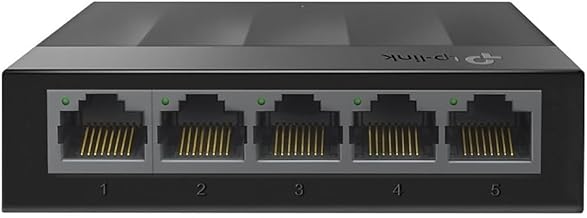
TP-Link LS1005G
Why We Love It

UGREEN Ethernet Switch 5-Port Gigabit
Why We Love It

D-Link DGS-105, 5 Port Gigabit Ethernet Switch Unmanaged
Why We Love It

TP-Link TL-SG1008D, 8 Port Gigabit Ethernet Network Switch
Why We Love It

ASUS QG-U1080
Why We Love It

TP-Link 8 Port 10/100Mbps Fast Ethernet Switch
Why We Love It

D-Link DGS-105/B 5-Port Gigabit Unmanaged Metal Desktop
Why We Love It

TP-Link 24-Port Gigabit Ethernet Unmanaged Switch
Why We Love It

NALACAL 5 Ports 100 Mbit Ethernet Switch
Why We Love It
Quick Pick
10 Best Unmanaged Network Switches Of 2026
Quick Pick
TP-Link TL-SG108, 8 Port Gigabit Unmanaged Ethernet Switch, Black | Fanless Metal Design, Plug & Play, Desktop/Wall Mount, Traffic Optimization, Limited Lifetime Protection
TP-Link LS1005G, Litewave 5 Port Gigabit Ethernet Unmanaged Switch | Desktop Ethernet Splitter, Unshielded Network Switch, Plug & Play, Fanless Quiet
UGREEN Ethernet Switch 5-Port Gigabit,240W Desktop Network Splitter | 5*RJ45 Port Support 10/100/1000Mbps,Unmanaged Plug & Play Ethernet Adapter,Compatible with Router,TV,Game Console,Computer
D-Link DGS-105, 5 Port Gigabit Ethernet Switch Unmanaged, Network Splitter, Silent Fanless, Network Hub, Sturdy Metal with Shielded Ports, Desktop/Wall Mount, QoS, Energy Saving, Plug and Play
TP-Link TL-SG1008D, 8 Port Gigabit Ethernet Network Switch | Plug and Play, Desktop or Wall Mount, Plastic Case Ethernet Splitter, Fanless, Traffic Optimization, Unmanaged
ASUS QG-U1080 - 8-Port 2.5G and 2-Port 10G SFP Plus Unmanaged Switch, 4 Smart Modes, Home Network Hub, Ethernet Separator, Plug and Play, Easy Setup, Quiet
TP-Link 8 Port 10/100Mbps Fast Ethernet Switch, Desktop Ethernet Splitter, Ethernet Hub, Plug and Play, Fanless Quiet, Desktop Design, Green Technology, Unmanaged (TL-SF1008D), White
D-Link DGS-105/B 5-Port Gigabit Unmanaged Metal Desktop Switch 10/100/1000 Mbit/s - UK Version, black DGS-105/B
TP-Link 24-Port Gigabit Ethernet Unmanaged Switch | Plug and Play | Desktop/Rackmount | Fanless | Limited Lifetime (TL-SG1024D)
NALACAL 5 Ports 100 Mbit Ethernet Switch, Unmanaged Network Switch, Ethernet Splitter, Plug & Play, Fanless Metal Design, Shielded Ports, Traffic Optimization, Supported Desktop Or Wall Mount
Buying Guide: Unmanaged Network Switches
📋 Table of Contents
1What port speed and quantity should I look for in an unmanaged network switch?
For basic home or small office use, look for 5-8 ports with speeds of at least 1 Gbps. If you need higher performance for file transfers or gaming, consider 10 Gbps ports, though they are more common in managed switches. Unmanaged switches typically don’t support VLANs or QoS, so prioritize port count and speed based on your current and future device needs.
2How does the number of ports affect performance in an unmanaged switch?
More ports allow you to connect more devices without additional switches, but performance per port remains the same. However, adding too many devices on a single switch can increase network congestion. For optimal performance, ensure the total number of connected devices doesn’t exceed the switch’s capacity, and avoid overloading it with high-bandwidth applications like video streaming or large file transfers.
3What should I consider when choosing between 10/100 vs. 10/100/1000 Mbps unmanaged switches?
10/100 Mbps switches are suitable for basic tasks like web browsing and email, but 10/100/1000 Mbps (Gigabit) switches support faster data transfer, making them better for HD video, large file sharing, or gaming. If your devices support Gigabit, always choose the 10/100/1000 option for future-proofing and better performance, even if you don’t need it immediately.
4Are there any common mistakes people make when buying unmanaged network switches?
One common mistake is buying a switch with insufficient ports, forcing users to daisy-chain multiple switches, which can degrade performance. Another is ignoring the speed rating, which can lead to bottlenecks. Always check that the switch supports the required speed for your devices and plan for future expansion by choosing a model with extra ports or higher speed capabilities.
5What are the key differences between unmanaged and managed switches, and when should I choose unmanaged?
Unmanaged switches are plug-and-play with no configuration options, while managed switches offer advanced features like VLANs, traffic control, and security settings. Choose unmanaged switches for simple setups where you don’t need customization, such as home networks or small offices with basic connectivity needs. They are more affordable and easier to use, but lack the flexibility of managed models.
How we choose
Our editors are people who genuinely love testing and writing about products. We compare each product's real-world usability and strengths, then distill what matters most into our own "Why We Love It" points — so you get an honest, at-a-glance sense of what counts before you buy.