10 Best Unifi Network Attached Storage Of 2026
Unifi Network Attached Storage — Reviews, Recommendations & Updated Buying Guide November 2026


Unifi Network Attached Storage Pro (UNAS-PRO) | 7 bays
Why We Love It

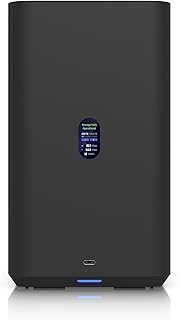
Ubiquiti UNAS 2 UniFi 2-Bay Network Attached Storage
Why We Love It

UGREEN NASync DH4300 Plus 4-Bay Desktop NAS
Why We Love It

UGREEN NAS DXP4800 GT 4-Bay for Creators
Why We Love It
Quick Pick
10 Best Unifi Network Attached Storage Of 2026
Quick Pick
Unifi Network Attached Storage Pro (UNAS-PRO) | 7 bays | 2U Rack-Mount NAS | Supports 2.5" & 3.5" drives, Spinning & SSDs | 10 Gbps - Silver
Ubiquiti UNAS 2 UniFi 2-Bay Network Attached Storage - Black (UNAS-2-B)
UGREEN NASync DH4300 Plus 4-Bay Desktop NAS, 4K HDMI NAS Server for Home | 2.5 GbE Port, 8GB LPDDR4X RAM, A76+A55 8 Cores SoC, Cloud Backup, Remote Access, NFC, Multi-Device Connectivity (Diskless)
UGREEN NAS DXP4800 GT 4-Bay for Creators, Tech Enthusiasts and Office Teams | Smart Home Data Hub, Direct NAS Editing & Dual 10GbE Transfers, Ryzen R2514, 8GB DDR4, 2x 10GbE, 2x M.2 NVMe Slots, Diskless
Buying Guide: Unifi Network Attached Storage
📋 Table of Contents
1What storage capacity do I actually need for a UniFi NAS?
Start by calculating how much data you're storing monthly — surveillance footage, backups, and media files add up fast. Most home users need 4-8TB, while small businesses should consider 12TB or higher with room to expand via additional drive bays.
2Can I use a UniFi NAS without UniFi cameras or equipment?
Yes, UniFi NAS works as a standalone network storage device for any files, backups, or media on your network. However, it integrates seamlessly with UniFi cameras for continuous recording, which is where it really shines.
3What's the difference between UniFi NAS models like the UDM-SE and Dream Machine SE?
The UDM-SE combines a router, security gateway, and NAS in one device, while dedicated NAS units like the UNVR offer pure storage without networking hardware. Pick the all-in-one if you need network management; choose dedicated NAS if you already have a UniFi gateway and want more storage flexibility.
4Is raid configuration necessary for a UniFi NAS, or is it overkill for home use?
RAID protects your data if a drive fails, which matters if your footage or backups are irreplaceable — we'd recommend at least RAID 1 mirroring. For less critical storage, single-drive setups work, but you lose data if that one drive dies.
5How much bandwidth does continuous surveillance recording actually consume?
A single 4K camera records about 50-100GB daily depending on compression, so multiple cameras quickly fill storage and network capacity. Factor in peak usage times and ensure your network can handle real-time recording without bottlenecks, especially if you're also accessing files remotely.
How we choose
Our editors are people who genuinely love testing and writing about products. We compare each product's real-world usability and strengths, then distill what matters most into our own "Why We Love It" points — so you get an honest, at-a-glance sense of what counts before you buy.