10 Best Ultrawide Monitor Arms Of 2026
Ultrawide Monitor Arms — Reviews, Recommendations & Updated Buying Guide November 2026

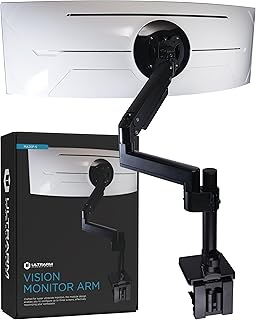
ULTRARM Heavy Duty Monitor Arm for Ultrawide Monitors up to
Why We Love It


ULTRARM Heavy Duty Monitor Arm for Ultrawide Curved Monitors
Why We Love It

NB Ergonomic RGB Monitor Arm for 32 to 60 inch Ultrawide
Why We Love It

ULTRARM Extra-Tall Heavy-Duty Monitor Arm Mount for 40"
Why We Love It

NEWSTAR Single Monitor Arm
Why We Love It

HUANUO FlowLift™ Pro Monitor Arm for 13–32" Screens
Why We Love It

VIVO Premium Aluminum Heavy Duty Monitor Arm for Ultrawide
Why We Love It
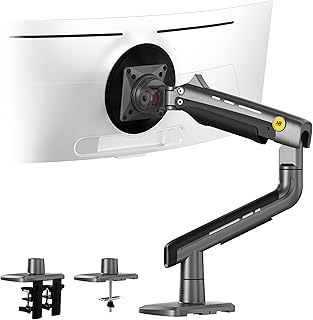
NB ERGONOMIC Gaming Monitor Arm for Flat/Ultrawide/Curved
Why We Love It

Dual Monitor-Arm Ultrawide Heavy Duty
Why We Love It

Dual Monitor-Arm Heavy-Duty for 17-49-inch Screens
Why We Love It
Quick Pick
10 Best Ultrawide Monitor Arms Of 2026
Quick Pick
ULTRARM Heavy Duty Monitor Arm for Ultrawide Monitors up to 57" and 20 KGS, Single Desk Stand, Pneumatic Height Adjustable, Modular Extension Arms - Max VESA 100x100, Black, MA20P-S | Max 57", 44 lb, 900R Screens, VESA 100x100, Upgradable, Pneumatic Height Adjustable, C-clamp & Grommet Mount, Black, MA20P-S
ULTRARM Heavy Duty Monitor Arm for Ultrawide Curved Monitors Modular Design | Max 57", 44 lb, 900R Screens, VESA 100x100, Upgradable, Pneumatic Height Adjustable, C-clamp & Grommet Mount, White, MA20PW-S
NB Ergonomic RGB Monitor Arm for 32 to 60 inch Ultrawide Curved Computer Screen, Heavy Duty Monitor Stand 49 inch Screens Max Load 20 kg, C-clamp & Grommet Installation VESA 75/100 mm (Purple)
ULTRARM Extra-Tall Heavy-Duty Monitor Arm Mount for 40" Ultrawide Monitors | 33.4" Max Height, 26.4 lb VESA Capacity, C-Clamp & Grommet Mount, Height Adjustable, Long-Reach Ergonomic Arm, Black, MA12P-S
NEWSTAR Single Monitor Arm, Gas Spring Single Monitor Mount up to 49 inches, Ultrawide Monitor Arm Holds up to 20KG, Heavy Duty Monitor Mount Desk with C Clamp and Grommet Base
HUANUO FlowLift™ Pro Monitor Arm for 13–32" Screens, MechaSpring Monitor Mount, Fully-Adjustable Monitor Stand with Tilt/Swivel/Rotation, Tool-Free VESA Mount, C-Clamp/Grommet Base, Max Load 19.8 lbs
VIVO Premium Aluminum Heavy Duty Monitor Arm for Ultrawide Screens up to 49 inches and 44 lbs, Single Wall Mount, Pneumatic Height, Max VESA 100x100, White, MOUNT-V101G1W
NB ERGONOMIC Gaming Monitor Arm for Flat/Ultrawide/Curved Monitors 32 to 60 inch, Heavy Duty Monitor Stand Load up to 20 kg, VESA 75/100 mm Mount (Grey Black) F5-G
Dual Monitor-Arm Ultrawide Heavy Duty - 27-57 inch Vertical Dual Monitor , Adjustable Stacked Double Monitor Desk Stand, Max Load 27KG (per Screen), VESA75/100mm, Black
Dual Monitor-Arm Heavy-Duty for 17-49-inch Screens - Premium Vertical Stacked Dual Monitor Arm Desk Mount for Ultrawide Screens up to 44lbs, Fully Adjustability, VESA 75/100 mm, Black
Buying Guide: Ultrawide Monitor Arms
📋 Table of Contents
1What weight capacity should I look for in an ultrawide monitor arm?
Look for a weight capacity of at least 15-20 pounds to support most ultrawide monitors, which typically range from 15 to 30 inches in width. A higher capacity ensures stability and reduces the risk of sagging or wobbling during use, especially with heavier models.
2What types of mounting options are best for ultrawide monitors?
VESA 100x100 or 200x200mm mounting patterns are most common for ultrawide monitors. Ensure the arm supports your monitor’s specific VESA size, and consider arms with adjustable height and rotation for optimal ergonomics and viewing angles.
3How does arm length affect usability for ultrawide monitors?
A minimum arm length of 24-30 inches allows for proper placement of an ultrawide monitor without crowding your desk. Longer arms offer more flexibility for positioning, but may require more space. Balance length with your workspace size and monitor size.
4What materials are best for durability and adjustability?
Look for arms made from steel or aluminum for strength and durability. Steel offers more rigidity, while aluminum is lighter. Ensure the joints are made of high-quality metal with smooth, tension-controlled pivots for precise and stable adjustments.
5Are there any common mistakes to avoid when buying an ultrawide monitor arm?
Avoid arms that lack sufficient adjustability or have a low weight capacity for your monitor. Also, skip models with flimsy joints or poor cable management features. Always check compatibility with your monitor’s VESA size and ensure the arm can support your specific setup and usage needs.
How we choose
Our editors are people who genuinely love testing and writing about products. We compare each product's real-world usability and strengths, then distill what matters most into our own "Why We Love It" points — so you get an honest, at-a-glance sense of what counts before you buy.