10 Best Ultrawide Computer Monitors Of 2026
Ultrawide Computer Monitors — Reviews, Recommendations & Updated Buying Guide November 2026


KOORUI 34 Inch UltraWide Curved Gaming Monitor
Why We Love It


LG UltraWide™ 34 Inch 144Hz 21:9 WQHD Curved (1800R) Monitor
Why We Love It

KOORUI 34 inch Gaming Monitor
Why We Love It

Z-Edge 34" Curved Ultrawide Gaming Monitor
Why We Love It

LG Electronics UltraWide Monitor 29WQ600
Why We Love It

Samsung 49" Gaming Monitor G9 (G91SD) Odyssey OLED Dual QHD
Why We Love It

LG 34U650A-B 34-inch UltraWide WQHD (3440 x 1440) IPS Curved
Why We Love It

Z-Edge 34" UWQHD 165Hz 1ms Curved IPS Gaming Monitor
Why We Love It
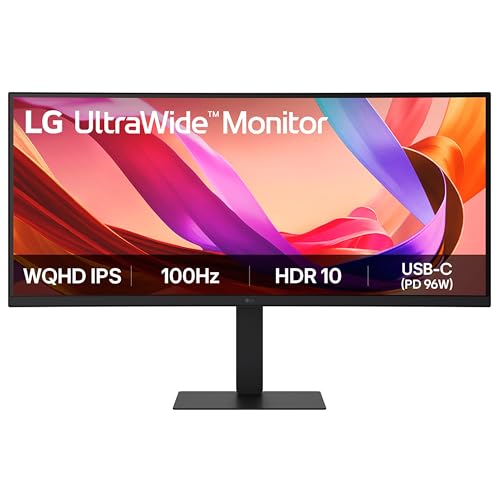
LG UltraWide Monitor 34U650A-B
Why We Love It

Dell 34 Plus USB-C Monitor - S3425DW
Why We Love It
Quick Pick
10 Best Ultrawide Computer Monitors Of 2026
Quick Pick
KOORUI 34 Inch UltraWide Curved Gaming Monitor, WQHD 180Hz, HDR400 | 3440x1440, 1000R VA Panel, 1ms MPRT, Adaptive Sync, 90% DCI-P3, PiP/PbP, DP 1.4, HDMI 2.0, VESA 75 × 75 mm
LG UltraWide™ 34 Inch 144Hz 21:9 WQHD Curved (1800R) Monitor 34U640B with USB-Type C (PD 65W), HDR 10, AMD FreeSync Premium, Tilt/Height Adjustment and sRGB 99% (Typ.)
KOORUI 34 inch Gaming Monitor, 240Hz, Ultrawide UWQHD (3440x1440P), Curved 1500R, HDR400, PIP/PBP, 1ms MPRT, Adaptive Sync, Height Adjustable, DP,HDMI,PS5 G3441XC
Z-Edge 34" Curved Ultrawide Gaming Monitor, Max 240Hz,WQHD,VA LED, AG34P
LG Electronics UltraWide Monitor 29WQ600, 29-inch, 1080p, 100Hz, 1ms MBR, IPS Display, sRGB 99% Colour Gamut, HDR 10, USB Type-C, AMD FreeSync, HDMI, 2 x 7W Stereo Speaker, Ergonomic Design
Samsung 49" Gaming Monitor G9 (G91SD) Odyssey OLED Dual QHD (5120 x 1440) 144Hz Refresh Rate 0.03Ms Response Time, NVIDIA G-Sync Compatible, Height Adjustable, Silver(Amazon Exclusive)
LG 34U650A-B 34-inch UltraWide WQHD (3440 x 1440) IPS Curved Wide Computer Monitor, 100Hz, HDR10, Built-in Speaker, HDMI, DisplayPort, USB Type-C PD 96W, Tilt/Height/Swivel Adjustable Stand, Black
Z-Edge 34" UWQHD 165Hz 1ms Curved IPS Gaming Monitor, FreeSync, 1500R Curvature, UWQHD 3440 * 1440, 96% DCI-P3, 1.07 Colors, 300 cd/㎡, 21:9, Powerful Connections, 2000:1, UG34I-Black
LG UltraWide Monitor 34U650A-B, Curved UWQHD 1440p IPS, 34 inch, 100Hz, 5ms GtG, HDR10, Speakers, HDMI, DP, USB-C (96W PD), Black
Dell 34 Plus USB-C Monitor - S3425DW, WQHD (3440x1440), 21:9 Curved, 120Hz, VA, 1ms, AMD FreeSync Premium, HDR10, Height Adjust, Built-in Speakers, 2 USB-C, 2 HDMI, 3 Year Warranty | AMD FreeSync Premium, 21:9 Curved, HDR10, Height Adjust, Built-in Speakers, 2 USB-C, 2 HDMI, 2 USB, 3 Year Warranty
Buying Guide: Ultrawide Computer Monitors
📋 Table of Contents
1What resolution should I look for in an ultrawide monitor?
For most users, 3440x1440 (WQHD) is ideal, offering sharp detail and enough space for multitasking. 3840x1600 (UWQHD) is better for high-end gaming or professional work, but requires a powerful graphics card to drive it smoothly.
2Does a curved screen really improve the experience?
Yes — a 1800R to 2000R curve mimics natural vision, reducing eye strain and making it easier to see across the full width. However, it's less important for small desks or if you sit far from the screen.
3What refresh rate is necessary for my use?
60Hz is fine for general work and casual use, but 144Hz or higher is recommended for gaming or fast-paced video editing. Higher refresh rates reduce motion blur and make on-screen action feel smoother.
4How do I know if the aspect ratio is right for me?
21:9 is the most common ultrawide ratio, great for multitasking and media. 32:9 is ultra-wide for dual-monitor-like setups, but may be too much for small desks or basic tasks. Match the ratio to your workflow and screen space.
5Are USB-C or HDMI 2.1 ports worth paying extra for?
USB-C with power delivery is ideal for connecting and charging laptops, while HDMI 2.1 is essential for next-gen gaming consoles or 4K 120Hz content. Prioritize these ports if you need all-in-one connectivity or future-proofing.
How we choose
Our editors are people who genuinely love testing and writing about products. We compare each product's real-world usability and strengths, then distill what matters most into our own "Why We Love It" points — so you get an honest, at-a-glance sense of what counts before you buy.