10 Best Type-c Hub Of 2026
Type-c Hub — Reviews, Recommendations & Updated Buying Guide November 2026


UGREEN USB C Hub
Why We Love It


USB C Hub, 8 in 1 Type C Hub Multiport Adapter with 4K HDMI
Why We Love It

Acer USB C Hub
Why We Love It

UGREEN USB C Hub with 4×USB C 3.2 Data and 100W PD Power
Why We Love It

UGREEN Laptop Docking Station Dual Monitor
Why We Love It

USB HUB Type-C to 4 Port USB 3.0+USB 2.0 Hub USB Adapter
Why We Love It
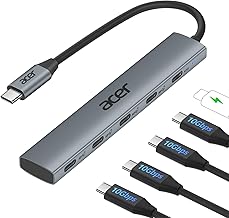
Acer 10 Gbps USB C Hub
Why We Love It

Anker USB C Hub
Why We Love It

TP-Link UH6120C USB Type-C 6 in 1 Hub|4K HDMI|Gigabit
Why We Love It

UGREEN USB C Hub
Why We Love It
Quick Pick
10 Best Type-c Hub Of 2026
Quick Pick
UGREEN USB C Hub, 6 in 1Revodok 4K@60Hz HDMI USB-C Multiport Adaptor | Type-C to HDMI Adapter, 4x 10Gbps USB-A & C Data Port, 100W PD, Aluminum Dock for MacBook Neo/Air/Pro, HP Laptops
USB C Hub, 8 in 1 Type C Hub Multiport Adapter with 4K HDMI, PD Power Delivery, USB-C, Ethernet, 2 USB, SD/TF Card Reader Compatible with Mac Book Pro XPS and More Type C Devices
Acer USB C Hub, 7IN1 USB-C to 4K HDMI, 2×USB 3.0, USBC 5Gbps, 100W, SD/TF | Card Reader, Aluminum Docking Station Multiport Adapter for iPhone 17 Series, MacBook/iPad Pro/Air, S26, Surface Pro (Grey)
UGREEN USB C Hub with 4×USB C 3.2 Data and 100W PD Power Ports, 10Gbps | 5 in 1 Multiport Adapter for PC, Laptop, Phone Compatible with MacBook Air, iPad, iPhone 17/16/15, Plug and Play, 30cm
UGREEN Laptop Docking Station Dual Monitor, 10-in-1 Dual 4K@60Hz USB C Hub | 2x HDMI, Single 8K, 100W PD, 1Gbps Ethernet, 4x 5Gbps USB-A/C Data, SD/TF, Revodok Pro Aluminum USB-C Dock for Dell/HP/Lenovo
USB HUB Type-C to 4 Port USB 3.0+USB 2.0 Hub USB Adapter Station Slim Portable Data Hub USB Aluminum
Acer 10 Gbps USB C Hub, USBC Splitter with 4*USB C 3.2 and 100W PD Port | Type-C Multiport Adapter Fast Data Transfer Compatible for MacBook Neo/Pro/Air, iPad, Surface Pro, XPS-0.5FT【No Video Output】
Anker USB C Hub, 7in1 Multi-Port USB Adapter, 4K@60Hz USBC to HDMI Splitter | 85W Max PD, 2 USB 3.0 & 1 USBC Data Ports, SD/TF Card Reader, for Laptops/Mac and Other Type C Devices (Charger Not Included)
TP-Link UH6120C USB Type-C 6 in 1 Hub|4K HDMI|Gigabit RJ45|PD 100W|USB 3.0|Plug & Play| Mac OS X El Capitan Version 10.11.6 and later, Windows 11/10/8.1, Linux OS, iPad OS, iOS, Android, Chrome OS
UGREEN USB C Hub, 7-in-1 4K HDMI to USB-C 100WPD USB Hub for Laptops | microSD SD Card Reader for Laptops, 3x USB-A/C Ports, Compact Aluminum Multiport Adapter for MacBook Neo/Air/Pro, HP, Dell
Buying Guide: Type-c Hub
📋 Table of Contents
1What should I look for in a Type-C hub?
Look for the number of ports, data transfer speed, power delivery capability, and compatibility with your device's Type-C version.
2What are the key specifications to check?
Check for USB 3.1 or USB 4 support, video output capabilities (like HDMI or DisplayPort), and whether it supports Thunderbolt 3 for high-speed data transfer.
3How do I ensure the hub is compatible with my device?
Verify that your device has a USB Type-C port and check if it supports the required protocols like USB Power Delivery or DisplayPort Alt Mode.
4When should I pay more for a Type-C hub?
Pay more if you need high-speed data transfer, multiple high-quality ports, or reliable power delivery for charging laptops or other devices.
5What are common mistakes to avoid when buying a Type-C hub?
Avoid hubs that don't specify compatibility with your device, lack proper power delivery, or use low-quality ports that may damage your device over time.
How we choose
Our editors are people who genuinely love testing and writing about products. We compare each product's real-world usability and strengths, then distill what matters most into our own "Why We Love It" points — so you get an honest, at-a-glance sense of what counts before you buy.