10 Best Triple Monitor Docking Stations Of 2026
Triple Monitor Docking Stations — Reviews, Recommendations & Updated Buying Guide November 2026


UGREEN Docking Station Triple Monitors with 2×4K@60Hz HDMI
Why We Love It


UGREEN Laptop Docking Station
Why We Love It

10Gbps Docking Station Dual Monitor
Why We Love It

WAVLINK USB C Docking Station with 3 HDMI
Why We Love It
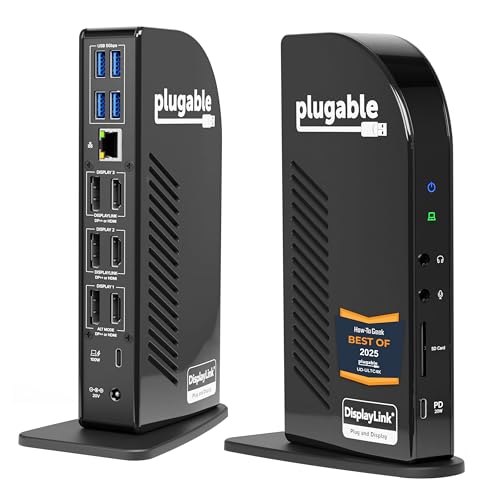
Plugable 4K USB-C Docking Station
Why We Love It

Plugable USB-C 4K Triple Display Docking Station with
Why We Love It

Plugable USB-C Triple Display Laptop Docking Station 3
Why We Love It

WAVLINK 15-in-1 DisplayLink Docking Station USB-C
Why We Love It

Selore USB C Laptop Docking Station Triple Monitor 4K for
Why We Love It

Selore 12-in-1 USB C Docking Station Triple Monitor 4K for
Why We Love It
Quick Pick
10 Best Triple Monitor Docking Stations Of 2026
Quick Pick
UGREEN Docking Station Triple Monitors with 2×4K@60Hz HDMI, 4K@120Hz DP | 2×Type-C 3.2, 2×USB-A 2.0 Data, 170MB/s SD/TF, 1Gbps Ethernet, 3.5mm Audio, 100W PD, 12-in-1 Dock for Laptop, HP, Thinkpad
UGREEN Laptop Docking Station, 13-in-1 Triple 4K Display Dock (2 HDMI + DP) | 100W Max PD, 27W Max USB-C, 10Gbps USB-C/A, Ethernet, SD/TF, Audio, for Dell/Lenovo/HP (Windows Only, Included 140W Adapter)
10Gbps Docking Station Dual Monitor, WAVLINK Displayport Docking Station Triple Display with Dual DP, HDMI, PD 100W, RJ45, USB 3.1 A/C 12 in 1 Hub, USB C Dock for Mac/Dell/HP/Lenovo | Single 8K@30Hz, 100W PD in, 3×USB-C/A 10Gb, 2.5G Ethernet, SD/TF and Mic/Audio, Compatible with Dell/HP/Lenovo, Windows Only
WAVLINK USB C Docking Station with 3 HDMI, Displaylink Laptop Dock Triple Monitor 4K60Hz, 100W Charging for M1 M2 M3 M4 Mac and Windows, 5 USB Ports, 2DP, 1Gbps Ethernet Port, Audio/Mic, SD/TF
Plugable 4K USB-C Docking Station - Triple Monitor with 100W Power Delivery, Thunderbolt 3/4 Support, Windows and Mac Compatible (3x HDMI, 3x DisplayPort, 1x USB-C, 4x USB 3.0, SD Card Reader)
Plugable USB-C 4K Triple Display Docking Station with Charging Support for Specific Windows USB C and Thunderbolt 3 Systems (1x HDMI and 2X DisplayPort++ Outputs, 5X USB Ports, 60W USB PD)
Plugable USB-C Triple Display Laptop Docking Station 3 Monitors, 15-in-1: 3X HDMI, Dual 4K or Triple (1x 4K60 + 2X 1080p) 2.5GbE, 100W PD, 30W USB-C Charge Port, Driverless for Windows, UD-MSTH3
WAVLINK 15-in-1 DisplayLink Docking Station USB-C, Triple 4K Monitors (3X HDMI + 2X DP), 100W PD, 10Gbps, Gigabit LAN, Audio/Mic, for Windows & Mac (including M1/M2)
Selore USB C Laptop Docking Station Triple Monitor 4K for Dell/HP/Lenovo | USB C to Dual HDMI 3 Monitor, 12-in-1 with 3 HDMI, 100W PD, 10Gbps USB A/C 3.1 Ports, RJ45 Ethernet, SD/TF
Selore 12-in-1 USB C Docking Station Triple Monitor 4K for Dell/Lenovo/HP | Multiport Adapter with 2 HDMI, USB A 2/3.0, USB C 3.1 10Gbps&30W Output,Ethernet,SD/TF,Audio&Mic,150W DC Power
Buying Guide: Triple Monitor Docking Stations
📋 Table of Contents
1How many video outputs do I need for three monitors?
Look for a docking station with at least three video outputs, such as HDMI, DisplayPort, or USB-C. Most triple-monitor setups use a combination of DP and HDMI, with USB-C docks often supporting two external displays plus the laptop screen for a total of three.
2What kind of graphics performance can I expect from a docking station?
Most docking stations rely on your laptop’s integrated GPU, which is fine for office work or light media. For gaming or 3D rendering, you’ll need a dedicated GPU in your laptop or a separate eGPU, as docking stations don’t typically include their own graphics cards.
3Is USB-C or Thunderbolt the better connection type?
USB-C docks are common and support video, power, and peripherals, but Thunderbolt 3 or 4 offers faster data transfer (up to 40Gbps) and better bandwidth for high-resolution displays. If your laptop supports Thunderbolt, it’s worth paying more for a Thunderbolt dock for smoother performance with 4K or 5K monitors.
4Can I power my laptop through the docking station?
Yes, most modern USB-C or Thunderbolt docking stations include power delivery (PD) and can charge your laptop while connected. Check the wattage (60W to 100W is typical) to ensure it matches your laptop’s charging requirements for full performance without overheating.
5What ports should I prioritize for peripherals and connectivity?
Look for at least four USB-A ports, one USB-C (for data), an Ethernet port for stable internet, and audio jacks. Some docks also include SD card readers or HDMI audio passthrough. Prioritize docks with enough bandwidth to avoid lag when using multiple high-speed devices simultaneously.
How we choose
Our editors are people who genuinely love testing and writing about products. We compare each product's real-world usability and strengths, then distill what matters most into our own "Why We Love It" points — so you get an honest, at-a-glance sense of what counts before you buy.