10 Best Triple Display Laptop Docking Station Of 2026
Triple Display Laptop Docking Station — Reviews, Recommendations & Updated Buying Guide November 2026


UGREEN Docking Station Triple Monitors with 2×4K@60Hz HDMI
Why We Love It


UGREEN Laptop Docking Station
Why We Love It

WAVLINK USB C Docking Station with 3 HDMI
Why We Love It

10Gbps Docking Station Dual Monitor
Why We Love It
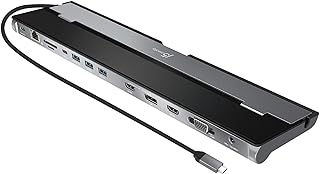
J5create USB C 13 in 1 4K Triple Display Docking Station
Why We Love It

UGREEN Laptop Docking Station Dual Monitor
Why We Love It

Plugable USB-C Triple Display Laptop Docking Station 3
Why We Love It

UGREEN Laptop Docking Station Dual Monitor
Why We Love It

Baseus 12 in 1 Triple Monitor Laptop Docking Station with 2
Why We Love It

Belkin Connect 16-in-1 Docking Station 140W
Why We Love It
Quick Pick
10 Best Triple Display Laptop Docking Station Of 2026
Quick Pick
UGREEN Docking Station Triple Monitors with 2×4K@60Hz HDMI, 4K@120Hz DP | 2×Type-C 3.2, 2×USB-A 2.0 Data, 170MB/s SD/TF, 1Gbps Ethernet, 3.5mm Audio, 100W PD, 12-in-1 Dock for Laptop, HP, Thinkpad
UGREEN Laptop Docking Station, 13-in-1 Triple 4K Display Dock (2 HDMI + DP) | 100W Max PD, 27W Max USB-C, 10Gbps USB-C/A, Ethernet, SD/TF, Audio, for Dell/Lenovo/HP (Windows Only, Included 140W Adapter)
WAVLINK USB C Docking Station with 3 HDMI, Displaylink Laptop Dock Triple Monitor 4K60Hz, 100W Charging for M1 M2 M3 M4 Mac and Windows, 5 USB Ports, 2DP, 1Gbps Ethernet Port, Audio/Mic, SD/TF
10Gbps Docking Station Dual Monitor, WAVLINK Displayport Docking Station Triple Display with Dual DP, HDMI, PD 100W, RJ45, USB 3.1 A/C 12 in 1 Hub, USB C Dock for Mac/Dell/HP/Lenovo | Single 8K@30Hz, 100W PD in, 3×USB-C/A 10Gb, 2.5G Ethernet, SD/TF and Mic/Audio, Compatible with Dell/HP/Lenovo, Windows Only
j5create USB C 13 in 1 4K Triple Display Docking Station - Resolution Support 4K HDMI, 1080p VGA, 4K DisplayPort outputs, 100W Power Delivery, USB 3.0 ports (1 USB-C and 3 USB Type-A ports) - JCD543
UGREEN Laptop Docking Station Dual Monitor, 10-in-1 Dual 4K@60Hz USB C Hub | 2x HDMI, Single 8K, 100W PD, 1Gbps Ethernet, 4x 5Gbps USB-A/C Data, SD/TF, Revodok Pro Aluminum USB-C Dock for Dell/HP/Lenovo
Plugable USB-C Triple Display Laptop Docking Station 3 Monitors, 15-in-1: 3X HDMI, Dual 4K or Triple (1x 4K60 + 2X 1080p) 2.5GbE, 100W PD, 30W USB-C Charge Port, Driverless for Windows, UD-MSTH3
UGREEN Laptop Docking Station Dual Monitor, Dual 4K@60Hz 10-in-1 USB C Hub | 3x 10Gbps USB-A/C Data Ports, 100W PD, 1Gbps Ethernet, SD/TF Card Reader, Aluminum USB-C Dock for Dell, HP, ThinkPad Laptops
Baseus 12 in 1 Triple Monitor Laptop Docking Station with 2 HDMI Ports 4K DP 100W PD 3 USB 3.0 Ports 1 USB C Port Gigabit Ethernet SD TF Card Reader for
Belkin Connect 16-in-1 Docking Station 140W, Triple Display USB C Dock with 4K@60Hz Support, DisplayLink Technology, USB C Dock with 10Gbps Data Transfer, 2.5Gb Ethernet Port - Laptop Expansion Hub
Buying Guide: Triple Display Laptop Docking Station
📋 Table of Contents
1What display resolution support should I look for in a triple display docking station?
Look for docking stations that support at least 1920x1080 resolution per monitor, with some models offering 4K support for higher clarity. Ensure the station has enough video outputs—typically HDMI, DisplayPort, and USB-C—to connect three monitors without downgrading resolution or performance.
2How important is USB-C power delivery for a triple display setup?
USB-C power delivery is crucial if you want to charge your laptop while using three external displays. Look for at least 65W or higher to ensure stable charging, especially for laptops with higher power requirements. This avoids the need for a separate power adapter and keeps your workspace tidy.
3What should I consider regarding video card compatibility?
Ensure your laptop’s graphics card supports multiple displays—most modern GPUs handle three monitors, but check your laptop’s specs. Some docking stations require specific chipsets like Intel Thunderbolt or USB 3.1 for optimal performance, so match the station’s capabilities with your laptop’s hardware.
4Are there differences between active and passive docking stations for triple displays?
Active docking stations are essential for triple display setups as they include built-in chips to manage multiple video signals and power delivery. Passive docks typically only pass through signals and lack the processing power needed for three monitors, making them unsuitable for this use case.
5What accessories or features are worth paying extra for?
Look for docks with built-in USB hubs, Ethernet ports, and audio jacks to reduce cable clutter. Some models include a Kensington lock slot for security. A compact, lightweight design is also valuable for portability, especially if you travel with your setup frequently.
How we choose
Our editors are people who genuinely love testing and writing about products. We compare each product's real-world usability and strengths, then distill what matters most into our own "Why We Love It" points — so you get an honest, at-a-glance sense of what counts before you buy.