10 Best Tri Mode Wireless Keyboards Of 2026
Tri Mode Wireless Keyboards — Reviews, Recommendations & Updated Buying Guide November 2026


Magic Pebble Tri Mode Wireless Keyboard and Mouse
Why We Love It


Baseus Wireless Keyboard for Desktops
Why We Love It

FREEWOLF M87V2 Wireless Keyboard
Why We Love It

Keychron B33 Wireless Keyboard & BM25 Mouse Combo
Why We Love It

Aula F99 Wireless Mechanical Keyboard
Why We Love It

AULA F75 MAX Tri-Mode Wireless Gaming Keyboard
Why We Love It

ASUS ROG Strix Scope II 96 Wireless Gaming Keyboard
Why We Love It

TFT Screen Mechanical Keyboard
Why We Love It

X Aula F75 Pro Tri-Mode Gasket Mechanical Keyboard with Knob
Why We Love It
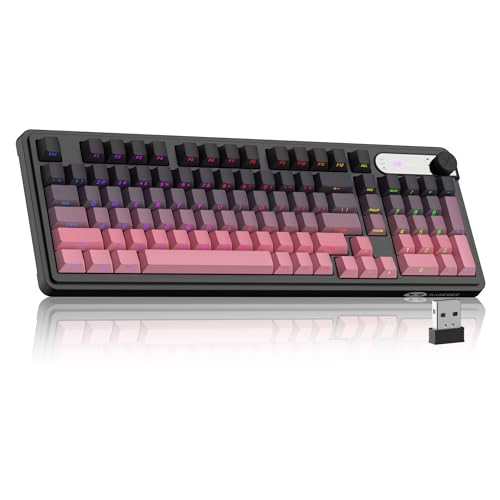
MageGee GK960 Wireless Keyboard
Why We Love It
Quick Pick
10 Best Tri Mode Wireless Keyboards Of 2026
Quick Pick
Magic Pebble Tri Mode Wireless Keyboard and Mouse,2.4Ghz, Bluetooth & Wired Connection, English/Arabic
Baseus Wireless Keyboard for Desktops, K01B Tri-Mode Wireless Multi-Device Keyboard, Ultra-Slim Keyboard for Computer, Desktop, PC, Laptop and Windows
FREEWOLF M87V2 Wireless Keyboard, Tri Mode-BT/2.4G/Wired, Silent and smooth, 4000mAh, Side-printed Keycap, QWERTY US layout, Anti-ghosting, 16M RGB Gaming Keyboard for MAC/Win (Blackberry)
Keychron B33 Wireless Keyboard & BM25 Mouse Combo | Silent Scissor Switches | 80% TKL | Tri-Mode Connectivity | 1000Hz Polling Rate | PAW3212 Sensor | Web Launcher | English-Arabic Black - KB1-AR
Aula F99 Wireless Mechanical Keyboard,Creamy Gaming Keyboard 8000mAh | Tri-Mode Bluetooth/USB-C/Wireless,Hot Swappable Pre-lubed Switches,Programmable RGB Backlit 99 PBT Keycaps
AULA F75 MAX Tri-Mode Wireless Gaming Keyboard, TFT Screen, Knob, Hot Swappable, 2.4GHz/Type-C/BT5.0, Gasket Creamy, for PC/Mac/Office/Gaming (Blue&White&Purple)
ASUS ROG Strix Scope II 96 Wireless Gaming Keyboard, Tri-Mode Connection, Dampening Foam & Switch-Dampening Pads, Hot-Swappable Pre-lubed ROG NX Snow Switches, UV-Coated ABS Keycaps, RGB-Black
TFT Screen Mechanical Keyboard, Arabic/English RGB Hot-Swappable | 87-key & Knob, 3000mAh battery, tri-mode wireless, silent linear switches, software support – macro & key remap, for PC/Mac
x Aula F75 Pro Tri-Mode Gasket Mechanical Keyboard with Knob,80 Keys 75% Layout Creamy Gaming Keyboard,Hot Swappable Custom Keyboard,RGB Backlit,BT5.0/2.4GHz/USB-C,PBT Keycaps (Glacier Blue)
MageGee GK960 Wireless Keyboard, 98 Keys Tri-Mode BT/2.4G/Wired Membrane Gaming Keyboard, RGB Creamy Keyboard with Number Pad, Knob Control, Side Printed Keycaps, 4000mAh Battery - Black & Pink
Buying Guide: Tri Mode Wireless Keyboards
📋 Table of Contents
1What does 'tri-mode' mean for a wireless keyboard, and why is it useful?
Tri-mode keyboards support three connection types: Bluetooth, 2.4 GHz wireless, and sometimes USB wired. This versatility ensures compatibility with multiple devices, like PCs, Macs, and tablets, and allows you to switch between connections for optimal performance and range.
2What battery life should I look for in a tri-mode wireless keyboard?
Aim for at least 12–24 months of battery life on a single set of AA or AAA batteries. Keyboards with low-power Bluetooth or sleep modes typically last longer, reducing the need for frequent replacements and minimizing downtime.
3Are mechanical switches worth the extra cost in tri-mode keyboards?
Mechanical switches offer a more tactile and durable typing experience, ideal for heavy users or those who prefer a clicky or linear feel. However, they often add weight and cost, so consider your usage and portability needs before upgrading.
4What size and layout options are best for tri-mode wireless keyboards?
Full-sized models with a number pad are best for desktop use, while compact or tenkeyless designs suit laptops and travel. Consider layouts like split or ergonomic if you prioritize comfort during long typing sessions.
5What features should I prioritize for multi-device use?
Look for keyboards with dedicated device pairing buttons, customizable profiles, and support for multiple Bluetooth connections. These features make switching between a laptop, tablet, and smartphone seamless and efficient.
How we choose
Our editors are people who genuinely love testing and writing about products. We compare each product's real-world usability and strengths, then distill what matters most into our own "Why We Love It" points — so you get an honest, at-a-glance sense of what counts before you buy.