10 Best Travel Monitors Of 2026
Travel Monitors — Reviews, Recommendations & Updated Buying Guide November 2026


UPERFECT Portable Monitor
Why We Love It

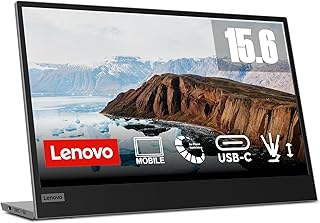
Lenovo L15 15.6 Inch Portable Monitor
Why We Love It

UPERFECT 24" 120Hz QLED Portable Touchscreen Monitor 1080P
Why We Love It
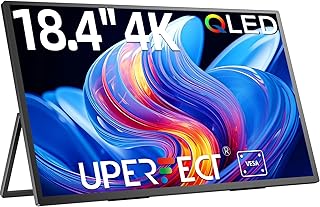
UPERFECT QLED 18.4" Portable Monitor 4K QHD 3840 * 2160
Why We Love It

Teamgee S1 Dual Laptop Screen Extender
Why We Love It

Blackview Triple Laptop Screen Extender
Why We Love It

Yodoit Portable Monitor 15.6"
Why We Love It

Cocopar Portable Monitor 15.6 Inch 1080P FHD 60Hz 85% sRGB
Why We Love It

Yodoit Portable Monitor 15.6"
Why We Love It

Cocopar Portable Monitor 15.6 Inch 1080P FHD 60Hz 85% sRGB
Why We Love It
Quick Pick
10 Best Travel Monitors Of 2026
Quick Pick
UPERFECT Portable Monitor, 15.6" 125% sRGB 1080P Ultra-Slim Travel Monitor USB C HDMI Plug & Play IPS Gaming Monitor Built-in Stand Dual Speakers External Screen for Laptop Phone Game Console
Lenovo L15 15.6 Inch Portable Monitor, HD, 1080p, 60Hz, IPS, 6ms, USB-C/Type-C Connector
UPERFECT 24" 120Hz QLED Portable Touchscreen Monitor 1080P 125% sRGB 400Nits w/Stand & VESA, HDMI USB-C Travel Monitor for Laptop/Gaming Devices/Phone/Mini PC, External Second Screen for Gaming & Work
UPERFECT QLED 18.4" Portable Monitor 4K QHD 3840 * 2160 Matte Screen w/Adjustable Kickstand & VESA, 2000:1, USB C Travel Monitor, Frameless 125% sRGB Display for PC, Laptops, Gaming Consoles, Phones
Teamgee S1 Dual Laptop Screen Extender — 14” FHD IPS Portable Monitor for 13–17” Laptops, USB-C/HDMI Plug & Play, Compatible with Windows, macOS & Android, Perfect for Hybrid Work & Travel
Blackview Triple Laptop Screen Extender,14" Portable Monitor [FHD 1080P TÜV SÜD & Ultra-Slim],Two Cable USB C Travel for 13-17" Laptop,Plug & Play Compatible with Windows/Mac/Chrome OS
Yodoit Portable Monitor 15.6", FHD 1080P Screen IPS 1920×1080 100% SRGB Display with Type C USB Port and Speakers, Compatible with PC, Laptop, MacBook, Xbox
cocopar Portable Monitor 15.6 Inch 1080P FHD 60Hz 85% sRGB Travel Monitor with Speaker HDMI USB-C Second Screen for Laptop MacBook Surface PC Xbox PS4/5, VESA Mountable, with Full Cover Stand
Yodoit Portable Monitor 15.6", FHD 1080P Screen IPS 1920×1080 100% SRGB Display with Type C USB Port and Speakers with Smart Cover, Compatible with PC, Laptop, MacBook, Xbox
cocopar Portable Monitor 15.6 Inch 1080P FHD 60Hz 85% sRGB Travel Monitor with Speaker HDMI USB-C Second Screen for Laptop MacBook Surface PC Xbox PS4/5, VESA Mountable, with Cover Stand
Buying Guide: Travel Monitors
📋 Table of Contents
1What screen size is best for portability without sacrificing usability?
A 10-13 inch display balances portability and readability for most users, while 8 inches or smaller is better for tight spaces. Larger screens (14+ inches) offer more real estate but are heavier and harder to pack.
2How important is battery life for a travel monitor?
Look for at least 4-6 hours of continuous use for short trips, and 8+ hours for all-day productivity. Monitors with USB-C power delivery are more convenient for charging on the go and using with laptops.
3Should I prioritize resolution or portability?
For most travel use, 1080p (Full HD) is sufficient and lighter than 4K models. If you need sharp text for spreadsheets or photo editing, 2K (QHD) is a good middle ground, but it adds weight and power consumption.
4What connectivity options should I look for?
USB-C with DisplayPort and power delivery is ideal for modern laptops, while HDMI or Thunderbolt 3/4 are useful for older or high-performance devices. Ensure the monitor has the right ports for your setup to avoid extra dongles.
5Are anti-glare or matte screens worth the extra cost?
Anti-glare or matte screens reduce reflections in bright environments like airplanes or cafes, making them ideal for travel. However, they may slightly dim the image and cost more, so consider your typical usage environment before upgrading.
How we choose
Our editors are people who genuinely love testing and writing about products. We compare each product's real-world usability and strengths, then distill what matters most into our own "Why We Love It" points — so you get an honest, at-a-glance sense of what counts before you buy.