10 Best Touchscreen Business Laptop Of 2026
Touchscreen Business Laptop — Reviews, Recommendations & Updated Buying Guide November 2026

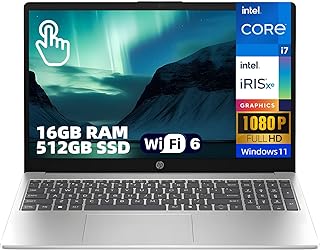
HP 15.6" FHD Touchscreen Business Laptop
Why We Love It


Lenovo IdeaPad Business Laptop
Why We Love It

HP OmniBook X Flip 14 2-in-1 Laptop
Why We Love It

Dell Inspiron 15 3530 Business Laptop 15.6" Touchscreen FHD
Why We Love It

HP 15.6" Touchscreen Laptop
Why We Love It

HP Pavilion 15.6" FHD Touchscreen Business Laptop
Why We Love It
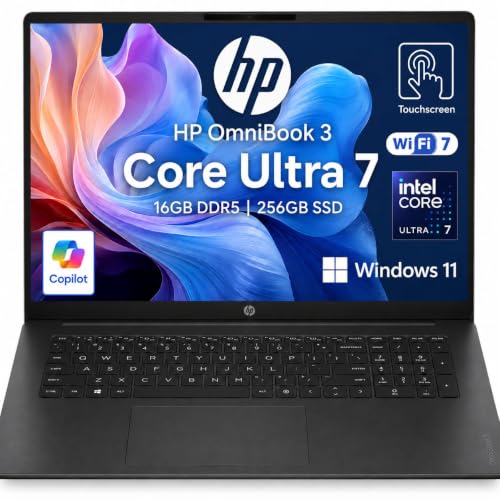
HP 16" OmniBook 3 AI Touchscreen Business Laptop
Why We Love It

Samsung 12.2" FHD 2-in-1 Touchscreen Chromebook Plus Laptop
Why We Love It

ASUS Zenbook 14 Laptop 14" WUXGA OLED Touchscreen 500nits
Why We Love It

HP i7 Touchscreen Laptop
Why We Love It
Quick Pick
10 Best Touchscreen Business Laptop Of 2026
Quick Pick
HP 15.6" FHD Touchscreen Business Laptop, Intel Core i7-1355U, 16GB DDR4 RAM, 512GB SSD, Windows 11 Home, Copilot Ready, Wi-Fi 6, Lightweight Notebook for Office and Remote Work
Lenovo IdeaPad Business Laptop, 15.6" FHD Touchscreen Display, Intel 13th 10-Core i5 CPU (Up to 4.6 GHz), 16GB RAM, 1TB SSD, Copilot AI Ready, Wi-Fi 6, Windows 11 Pro with Microsoft Office, WOWPC USB
HP OmniBook X Flip 14 2-in-1 Laptop, Laptop Touchscreen 14" WUXGA IPS, Intel 8-core Ultra 5 226V, Intel Arc 130V GPU, 16GB RAM 512GB SSD, Thunderbolt 4, Windows 11 with Stylus Pen
Dell Inspiron 15 3530 Business Laptop 15.6" Touchscreen FHD Display (Intel i5-1334U (Beat i7-1250U), 16GB DDR4, 1TB SSD, WiFi 6, HD Webcam, BT 5.3, Win11P)
HP 15.6" Touchscreen Laptop, Intel Core i5-1235u, 16GB Memory, 512GB SSD, Intel Iris Xe Graphics, Wi - Fi 6E, Windows 11 Home, Ideal for Students and Business, Natural Silver(Upgraded)
HP Pavilion 15.6" FHD Touchscreen Business Laptop, AMD Ryzen 7 7730U, 16GB RAM, 512GB PCIe SSD, Numeric Keypad, Webcam, Wi-Fi 6, HDMI, Windows 11, W/Mouse
HP 16" OmniBook 3 AI Touchscreen Business Laptop, 12-Core Intel Core Ultra 7 Processor (Up to 5.2GHz), 16GB DDR5 RAM, 256GB PCIe SSD, Touch WUXGA (1920 x 1200) IPS Display, Wi-Fi 7,Windows 11
Samsung 12.2" FHD 2-in-1 Touchscreen Chromebook Plus Laptop for Business&Students, Intel Dual-Core, 4GB RAM, 224GB Storage(64GB eMMC+160GB Docking Station Set), Stylus Pen, Wireless Mouse, Silver
ASUS Zenbook 14 Laptop 14" WUXGA OLED Touchscreen 500nits Peak HDR AMD AMD 6-core Ryzen AI 7 445 (Up to 50 AI Tops) 16GB RAM 1TB SSD Backlit Type-c for Creator Business Professional Win11Pro ICP Hub
HP i7 Touchscreen Laptop, 10-Core Intel Core i7-1355U(Up to 5GHz, Beat Core 7 160U), 16GB RAM 1TB SSD 15.6" FHD Intel Iris Xe Graphics Win 11 Pro Wifi6 w/GM Accessory Notebook for Business Gaming
Buying Guide: Touchscreen Business Laptop
📋 Table of Contents
1What screen size and resolution should I look for in a touchscreen business laptop?
Opt for 13-15 inch screens with at least 1080p resolution for portability and clarity. Larger screens (15-17 inches) with 4K resolution offer better multitasking and visual detail, but may sacrifice battery life and weight for frequent travelers.
2Is a touchscreen worth the extra cost for a business laptop?
Yes, if you need to interact with apps, annotate documents, or present wirelessly. Touchscreens improve usability for tasks like calendar navigation, email, and video conferencing, but may add weight and reduce battery efficiency compared to traditional laptops.
3What processor and RAM are ideal for a touchscreen business laptop?
Look for at least an Intel Core i5 or AMD Ryzen 5 processor with 8GB of RAM for smooth multitasking. For heavy use like video editing or running virtual machines, aim for an i7/Ryzen 7 with 16GB RAM to ensure responsiveness and future-proofing.
4What battery life should I expect from a touchscreen business laptop?
Expect 6-10 hours of battery life on a single charge, depending on screen size and usage. Laptops with 13-inch screens and low-power processors tend to last longer, while 15-inch models with high-resolution touchscreens may offer 6-8 hours under typical business use.
5What ports and connectivity options are essential for a touchscreen business laptop?
Ensure the laptop has at least one USB-C/Thunderbolt port for charging and data transfer, an HDMI port for presentations, and a headphone jack. Wi-Fi 6 and Bluetooth 5.0 are standard for modern connectivity, and an SD card reader can be useful for photographers or field workers.
How we choose
Our editors are people who genuinely love testing and writing about products. We compare each product's real-world usability and strengths, then distill what matters most into our own "Why We Love It" points — so you get an honest, at-a-glance sense of what counts before you buy.