10 Best Tkl Gaming Keyboards Of 2026
Tkl Gaming Keyboards — Reviews, Recommendations & Updated Buying Guide November 2026


SteelSeries Apex 7 TKL Mechanical Gaming Keyboard
Why We Love It


Logitech G PRO X TKL RAPID Tenkeyless Wired Gaming Keyboard
Why We Love It

Corsair K70 RGB TKL Champion Series Tenkeyless
Why We Love It

ATTACK SHARK K86 75% Wireless Mechanical Keyboard
Why We Love It
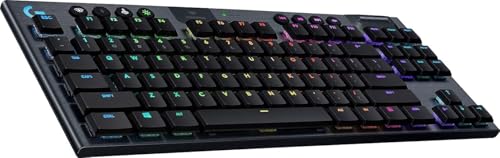
Logitech G915 TKL Tenkeyless Lightspeed Wireless RGB
Why We Love It

SteelSeries Apex 9 TKL
Why We Love It

Logitech G515 TKL Wired Low Profile Gaming Keyboard
Why We Love It

SteelSeries Apex Pro TKL Wireless Gen 3 (2025)
Why We Love It

SteelSeries Apex Pro TKL Gen 3 Gaming Keyboard
Why We Love It

Logitech G915 X LIGHTSPEED TKL Low-Profile Wireless Gaming
Why We Love It
Quick Pick
10 Best Tkl Gaming Keyboards Of 2026
Quick Pick
SteelSeries Apex 7 TKL Mechanical Gaming Keyboard, OLED Display, Red Switches, American QWERTY Layout
Logitech G PRO X TKL RAPID Tenkeyless Wired Gaming Keyboard With Magnetic Analog Switches, Rapid Trigger Mode, Adjustable Actuation, and Customizable RGB Lighting - Black | US International QWERTY Keyboard - Linear - Black
Corsair K70 RGB TKL Champion Series Tenkeyless Optical-Mechanical Gaming Keyboard (OPX RGB Optical-Mechanical Keyswitches, PBT Double-Shot Keycaps, Detachable USB-C Cable) QWERTY, NA Layout - Black
ATTACK SHARK K86 75% Wireless Mechanical Keyboard, Tri-Mode Gaming Keyboard with 2.4G/BT5.0/USB-C Cable, QWERTY TKL 87 Key, 1.2' TFT HD Display and Knob, RGB Hot-Swap Linear Switch - Grey
Logitech G915 TKL Tenkeyless Lightspeed Wireless RGB Mechanical Gaming Keyboard, Low Profile Switch Options, LIGHTSYNC RGB, Advanced Wireless and Bluetooth Support - Clicky , Black
SteelSeries Apex 9 TKL - Mechanical Gaming Keyboard – Optical Switches – 2-Point Actuation – Compact Esports Tenkeyless Form Factor – Hotswappable Switches - English QWERTY Layout
Logitech G515 TKL Wired Low Profile Gaming Keyboard, Fully Customisable RGB, Double-Shot PBT Keycaps, Tactile/Brown Switches - Black | Low-profile, fully customizable RGB keycaps, 2-component PBT keycaps, Tactile switch - Black
SteelSeries Apex Pro TKL Wireless Gen 3 (2025) - HyperMagnetic Wireless Gaming Keyboard - Adjustable Actuation - Rapid Trigger - Protection Mode - Rapid Tap/SOCD - American QWERTY Layout - TKL
SteelSeries Apex Pro TKL Gen 3 Gaming Keyboard - OmniPoint 3.0 Analog Magnetic Switches, QuickSet Auto-Presets (Rapid Trigger, Rapid Tap/SOCD, Protection Mode), OLED, RGB, PBT Keycaps, USB-C, White
Logitech G915 X LIGHTSPEED TKL Low-Profile Wireless Gaming Keyboard, Double-Shot PBT Keycaps, Fully Programmable Keys, RGB Backlighting, Sleek Aluminum Finishing, GL Brown Tactile, PC/Mac - Black | Layout US International QWERTY, Tactile - Black
Buying Guide: Tkl Gaming Keyboards
📋 Table of Contents
1What switch type is best for TKL gaming keyboards?
Linear switches offer smooth, consistent actuation and are ideal for fast-paced games like FPS or MOBA. Tactile switches provide a clicky feedback, preferred by some for typing, while clicky switches add audible feedback but may slow down gameplay. Choose based on your playstyle and preference for tactile or silent operation.
2How many keycaps should a TKL keyboard have?
A standard TKL (Tenkeyless) keyboard has 75 keys, omitting the numeric keypad. This compact design is perfect for smaller desks or players who prefer a more streamlined setup. Ensure the keyboard includes all essential function keys and media controls for full usability without the numpad.
3What's the ideal actuation force for gaming?
Look for an actuation force between 45–50cN for a balance of responsiveness and comfort. Lower forces (35–45cN) are better for fast, light taps in competitive gaming, while higher forces (50–60cN) offer a more tactile, durable feel. Match this to your preferred gaming style and hand size.
4Are RGB lighting features worth the extra cost?
RGB lighting adds customization and aesthetic appeal but doesn't impact performance. If you prioritize immersion or want to match your setup, opt for a keyboard with at least 16.8 million color options and programmable zones. Avoid models with overly bright or distracting lighting that could affect focus during gameplay.
5What should I look for in a TKL keyboard's build quality?
Opt for aluminum or reinforced plastic frames for durability. Look for keycaps made from PBT or ABS with a textured finish for better grip and longevity. A solid, clicky chassis and proper spacing between keys reduce wobble and improve typing accuracy, especially during long gaming sessions.
How we choose
Our editors are people who genuinely love testing and writing about products. We compare each product's real-world usability and strengths, then distill what matters most into our own "Why We Love It" points — so you get an honest, at-a-glance sense of what counts before you buy.