10 Best Thunderbolt Adapters Of 2026
Thunderbolt Adapters — Reviews, Recommendations & Updated Buying Guide November 2026


BENFEI Mini DisplayPort to HDMI Adapter
Why We Love It


AREKEJI USB C to USB Adapter [2-Pack]
Why We Love It

Apple Thunderbolt 3 (USB-C) to Thunderbolt 2 Adapter
Why We Love It

UGREEN 4K USB C to HDMI Adapter Cable Thunderbolt 4 HDMI 2.0
Why We Love It

VENTION TCAH0 USB C to HDMI Adapter 4K 60Hz
Why We Love It

JSAUX USB C to HDMI Adapter
Why We Love It

StarTech.com Thunderbolt 3 to Dual DisplayPort Adapter DP
Why We Love It

Anker USB C to HDMI Adapter (4K@60Hz)
Why We Love It

Hagibis 240W 40Gbps 8K USB C Adapter
Why We Love It
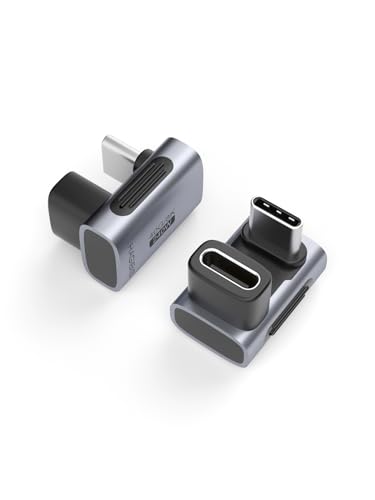
Hagibis 240W 40Gbps 8K USB-C Adapter
Why We Love It
Quick Pick
10 Best Thunderbolt Adapters Of 2026
Quick Pick
BENFEI Mini DisplayPort to HDMI Adapter, Thunderbolt 2 to HDMI Adapter Compatible for MacBook Air/Pro, Microsoft Surface Pro/Dock, Monitor, Projector[Gold-Plated Connectors& Aluminium Shell]
AREKEJI USB C to USB Adapter [2-Pack], Thunderbolt 3 to USB 3.0 OTG Adapter Compatible with MacBook Pro,Pixelbook,and More Type-C Devices (black)
Apple Thunderbolt 3 (USB-C) to Thunderbolt 2 Adapter
UGREEN 4K USB C to HDMI Adapter Cable Thunderbolt 4 HDMI 2.0 iPhone 17/16 | Converter for iPad 10/Pro/Air/Mini MacBook Pro Samsung S26/S25 Ultra/Galaxy Z Tab S6 Huawei P60 Pro
VENTION TCAH0 USB C to HDMI Adapter 4K 60Hz, Type C Thunderbolt 3 Male to HDMI 2.0 Female Adapter Compatible with MacBook Pro, MacBook Air, iPad Pro, Pixelbook, XPS, Galaxy, and More (1 Year Warranty)
JSAUX USB C to HDMI Adapter, 4K HDMI to USB C Adapter [Thunderbolt 3], USB Type C to HDMI Adapter Compatible with iPhone 17/16 Pro Max, MacBook Pro/Air, Surface, Galaxy S21 S20 Ultra, Dell XPS 15-Grey
StarTech.com Thunderbolt 3 to Dual DisplayPort Adapter DP 1.4 - Dual 4K 60Hz or Single 8K/5K Thunderbolt 3 to DP Adapter - TB3 to 2x DisplayPort Monitor Video Display Adapter - Mac/Windows (TB32DP14)
Anker USB C to HDMI Adapter (4K@60Hz), PowerExpand+ Aluminum Portable USB C Adapter, for MacBook Pro, MacBook Air, iPad Pro, Pixelbook, XPS, Galaxy, and More (Compatible with Thunderbolt 3 ports) | For MacBook Pro, MacBook Air, iPad Pro, Pixelbook, XPS, Galaxy, and More(Compatible with Thunderbolt 3 Ports)
Hagibis 240W 40Gbps 8K USB C Adapter, 2 Pack USB-C Male to USB-C Female Adapter, USB4 Connecter for Thunderbolt 4/3, ROG Ally, Steam Deck, Switch, Dock, Mac, Tablet, iPhone 15 Pro Max (90 Degree)
Hagibis 240W 40Gbps 8K USB-C Adapter, 2-Pack USB-C Male to Female, USB4 Connector for Thunderbolt 4/3, ROG Ally, Steam Deck, Switch, Dock, Mac, Tablet, iPhone 16/15 Pro Max (180 Degree)
Buying Guide: Thunderbolt Adapters
📋 Table of Contents
1What's the difference between Thunderbolt 3 and Thunderbolt 4 adapters?
Thunderbolt 4 offers faster data speeds (40 Gbps vs 40 Gbps, but with better consistency), improved power delivery, and guaranteed video and storage performance. If you're using newer devices and need maximum reliability for professional work, Thunderbolt 4 is worth it—otherwise Thunderbolt 3 handles most tasks fine.
2How do I know which adapter will work with my device?
Check your device's port type (Thunderbolt 3 or 4) and what you're connecting to—HDMI, USB-C, DisplayPort, or SD card. Most modern MacBooks, Dell XPS laptops, and newer professional cameras use Thunderbolt 3 or 4, so verify compatibility before buying.
3Should I buy a multi-port hub or single adapters?
A multi-port hub saves space and money if you regularly need multiple connections (display, USB, storage), while single adapters are lighter for travel or occasional use. Consider how many devices you connect simultaneously to decide which setup works best for you.
4Do expensive Thunderbolt adapters perform better than cheap ones?
Quality matters here—cheaper adapters often have slower data transfer, poor build quality, or compatibility issues that cause frustration. Spend more on established brands with proper certification to avoid dropping your device or losing data reliability.
5What power delivery rating do I need in a Thunderbolt adapter?
Check your device's charging requirements—most laptops need 60-100W, while 16-inch MacBook Pros need 140W. If you're only using the adapter for data transfer, power delivery matters less, but get at least 60W if you plan to charge while working.
How we choose
Our editors are people who genuinely love testing and writing about products. We compare each product's real-world usability and strengths, then distill what matters most into our own "Why We Love It" points — so you get an honest, at-a-glance sense of what counts before you buy.