10 Best Thunderbolt 5 Thunderbolt Cables Of 2026
Thunderbolt 5 Thunderbolt Cables — Reviews, Recommendations & Updated Buying Guide November 2026


Anker Prime Thunderbolt 5 Cable
Why We Love It


Apple Thunderbolt 5 (USB‑C) Pro Cable (1m)
Why We Love It

Thunderbolt 5 Extension Cable 1m USB 4 Super High Speed
Why We Love It
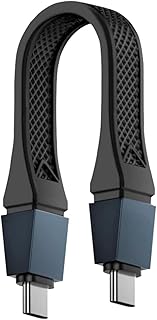
Short 5-inch USB C Cable Thunderbolt 5 with 80-120Gbps High
Why We Love It

OWC 0.8 Metre Thunderbolt 5/USB-C Cable
Why We Love It

M5 PRO [Intel Certified] Thunderbolt 5 Cable 2M
Why We Love It

CABLEDECONN Thunderbolt 5 240W Extension 80Gbps Super High
Why We Love It
OWC 1 metre Thunderbolt 5/USB-C Cable
Why We Love It

Silkland 80Gbps USB4 Cable for Thunderbolt 5 Cable 1M
Why We Love It

Silkland USB4 for Thunderbolt 5 Cable 2M
Why We Love It
Quick Pick
10 Best Thunderbolt 5 Thunderbolt Cables Of 2026
Quick Pick
Anker Prime Thunderbolt 5 Cable, 3.3ft USB-C to USB-C Cable, 240W Charging | 80Gbps Data Transfer, Up to 120Gbps Bandwidth, 8K/4K Displays, for iPhone 16, MacBook and More (Thunderbolt 5-Certified)
Apple Thunderbolt 5 (USB‑C) Pro Cable (1m)
Thunderbolt 5 Extension Cable 1m USB 4 Super High Speed 80Gbps Data 240W Quick Charging 16K Ultra HD Video Connection USB Type-C
Short 5-inch USB C Cable Thunderbolt 5 with 80-120Gbps High Speed Data Transfer, 240W PD Fast Charging USB4 Compatible Cord for 16K, Dual 8K/6K Display, MacBook, SSD, Docking Station
OWC 0.8 Metre Thunderbolt 5/USB-C Cable
M5 PRO [Intel Certified] Thunderbolt 5 Cable 2M, 120Gbps, 240W Charging, 16K@60Hz Display, 80Gbps Data Transfer, USB4 Compatible, for MacBook Pro, Mac Mini M4, eGPU, SSD
CABLEDECONN Thunderbolt 5 240W Extension 80Gbps Super High Speed Data USB4.0 Cable 240W Quick Charging 16K Ultra HD Video Connection USB Type-C Connector (1m)
OWC 1 metre Thunderbolt 5/USB-C Cable
Silkland 80Gbps USB4 Cable for Thunderbolt 5 Cable 1M [USB-IF Certified] | High Speed USB C Cable, Support Dual 8K Displays, 240W Charge, Compatible with MacBook Pro, Mac Mini, SSD, Dock
Silkland USB4 for Thunderbolt 5 Cable 2M, 80Gbps Data Sync, 240W | with 120Gbps Bandwidth for 4K@540Hz/Dual 8K, Long USB C Video Cable Compatible for Thunderbolt 4, SSD, MacBook, iPhone 17/16
Buying Guide: Thunderbolt 5 Thunderbolt Cables
📋 Table of Contents
1What data transfer speeds should I look for in a Thunderbolt 5 cable?
Thunderbolt 5 supports speeds up to 40 Gbps, so look for cables that explicitly state compatibility with this standard. This speed is ideal for high-resolution video editing, large file transfers, and external GPU performance, making it essential for professionals working with demanding workflows.
2Are there differences between active and passive Thunderbolt 5 cables?
Active cables include built-in signal amplification and are required for longer lengths, typically beyond 2 meters. Passive cables are shorter and less expensive but may not support full Thunderbolt 5 speeds over longer distances. Choose active cables if you need extended reach or higher reliability.
3What connector types are available for Thunderbolt 5 cables?
Thunderbolt 5 uses the USB-C connector with a distinct 20-pin design. Ensure your devices have the correct port and that the cable is certified for Thunderbolt 5. Some cables may also support USB 4 or DisplayPort, but prioritize Thunderbolt 5 compatibility for full performance.
4How does Thunderbolt 5 compare to previous versions like Thunderbolt 4?
Thunderbolt 5 doubles the data transfer speed of Thunderbolt 4 (from 40 Gbps to 80 Gbps) and supports higher-resolution displays and more power delivery. If you need faster file transfers or more bandwidth for peripherals, Thunderbolt 5 is a significant upgrade, though older devices may not be compatible.
5What should I avoid when buying a Thunderbolt 5 cable?
Avoid cables that don’t specify Thunderbolt 5 compatibility or are marketed as generic USB-C cables. Also, steer clear of third-party cables that lack official certification, as they may not deliver the promised speeds or could damage your devices. Always check for manufacturer seals or certifications like USB-IF or Intel.
How we choose
Our editors are people who genuinely love testing and writing about products. We compare each product's real-world usability and strengths, then distill what matters most into our own "Why We Love It" points — so you get an honest, at-a-glance sense of what counts before you buy.