10 Best Teleprompters With Built In Screen Of 2026
Teleprompters With Built In Screen — Reviews, Recommendations & Updated Buying Guide November 2026


Elgato Prompter–Teleprompter with Built-in Screen for
Why We Love It


NEEWER 2 in 1 Teleprompter 11 Inch with Monitor
Why We Love It
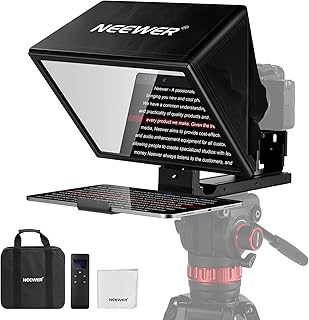
NEEWER Basic X12B Aluminium Alloy Liftable Teleprompter 12
Why We Love It
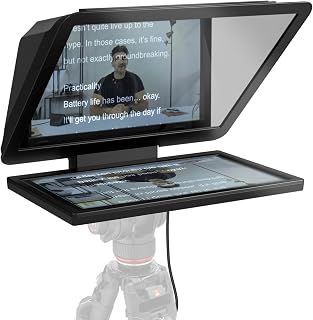
Elgato Prompter XL
Why We Love It

Ambitful Mini Teleprompter (Only) - Adjustable Phone/DSLR
Why We Love It

NEEWER X12 14 inch Aluminum Alloy Teleprompter for iPad
Why We Love It
PRONSTOOR Teleprompter Kit Portable Inscriber Mobile Phone
Why We Love It

NEEWER Teleprompter X17 II with RT113 Remote/APP Control
Why We Love It

NEEWER Teleprompter X14 III with RT113 Remote/App Control
Why We Love It

Desview TP170 Teleprompter Aluminium Alloy 17 Inch High
Why We Love It
Quick Pick
10 Best Teleprompters With Built In Screen Of 2026
Quick Pick
elgato Prompter–Teleprompter with Built-in Screen for YouTube, Twitch, Zoom, MS Teams, Supports DSLR, Webcam, Smartphone, Drag & Drop Monitor Display, Works with Mac, PC & Stream Deck, 1080p | Drag and drop display, for DSLR, webcam, smartphone, read chat or scripts, Mac, PC, stream deck
NEEWER 2 in 1 Teleprompter 11 Inch with Monitor, Supports Screen Mirroring, Plastic, Portable Prompter for Camera Mobile Phone Webcam Windows MacOS for YouTube Twitch Live Streaming Conference, X11
NEEWER Basic X12B Aluminium Alloy Liftable Teleprompter 12 Inch for iPad Tablet Phone DSLR Camera, Remote Control & App Control, Compatible with iOS Android, Pro for Online Lessons Live Streaming | Compatible with iPad Bluetooth without mounting remote control and app control, compatible with iOS Android, black
Elgato Prompter XL – Full-Sized Teleprompter with Removable Display, Video Conferencing Monitor, For DSLR Mirrorless & Studio Cameras, Single-Cable Setup – USB-C 3.2 for PC & Mac
Ambitful Mini Teleprompter (Only) - Adjustable Phone/DSLR | Portable Mini Teleprompter Remote Control, Adjustable Phone/DSLR. Ideal Video Recording, Live Streaming, Interviews
NEEWER X12 14 inch Aluminum Alloy Teleprompter for iPad Tablet Smartphone DSLR Cameras with Remote Control, Carry Case, APP Compatible with iOS/Android for Online Teaching/Vlogger/Live Streaming | With Remote Control, Carry Case, App Compatible with iOS/Android, for DSLR, Online Teaching, Vlogger, Live Streaming
PRONSTOOR Teleprompter Kit Portable Inscriber Mobile Phone Teleprompter Artifact Video With Remote Control for Phone and DSLR Recording (Mini Teleprompter+Mini Tripod)
NEEWER Teleprompter X17 II with RT113 Remote/APP Control, 17" HD Beamsplitter All Metal Frame Upgraded Mount QR Plate Compatible with 501PL iPad, Max Load 44.1Ib, Assembly Free
NEEWER Teleprompter X14 III with RT113 Remote/App Control, 45° Tilt 14" Beamsplitter All Metal Frame Upgraded Mount QR Plate Compatible with 501PL for iPad DSLR, Assembly Free
Desview TP170 Teleprompter Aluminium Alloy 17 Inch High Display Glass Removable Teleprompter with Remote Control & App for iPad Smartphone DSLR Camcorder Wide Angle Camera Lens Video Recording
Buying Guide: Teleprompters With Built In Screen
📋 Table of Contents
1What screen size is ideal for different uses?
For video calls or small setups, a 7-10 inch screen is sufficient, while 12-15 inches offers better visibility for larger spaces or multiple users. Larger screens may add bulk, so balance portability with readability based on your typical use environment.
2How does resolution affect performance?
Look for at least 1080p resolution for clear text and smooth scrolling. 4K screens provide sharper visuals but may drain battery faster and require more powerful processors, which is more important for professional or extended use.
3What’s the difference between LED and LCD screens?
LED screens are typically thinner, lighter, and more energy-efficient, making them better for portable teleprompters. LCD screens can offer better color accuracy but are heavier and less common in compact models. Choose based on your need for portability versus visual quality.
4Should I prioritize touch screen or physical controls?
Touch screens offer convenience for quick adjustments and scrolling, but may be less precise in bright environments. Physical buttons are more reliable for hands-free operation, especially during live presentations. Consider your workflow and environment when choosing.
5What connectivity options are most useful?
Look for models with HDMI, USB-C, or wireless connectivity for flexibility in connecting to cameras, laptops, or phones. Bluetooth or Wi-Fi support can be handy for remote control, but ensure compatibility with your existing devices for seamless use.
How we choose
Our editors are people who genuinely love testing and writing about products. We compare each product's real-world usability and strengths, then distill what matters most into our own "Why We Love It" points — so you get an honest, at-a-glance sense of what counts before you buy.