10 Best Studio Monitor Subwoofers Of 2026
Studio Monitor Subwoofers — Reviews, Recommendations & Updated Buying Guide November 2026


VULKKANO A5 Arc Active Monitoring Speakers with Woofer 5.25
Why We Love It


IK Multimedia iLoud Sub
Why We Love It

PreSonus Eris 3.5 Gen 2
Why We Love It
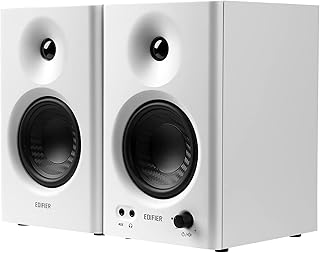
Edifier MR4 Powered Studio Monitor Speakers
Why We Love It

PreSonus Eris Sub 8BT
Why We Love It

PreSonus Eris 3.5BT Gen 2
Why We Love It

Edifier Speakers 2.0 MR4 (black)
Why We Love It

Edifier MR5 Active Studio Speakers
Why We Love It

Edifier MR3 Powered Studio Monitor Speakers
Why We Love It

Pyle Sound Dampening Speaker Riser Foam
Why We Love It
Quick Pick
10 Best Studio Monitor Subwoofers Of 2026
Quick Pick
VULKKANO A5 Arc Active Monitoring Speakers with Woofer 5.25 Inches, Bluetooth 5.0, HDMI Arc, Optical, RCA, Coaxial, USB, Subwoofer Output, Amplified HiFi Speaker with Elegant Design, Black
IK Multimedia iLoud Sub - Compact 25Hz Studio Subwoofer with ARC X Automatic Calibration, 6.5" Driver, Dual Passive Radiators, USB/Bluetooth, Perfect for Small Studios & Any Monitor Setup
PreSonus Eris 3.5 Gen 2, Studio Monitor Pair, 3.5 Inch, 2-Way, Powered Desktop Speakers for Multimedia, Gaming, Studio-Quality Music Production, 50W Power | Near-field studio monitors, home recording, gaming, multimedia, 3.5-inch woofers, balanced sound, beginner-friendly
Edifier MR4 Powered Studio Monitor Speakers, 4" Active Near-field Monitor Speaker - White (Pair)
PreSonus Eris Sub 8BT, 8-inch Active Studio Subwoofer with Bluetooth for Multimedia, Gaming, Studio-Quality Music Production, Black | Active studio subwoofer, Bluetooth connectivity, 30-200 Hz, home theater, gaming, music production, desktop speakers
PreSonus Eris 3.5BT Gen 2, Studio Monitor Speakers with Bluetooth, Pair, 3.5 Inch, 2-Way, Powered Desktop, Multimedia, Gaming, Studio-Quality Music Production, 50W Power | Bluetooth computer speakers, studio monitors for beginners, home studio, gaming, multimedia, music production
Edifier Speakers 2.0 MR4 (black)
Edifier MR5 Active Studio Speakers | 110W Hi-Res 3-Way Monitor + Tri-Amped Crossover | XLR, TRS, RCA + AUX | 24-bit/96kHz LDAC Wireless | ConneX App | EQ + Front Regulator | 2
Edifier MR3 Powered Studio Monitor Speakers, Hi-Res Audio Certified Bluetooth V5.4 Active Bookshelf Speakers, 2.0 Computer Speaker with Headphone Output RCA AUX Balanced TRS Input - Black (Pair)
Pyle Sound Dampening Speaker Riser Foam - Audio Acoustic Noise Isolation Platform Pads Recoil Stabilizer w/Rubber Base Pad For Studio Monitor, Subwoofer, Loud Speakers - PSI08 (13 x 11 x 2.6 Inch)
Buying Guide: Studio Monitor Subwoofers
📋 Table of Contents
1What frequency range should a subwoofer cover for studio use?
Aim for subwoofers with a frequency response of 20-120Hz to accurately reproduce low-end content. Some models extend down to 18Hz, but in a studio setting, tight and accurate reproduction in the 40-100Hz range is more important than extreme low-end reach for mixing purposes.
2Is a powered or passive subwoofer better for a studio setup?
Powered subwoofers are ideal for most studios because they include built-in amplifiers and crossovers, simplifying setup and ensuring consistent performance. Passive models require a separate amplifier and are more common in large-scale installations, not typical home or project studios.
3What crossover settings should I look for?
Look for subwoofers with adjustable crossover settings (typically 50-150Hz) and a choice between high-pass and low-pass filters. This allows you to seamlessly blend the sub with your main monitors and avoid frequency overlap or gaps in the audio spectrum.
4How important is driver size in a studio subwoofer?
A 10-12 inch driver is standard for most studio subwoofers, offering a good balance between low-frequency extension and room compatibility. Larger drivers (15 inches) can produce deeper bass but may cause room mode issues in smaller spaces, while smaller drivers may lack low-end impact for full-range monitoring.
5What are common mistakes when setting up a subwoofer in a studio?
Placing the sub in a corner can cause exaggerated bass due to room reflections, leading to inaccurate mixes. Use a measurement tool or test tones to find the best position and apply room correction if available. Also, always phase-align the sub with your main monitors for a cohesive soundstage.
How we choose
Our editors are people who genuinely love testing and writing about products. We compare each product's real-world usability and strengths, then distill what matters most into our own "Why We Love It" points — so you get an honest, at-a-glance sense of what counts before you buy.