10 Best Studio Audio Midi Interfaces Of 2026
Studio Audio Midi Interfaces — Reviews, Recommendations & Updated Buying Guide November 2026


Focusrite Scarlett Solo 4th Gen USB-C Audio Interface
Why We Love It


Focusrite Scarlett 3rd Gen Audio Interface
Why We Love It

AudioDeluxe Focusrite Scarlett 2i2 Studio (4th Gen) USB
Why We Love It
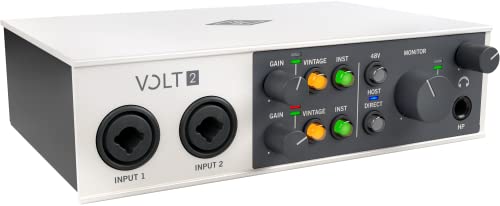
Universal Audio Volt 2 USB Audio Interface
Why We Love It

Focusrite Scarlett Solo Studio 4th Gen USB-C Audio Interface
Why We Love It
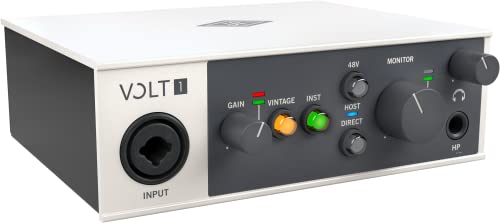
Universal Audio Volt 1 USB Audio Interface
Why We Love It

AudioBox USB 96 Studio Recording Bundle with Fender Studio
Why We Love It

Universal Audio Apollo Twin X DUO Gen 2 and Studio+ Edition
Why We Love It

Audient Audio Interface iD4 MKII
Why We Love It

Universal Audio Volt 2 Gen 2 2-in / 4-out USB Audio
Why We Love It
Quick Pick
10 Best Studio Audio Midi Interfaces Of 2026
Quick Pick
Focusrite Scarlett Solo 4th Gen USB-C Audio Interface
Focusrite Scarlett 3rd Gen Audio Interface
AudioDeluxe Focusrite Scarlett 2i2 Studio (4th Gen) USB Audio Interface and Waves Musicians 2 Bundle
Universal Audio Volt 2 USB Audio Interface
Focusrite Scarlett Solo Studio 4th Gen USB-C Audio Interface Bundle
Universal Audio Volt 1 USB Audio Interface
AudioBox USB 96 Studio Recording Bundle with Fender Studio Pro Software
Universal Audio Apollo Twin X DUO Gen 2 and Studio+ Edition Bundle 10-in/6-out, 24-bit/192kHz, Thunderbolt 3 Audio Interface with DUO Core Processor, 2 Unison Preamps, Auto-Gain, Monitor Correction
Audient Audio Interface iD4 MKII, Class A Console Microphone Preamp (High Speed USB-C, Monitor Mix and Monitor Panning Function, 2 Headphone Outputs, Mac/PC/iOS Compatible), Black
Universal Audio Volt 2 Gen 2 2-in / 4-out USB Audio Interface with Onboard Tone Shaping
Buying Guide: Studio Audio Midi Interfaces
📋 Table of Contents
1How many inputs do I actually need for my setup?
For solo recording, 2 inputs (1 for mic, 1 for instrument) are usually enough. If you plan to record multiple instruments or vocals at once, look for 4 or more inputs to avoid overloading your workflow.
2What is the importance of preamps in a MIDI interface?
High-quality preamps ensure clean, clear audio with low noise, especially important for vocal and acoustic recordings. Budget models often use basic preamps that can sound muddy or distorted at high gain.
3Should I prioritize USB or Thunderbolt connectivity?
USB 3.0 or USB-C is widely compatible and sufficient for most home studios. Thunderbolt offers faster data transfer and lower latency, which is ideal for large sessions or high-track-count projects, but requires a compatible computer port.
4What is the ideal latency for real-time monitoring?
Look for interfaces with latency under 10ms for smooth real-time monitoring. Lower latency (5ms or less) is best for tracking live instruments or vocals, as it prevents the distracting 'echo' effect from delayed audio feedback.
5Are MIDI ports still relevant in modern interfaces?
While many DAWs use USB for MIDI devices, physical MIDI ports (5-pin DIN) are still useful for connecting older gear or multiple MIDI controllers. If you plan to expand your MIDI setup, look for at least one dedicated MIDI I/O port.
How we choose
Our editors are people who genuinely love testing and writing about products. We compare each product's real-world usability and strengths, then distill what matters most into our own "Why We Love It" points — so you get an honest, at-a-glance sense of what counts before you buy.