10 Best Studio Audio Interfaces For Streaming Of 2026
Studio Audio Interfaces For Streaming — Reviews, Recommendations & Updated Buying Guide November 2026

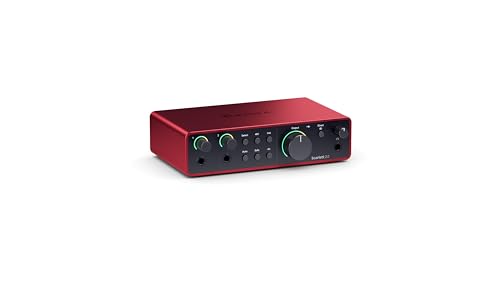
Focusrite Scarlett 2i2 4th Gen USB-C Audio Interface
Why We Love It


Focusrite Scarlett Solo 4th Gen USB-C Audio Interface
Why We Love It

Focusrite Scarlett 3rd Gen Audio Interface
Why We Love It

MAONO Audio Interface with DJ Mixer and Sound Card
Why We Love It

FIFINE AmpliGame D6 Stream Controller with 15 Macro Keys
Why We Love It

Universal Audio Volt 276 USB Audio Interface
Why We Love It

Kadence KOTG-4 4 Channel Audio Mixer with OTG Recording
Why We Love It

FIFINE Studio XLR Dynamic Microphone
Why We Love It

Focusrite Scarlett Solo Studio 4th Gen USB-C Audio Interface
Why We Love It

M-AUDIO M-Track Solo USB Audio Interface | XLR
Why We Love It
Quick Pick
10 Best Studio Audio Interfaces For Streaming Of 2026
Quick Pick
Focusrite Scarlett 2i2 4th Gen USB-C Audio Interface
Focusrite Scarlett Solo 4th Gen USB-C Audio Interface
Focusrite Scarlett 3rd Gen Audio Interface
MAONO Audio Interface with DJ Mixer and Sound Card, Portable ALL-IN-ONE Podcast Production Studio with 3.5mm Microphone for Guitar, Live Youtube Streaming, PC, Recording Studio and Gaming(AU-AM200-S1)
FIFINE AmpliGame D6 Stream Controller with 15 Macro Keys, Trigger Actions | Streaming Keyboard for OBS, Twitch/YouTube/Streamlabs, Shortcut Buttons Keypad, MAC and PC
Universal Audio Volt 276 USB Audio Interface
Kadence KOTG-4 4 Channel Audio Mixer with OTG Recording | Podcast, Streaming & Live Sound Mixer | 192kHz/24-Bit USB Audio Interface | USB/BT Playback | 99 DSP Effects with Faders | Black
FIFINE Studio XLR Dynamic Microphone, USB PC Podcast Microphone for Streaming Recording, XLR/USB Vocal Mic with Tap-to-Mute, Gain Knob, Headphones Monitoring-Amplitank K688 White
Focusrite Scarlett Solo Studio 4th Gen USB-C Audio Interface Bundle
M-AUDIO M-Track Solo USB Audio Interface | XLR, Line and DI Inputs, Professional Software Suite for Recording, Streaming, and Podcasting
Buying Guide: Studio Audio Interfaces For Streaming
📋 Table of Contents
1How many inputs do I actually need for streaming?
For solo streaming, a single XLR/1/4" combo input is usually enough. If you plan to record multiple microphones or instruments at once, look for at least two inputs to avoid switching gear mid-session.
2Does preamp quality really affect my stream's sound?
Yes — higher-quality preamps reduce noise and provide a clearer, more natural sound. Budget models may introduce hiss or muddiness, especially with dynamic or condenser microphones.
3What's the difference between USB and Thunderbolt interfaces?
USB is standard, widely compatible, and sufficient for most streamers. Thunderbolt offers faster data transfer and lower latency, but only matters if you're using high-channel-count setups or advanced DAWs.
4Should I prioritize 24-bit/192kHz support for streaming?
Not always — 24-bit/96kHz is more than enough for most streaming purposes. Higher sample rates don't improve audio quality for online platforms and may increase system load unnecessarily.
5What monitoring features are essential for live streaming?
Look for a dedicated headphone output with volume control and a direct monitor switch to reduce latency. This lets you hear yourself in real time without audio lag, which is crucial for voiceovers and live commentary.
How we choose
Our editors are people who genuinely love testing and writing about products. We compare each product's real-world usability and strengths, then distill what matters most into our own "Why We Love It" points — so you get an honest, at-a-glance sense of what counts before you buy.