10 Best Stream Controllers For Obs Of 2026
Stream Controllers For Obs — Reviews, Recommendations & Updated Buying Guide November 2026


FIFINE AmpliGame D6 Stream Controller with 15 Macro Keys
Why We Love It


Elgato Stream Deck MK.2–Studio Controller
Why We Love It

Elgato Stream Deck MK.2 White–Studio Controller
Why We Love It

FIFINE AmpliGame D6 White Gaming Controller with 15 Shortcut
Why We Love It
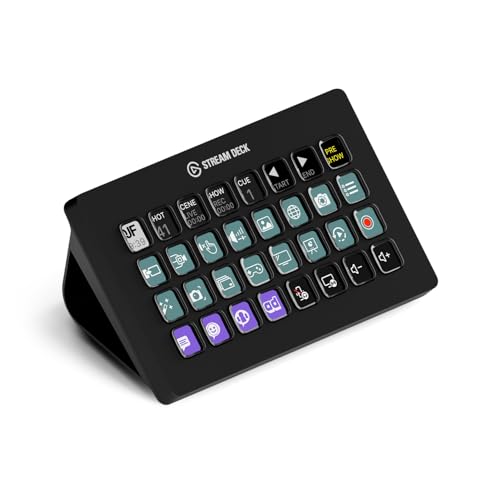
Elgato Stream Deck XL–Advanced Studio Controller
Why We Love It
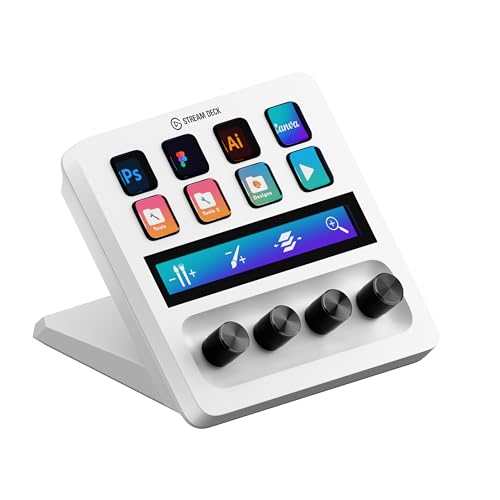
Elgato Stream Deck + White
Why We Love It

LCD Stream Controller
Why We Love It

Elgato Stream Deck Pedal
Why We Love It

Elgato Stream Deck +
Why We Love It

VSDINSIDE Macro Keypad
Why We Love It
Quick Pick
10 Best Stream Controllers For Obs Of 2026
Quick Pick
FIFINE AmpliGame D6 Stream Controller with 15 Macro Keys, Trigger Actions | Streaming Keyboard for OBS, Twitch/YouTube/Streamlabs, Shortcut Buttons Keypad, MAC and PC
elgato Stream Deck MK.2–Studio Controller, 15 Macro Keys, Trigger Actions in apps and Software Like OBS, Twitch, YouTube and More, Works with Mac and PC
Elgato Stream Deck MK.2 White–Studio Controller, 15 Macro Keys, Wi-Fi, Trigger Actions in apps and Software Like OBS, Twitch, YouTube and More, Works with Mac and PC
FIFINE AmpliGame D6 White Gaming Controller with 15 Shortcut Buttons
elgato Stream Deck XL–Advanced Studio Controller, 32 Macro Keys, Activates Actions in apps and Software Such as OBS, Twitch, Youtube and Others, Works on Mac and PC
Elgato Stream Deck + White, Bluetooth Audio Mixer, Live Production and Studio Controller, Customizable Touch Bar, Control Knobs, LCD Keys, for Mac and PC
LCD Stream Controller, 15-Key Shortcut Console Desktop Stream Console Customise Touch Buttons OBS Stream Key All-in-One Stream Key Stream Setup Enhancer for OBS, Twitch, YouTube - Mac & PC Compatible
Elgato Stream Deck Pedal, 3 Hands-Free Macro Footswitches
Elgato Stream Deck +, Audio Mixer, Production Console and Studio Controller for Content Creators, Streaming, Gaming, with customizable touch strip dials and LCD keys, works with Mac and PC
VSDINSIDE Macro Keypad, Stream Controller Deck with 18 Programmable Keys, Customizable Visual AI Pad, USB Soundboard for OBS, YouTube, Desk Office, Laptop, PC, Mac
Buying Guide: Stream Controllers For Obs
📋 Table of Contents
1What input methods are essential for a stream controller with OBS?
Look for at least 16+ programmable buttons and support for both USB and Bluetooth. A controller with macro support and assignable hotkeys streamlines complex OBS tasks like scene switching and source toggling without needing a keyboard.
2How important is compatibility with my streaming software?
Most stream controllers work with OBS via built-in profiles or third-party apps like Stream Deck or Elgato. Ensure the controller supports your version of OBS and offers firmware updates for future compatibility and feature expansion.
3Should I prioritize RGB lighting or physical feedback?
RGB lighting is mostly cosmetic, while tactile feedback (clicky or rubber-dome buttons) improves usability in low-light or fast-paced setups. Prioritize physical feedback if you rely on muscle memory during live streams or gameplay.
4What accessories or add-ons are worth considering?
Expandable modules like LCD screens or OLED displays let you preview scenes or monitor stream stats directly on the controller. A durable carrying case and spare buttons are also handy for frequent travel or on-the-go streaming setups.
5Is a wired or wireless controller better for streaming?
Wired controllers offer zero latency and consistent performance, which is crucial for real-time scene changes. Wireless models provide more desk space flexibility but may introduce lag if not using a 2.4GHz dongle or high-quality Bluetooth connection.
How we choose
Our editors are people who genuinely love testing and writing about products. We compare each product's real-world usability and strengths, then distill what matters most into our own "Why We Love It" points — so you get an honest, at-a-glance sense of what counts before you buy.