10 Best Stereo Audio Interfaces For Recording Of 2026
Stereo Audio Interfaces For Recording — Reviews, Recommendations & Updated Buying Guide November 2026


Focusrite Scarlett 3rd Gen Audio Interface
Why We Love It


Focusrite Scarlett Solo 4th Gen USB-C Audio Interface
Why We Love It

KASTWAVE 4 Channel Mixer for Streaming
Why We Love It

Nalacal Recording Music Usb Audio Interface For Pc
Why We Love It
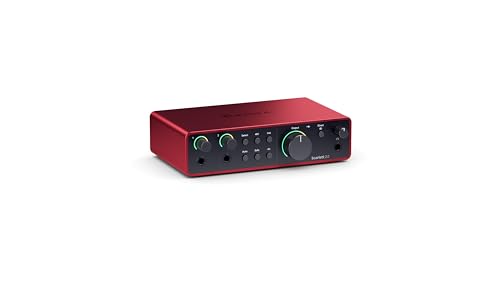
Focusrite Scarlett 2i2 4th Gen USB-C Audio Interface
Why We Love It

Zoom AMS-22 USB Audio Interface for Recording & Streaming
Why We Love It

Kadence KOTG-4 4 Channel Audio Mixer with OTG Recording
Why We Love It

Behringer U-Control Uca202 Usb Audio Interface
Why We Love It

Professional Audio Mixer
Why We Love It

Guitar Audio Interface Pocket Internal Recording Sound Card
Why We Love It
Quick Pick
10 Best Stereo Audio Interfaces For Recording Of 2026
Quick Pick
Focusrite Scarlett 3rd Gen Audio Interface
Focusrite Scarlett Solo 4th Gen USB-C Audio Interface
KASTWAVE 4 Channel Mixer for Streaming, Professional Mini 4 Stereo Audio Mixer, Low Noise DJ Mixer, 48V Phantom Power, USB Audio Interface for Podcasting, Live Performance, Recording, DJ, PC
Nalacal Recording Music Usb Audio Interface For Pc, Sound Card Studio, Computer With 3.5Mm Microphone Jack, Plug And Play
Focusrite Scarlett 2i2 4th Gen USB-C Audio Interface
Zoom AMS-22 USB Audio Interface for Recording & Streaming, 1 In / 2 Out
Kadence KOTG-4 4 Channel Audio Mixer with OTG Recording | Podcast, Streaming & Live Sound Mixer | 192kHz/24-Bit USB Audio Interface | USB/BT Playback | 99 DSP Effects with Faders | Black
Behringer U-Control Uca202 Usb Audio Interface
Professional Audio Mixer, Bluetooth Sound Board with XLR interface, Live Sound Card and Stereo Audio Interface, 48V Phantom Power, Voice Changer, for Podcasting, Live sound, recording Studio, Gaming
Guitar Audio Interface Pocket Internal Recording Sound Card, with Type-C and Lightning, Wireless Audio Interface Transmitter and Receiver, for Live Streaming by Phone and Laptop (MOMIX CAB)
Buying Guide: Stereo Audio Interfaces For Recording
📋 Table of Contents
1How many input channels do I actually need for stereo recording?
For stereo recording, look for at least two balanced XLR or 1/4" inputs to capture both channels independently. More inputs allow for simultaneous tracking of additional instruments or microphones, which is useful for live sessions or layered recordings.
2What preamp quality should I prioritize in a stereo interface?
High-quality preamps with low noise and a clean, transparent sound are essential for capturing detailed audio. Look for interfaces with at least 24-bit/192kHz resolution and a headroom of 16dB or more to avoid distortion during loud recordings.
3Is MIDI support necessary for a stereo audio interface?
MIDI support is optional but valuable if you plan to connect external synthesizers, drum machines, or DAW control surfaces. A built-in MIDI I/O or USB MIDI ports can streamline your setup and reduce the need for extra hardware.
4What connectivity options are most useful for a stereo interface?
USB 2.0 or higher is standard for most home studios, while Thunderbolt or PCIe options offer faster data transfer for high-track-count sessions. Optical inputs (ADAT) are also useful for expanding your interface’s input capacity without extra cables.
5What monitoring features should I look for in a stereo interface?
A dedicated monitor output with a physical volume knob and a cue mix allows you to adjust levels in real time. Headphone outputs with isolation and a direct monitoring option help reduce latency, making it easier to track live instruments or vocals.
How we choose
Our editors are people who genuinely love testing and writing about products. We compare each product's real-world usability and strengths, then distill what matters most into our own "Why We Love It" points — so you get an honest, at-a-glance sense of what counts before you buy.