10 Best Smart Displays 8.7 Inch Of 2026
Smart Displays 8.7 Inch — Reviews, Recommendations & Updated Buying Guide November 2026


Amazon Echo Show 8 (newest gen)
Why We Love It


7 Inch IPS LCD Touch Screen Display Panel
Why We Love It

SAMSUNG 75" Interactive Display Touch Screen Whiteboard WAF
Why We Love It

Waveshare 7inch HDMI LCD IPS Capacitive Touch Screen
Why We Love It

Waveshare 7inch HDMI LCD (H) (with case) 1024x600 Resolution
Why We Love It

Waveshare 7inch HDMI LCD (C) Capacitive Touch Display
Why We Love It

Hosyond 5 Inch IPS LCD Touch Screen Display Panel 800×480
Why We Love It

GeeekPi 7 Inch LCD Screen for Raspberry Pi
Why We Love It

7 Inch Touchscreen Monitor for RPi (3 Gen
Why We Love It
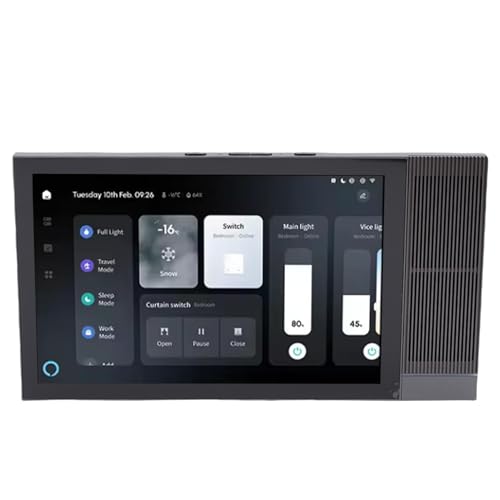
Cryfokt Smart Home Panel
Why We Love It
Quick Pick
10 Best Smart Displays 8.7 Inch Of 2026
Quick Pick
Amazon Echo Show 8 (newest gen), Vibrant HD 8.7" display with spatial audio, and Alexa, Graphite
7 Inch IPS LCD Touch Screen Display Panel, Portable 1024×600 Capacitive Screen HDMI Monitor, Touchscreen Monitor for Raspberry Pi, BB Black, Windows 10 8 7
SAMSUNG 75" Interactive Display Touch Screen Whiteboard WAF Series, Compatible with Android™ Devices, EDLA Certified, OPS Slot, Smart Wireless Sharing, LH75WAFWLGCXZA
waveshare 7inch HDMI LCD IPS Capacitive Touch Screen 1024×600 Display Monitor for All Rev Raspberry Pi 4B/3B+/3B/2B/B+/A+/Zero,BeagleBone Black Windows 10/8.1/8/7
Waveshare 7inch HDMI LCD (H) (with case) 1024x600 Resolution Monitor IPS Capacitive Touch Screen with Toughened Glass Cover Supports Multi Mini PC Raspberry Pi BB Black Banana Pi
Waveshare 7inch HDMI LCD (C) Capacitive Touch Display Without Back Case 1024×600 Hardware Resolution Compatible with Raspberry Pi 4B/3B+/3A+/Zero/Zero 2W etc. Supports Windows 11/10/8.1/8/7
Hosyond 5 Inch IPS LCD Touch Screen Display Panel 800×480 Capacitive Screen HDMI Monitor for Raspberry Pi 5/4/3, BB Black, Windows 10 8 7
GeeekPi 7 Inch LCD Screen for Raspberry Pi, 1024x600 IPS LCD Display with Stand, HDMI Portable Monitor for Raspberry Pi 5/Pi 4B/3B+/3B/B+/Zero/400, Win11/10/8/7, Banana Pi M5/M2 Zero
7 Inch Touchscreen Monitor for RPi (3 Gen, 2 Gen, 1 Gen), 1024x600 Ultra HD Raspberry Pi Screen, HDMI Capacitive Touch Screen for Win7 / Win8 / Win10
Cryfokt Smart Home Panel, 8 Inch Touch Screen 2GB RAM 16GB ROM Smart Control Panel, Home Assistant Touch Screen with Voice Control Dual Speakers for Automati
Buying Guide: Smart Displays 8.7 Inch
📋 Table of Contents
1What resolution should I look for in an 8.7-inch smart display?
Opt for at least 1920 x 1200 (WUXGA) resolution for sharp text and clear video calls. Lower resolutions like 1280 x 800 may look blurry on an 8.7-inch screen, especially when viewing close-up content like recipes or maps.
2Does the display support voice control, and how important is that?
Voice control is essential for hands-free use, like setting reminders or playing music. Look for models with built-in voice assistant support and a sensitive microphone array for accurate commands in a room with background noise.
3What connectivity options are necessary for smart displays?
Wi-Fi 5 or Wi-Fi 6 is standard, but also check for Bluetooth 5.0 for connecting speakers or headphones. Some models include a 3.5mm audio jack or USB ports, which can be useful for wired accessories or charging devices.
4How does screen brightness affect usability in different lighting?
A minimum of 300 nits of brightness is ideal for indoor use, but 400+ nits is better for rooms with natural light. Lower brightness can cause eye strain in well-lit areas and may make the screen hard to see in direct sunlight.
5What kind of speakers are worth paying extra for?
Look for at least 5W stereo speakers with clear mid-range and decent bass for casual use. If you plan to use the display for music or video, consider models with 8W or more and support for spatial audio or Dolby Atmos for a richer sound experience.
How we choose
Our editors are people who genuinely love testing and writing about products. We compare each product's real-world usability and strengths, then distill what matters most into our own "Why We Love It" points — so you get an honest, at-a-glance sense of what counts before you buy.