10 Best Smart Displays 11 Inch Of 2026
Smart Displays 11 Inch — Reviews, Recommendations & Updated Buying Guide November 2026


Skyworth 24 Inch Portable Monitor
Why We Love It

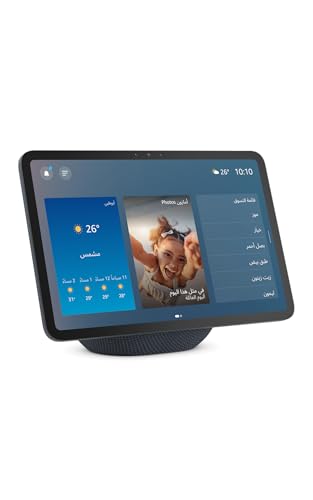
Amazon Echo Show 11
Why We Love It

7 Inch IPS LCD Touch Screen Display Panel
Why We Love It

Hisense 65-inch interactive Displays
Why We Love It

TABWEE Gemini AI 3.0 Tablet 11 Inch Android 16 with Pen and
Why We Love It

Anker Nano Smart Display Charger
Why We Love It

Hosyond 5 Inch IPS LCD Touch Screen Display Panel 800×480
Why We Love It

Acer CS272 27" IPS Full HD Smart Monitor | WebOS
Why We Love It

SAMSUNG 75" Interactive Display Touch Screen Whiteboard WAF
Why We Love It

21.5-Inch Smart Touchscreen Monitor
Why We Love It
Quick Pick
10 Best Smart Displays 11 Inch Of 2026
Quick Pick
Skyworth 24 Inch Portable Monitor - Smart FHD Google TV With Case – 1080p FHD Display, 3 Hour Battery, Google Assistant Voice, Chromecast, Dolby Audio, Dual Band Wi Fi & Bluetooth 5.0 Smart TV
Amazon Echo Show 11, Vibrant Full-HD 11" display with more viewing area, spatial audio, and Alexa, Graphite
7 Inch IPS LCD Touch Screen Display Panel, Portable 1024×600 Capacitive Screen HDMI Monitor, Touchscreen Monitor for Raspberry Pi, BB Black, Windows 10 8 7
Hisense 65-inch interactive Displays,Android 13.0 operating system,providing access to Google Play Store,Smart White board/GoBoard Live Pro+Smart Pen,Integrated 4K UHD camera
TABWEE Gemini AI 3.0 Tablet 11 Inch Android 16 with Pen and Keyboard, 24GB RAM + 128GB ROM (2TB TF), FHD IPS 120Hz Display, 8000mAh Battery, 13MP Camera, 5G WiFi/BT 5.0, PC Mode for Study & Work
Anker Nano Smart Display Charger,45W Max Fast Charger USB C for iPhone 18p
Hosyond 5 Inch IPS LCD Touch Screen Display Panel 800×480 Capacitive Screen HDMI Monitor for Raspberry Pi 5/4/3, BB Black, Windows 10 8 7
Acer CS272 27" IPS Full HD Smart Monitor | WebOS | Streaming TV | Bluetooth | Wireless Projection | iOT Device for Smart Home | Height Adjustable, Swivel, Tilt & Pivot | 3Wx2 Speakers | sRGB 99%
SAMSUNG 75" Interactive Display Touch Screen Whiteboard WAF Series, Compatible with Android™ Devices, EDLA Certified, OPS Slot, Smart Wireless Sharing, LH75WAFWLGCXZA
21.5-Inch Smart Touchscreen Monitor, 1080p Mobile Portable TV Stand on Wheels, Android 13, Built-in 7800mAh, Swivel Rotation Rolling Monitor 8G+128G
Buying Guide: Smart Displays 11 Inch
📋 Table of Contents
1What resolution should I look for in an 11-inch smart display?
Opt for at least 1920x1080 (Full HD) for sharp video calls and media. Some models offer 2560x1440 (QHD), which is better for close viewing and vibrant visuals, but the difference is subtle on smaller screens.
2Does the display need a built-in camera and microphone?
Yes, for video calls and voice commands. A 5MP camera with a physical shutter and a 3-4 microphone array is standard for clear audio and privacy. Check if the camera supports portrait mode for hands-free use.
3How important is voice assistant compatibility?
It's essential for hands-free control of smart home devices, music, and reminders. Most 11-inch models integrate with major voice assistants, but check if the assistant supports your preferred language and third-party apps.
4What connectivity options are necessary for smart displays?
Wi-Fi 5 or 6 is standard, and Bluetooth 5.0 is useful for connecting speakers or headphones. Some models include a 3.5mm audio jack or USB-C for wired accessories, which is handy for wired mics or external storage.
5Are smart displays suitable for use in low-light environments?
Yes, but look for models with at least 300 nits of brightness and an anti-glare screen. A display with ambient light sensors and adjustable color temperature will perform better in dim or dark rooms.
How we choose
Our editors are people who genuinely love testing and writing about products. We compare each product's real-world usability and strengths, then distill what matters most into our own "Why We Love It" points — so you get an honest, at-a-glance sense of what counts before you buy.