10 Best Slim Wireless Keyboard Of 2026
Slim Wireless Keyboard — Reviews, Recommendations & Updated Buying Guide November 2026


Logitech K580 Slim Multi-Device Wireless Keyboard
Why We Love It


UGREEN Slim Wireless Keyboard BT5.4/2.4G 99-Key Rechargeable
Why We Love It

Logitech Pebble Keys 2 K380s
Why We Love It

TECKNET 2.4G Wireless Keyboard For Windows/Chrome OS
Why We Love It

Seenda Wireless Keyboard and Mouse Combo
Why We Love It

Logitech MK470 Slim Wireless Keyboard and Mouse Combo
Why We Love It

Logitech Pebble Keys 2 K380s Wireless Bluetooth Keyboard
Why We Love It

Logitech K250 Bluetooth Keyboard with Numpad
Why We Love It

UGREEN Arabic/English Slim Wireless Keyboard BT/2.4G 78-Key
Why We Love It
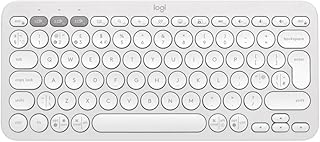
Logitech Pebble Keys 2 K380s
Why We Love It
Quick Pick
10 Best Slim Wireless Keyboard Of 2026
Quick Pick
Logitech K580 Slim Multi-Device Wireless Keyboard - Bluetooth/Receiver, Compact, Easy Switch, 24 Month Battery, Win/Mac, Desktop, Tablet,Smartphone, Laptop Compatible, English+Arabic Keyboard - White
UGREEN Slim Wireless Keyboard BT5.4/2.4G 99-Key Rechargeable Stand | Slim wireless keyboard, 99-key compact, Bluetooth5.4/2.4G, rechargeable USB-C, 7°-10° stand, 3 devices, for PC Mac
Logitech Pebble Keys 2 K380s, Multi-Device Bluetooth Wireless Keyboard with Customisable Shortcuts, Slim and Portable, Easy-Switch for Windows, macOS, iPadOS, Android, Chrome OS, ARA Layout - Graphite
TECKNET 2.4G Wireless Keyboard For Windows/Chrome OS, UK Layout Compact Mini Keyboards, Small Silent Whisper-Quiet Keyboard with 12 months Battery Life (Black)
seenda Wireless Keyboard and Mouse Combo, Rechargeable Quiet Keyboard Mouse, Sleek and Ultra Thin Design, Full-Size with Number Pad for Laptop, PC, Notebook, Desktop, Silver & White- English Layout
Logitech MK470 Slim Wireless Keyboard and Mouse Combo - Modern Compact Layout, Ultra Quiet, 2.4 GHz USB Receiver, Plug n' Play Connectivity, Compatible with Windows - White | 2.4 GHz, nano USB, 10 m range, 18-month battery, PC/laptop, Dutch QWERTY layout - off-white/white
Logitech Pebble Keys 2 K380s Wireless Bluetooth Keyboard - Tonal Graphite | Slim portable compact Bluetooth keyboard, customizable keys, switch between 3 paired devices with Easy-Switch buttons.
Logitech K250 Bluetooth Keyboard with Numpad, Easy Connectivity, Compact Wireless Keyboard Made with Recycled Plastic, Spill-Resistant, Comfortable Keys - Windows/MacOS - Graphite
UGREEN Arabic/English Slim Wireless Keyboard BT/2.4G 78-Key | Arabic/English, slim wireless keyboard, 78-key compact, Bluetooth/2.4G, long battery, for Mac iPad Windows
Logitech Pebble Keys 2 K380s, Multi-Device Bluetooth Wireless Keyboard with Customizable Shortcuts, Slim and Portable, Easy-Switch for Windows, macOS, iPadOS, Android, Chrome OS, US Intl Layout- White
Buying Guide: Slim Wireless Keyboard
📋 Table of Contents
1What size and weight should I look for in a slim wireless keyboard?
Opt for a keyboard that’s 25-30 inches long and weighs under 2 pounds for portability. Slim models often prioritize compactness, so check that the key layout still feels comfortable for extended typing sessions without sacrificing ergonomics.
2What battery life is typical, and how does it affect my choice?
Most slim wireless keyboards offer 6-12 months of battery life on a single charge, depending on usage. Look for models with low-power Bluetooth or a sleep mode to extend life, especially if you use it frequently on the go or for long work sessions.
3Are membrane or mechanical switches better for a slim design?
Membrane switches are more common in slim keyboards due to their compact build and quiet operation, ideal for travel or shared spaces. Mechanical switches offer better tactile feedback but are bulkier and less common in ultra-slim models, so choose based on your typing preference and portability needs.
4What connectivity options should I prioritize?
Bluetooth 5.0 or later is standard for low latency and better range, while some models include a USB receiver for more stable connections. If you use multiple devices, look for keyboards that support multi-device pairing for seamless switching between laptop, tablet, or phone.
5What accessories or features are worth paying extra for?
A built-in stand or adjustable angle can improve comfort during long sessions. Backlit keys are useful for low-light environments, and a detachable wrist rest adds ergonomic support. Consider models with a trackpad or touchpad for added convenience, especially if you're using it as a secondary input device.
How we choose
Our editors are people who genuinely love testing and writing about products. We compare each product's real-world usability and strengths, then distill what matters most into our own "Why We Love It" points — so you get an honest, at-a-glance sense of what counts before you buy.