10 Best Silent Wireless Mouse Ergonomic Of 2026
Silent Wireless Mouse Ergonomic — Reviews, Recommendations & Updated Buying Guide November 2026


Logitech M330 SILENT PLUS Wireless Mouse
Why We Love It


UGREEN Wireless Mouse 2.4G Silent Ergonomic Mice 1600DPI for
Why We Love It

UGREEN Wireless Ergonomic Mouse
Why We Love It

UGREEN Rechargeable Wireless Mouse
Why We Love It

Logitech Lift Vertical Ergonomic Mouse
Why We Love It
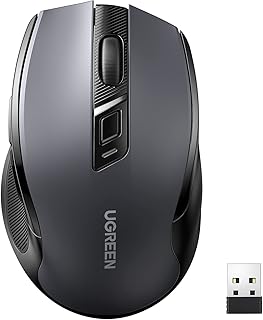
UGREEN Wireless Mouse, 40dB Silent Computer Mouse
Why We Love It

UGREEN Wireless Mouse, Slient Computer Mouse
Why We Love It

TECKNET Wireless Mouse
Why We Love It

Logitech M240 Silent Bluetooth Mouse
Why We Love It

UGREEN Vertical Wireless Mouse BT5.4/2.4G Ergonomic 4000DPI
Why We Love It
Quick Pick
10 Best Silent Wireless Mouse Ergonomic Of 2026
Quick Pick
Logitech M330 SILENT PLUS Wireless Mouse, 2.4GHz with USB Nano Receiver, 1000 DPI Optical Tracking, 2-year Battery Life, Compatible with PC, Mac, Laptop, Chromebook - Black | 2.4GHz with USB Nano Receiver, 1000 DPI, 2-year Battery Life, PC/Mac/Laptop/Chromebook - Black
UGREEN Wireless Mouse 2.4G Silent Ergonomic Mice 1600DPI for PC/Mac | AAA battery included, wireless mouse, 2.4G, silent clicks, 3 DPI (800/1200/1600), 5 buttons, ergonomic, for PC Mac
UGREEN Wireless Ergonomic Mouse, 2.4G USB, 1600 DPI Optical Tracking, Silent Mice, ≤40dB, 12-Month Battery Life for Laptop, MacBook, Chromebook
UGREEN Rechargeable Wireless Mouse, Bluetooth5.4 and 2.4GHz, Long Battery Life, Ergonomic Silent Mouse, 6 Buttons with 5 Adjustable 4000 DPI, Compatible with Laptop PC Mac Computer Chromebook MacBook | Long Life Battery Design, Ergonomic, Quiet Click, 4000 DPI for PC Laptop Windows macOS Linux
Logitech Lift Vertical Ergonomic Mouse, Wireless, Bluetooth or Logi Bolt USB Receiver, Quiet clicks, 4 Buttons, Compatible with Windows/macOS/iPadOS, Laptop, PC-Graphite | Wireless, Bluetooth or Logi Bolt, Silent clicks, 4 buttons, Windows/macOS/iPadOS, Laptop, PC - Grey
UGREEN Wireless Mouse, 40dB Silent Computer Mouse, Ultra-long Battery Life | Ultralight & Ergonomic Design, Multi-level DPI, 6 Buttons,15M Distance, Plug & Play USB Receiver, for Laptop/Desktop, etc.
UGREEN Wireless Mouse, Slient Computer Mouse, 18-Month Battery, Plug & Play
TECKNET Wireless Mouse, 2.4G USB Computer Mouse with 6-Level Adjustable 4800 DPI, Silent Quiet Click,30 Months Battery, Ergonomic Grips, 6 Buttons Portable for PC, Chromebook, Mac - Dark-Grey
Logitech M240 Silent Bluetooth Mouse, Wireless, Compact, Portable, Smooth Tracking, 18-Month Battery, for Windows, macOS, ChromeOS, Compatible with PC, Mac, Laptop, Tablets - White
UGREEN Vertical Wireless Mouse BT5.4/2.4G Ergonomic 4000DPI 6-Button | Vertical wireless mouse, Bluetooth5.4/2.4G, ergonomic, 4000 DPI, 6 buttons, wrist relief, for PC Mac
Buying Guide: Silent Wireless Mouse Ergonomic
📋 Table of Contents
1What battery life should I look for in a silent wireless mouse?
Opt for models with at least 12–24 months of battery life on a single AA or AAA battery. Longer life reduces the hassle of frequent replacements, especially for heavy users who need consistent performance without interruptions.
2How does a silent wireless mouse differ from a regular wireless mouse?
Silent mice use mechanical switches or rubberized click mechanisms to eliminate the clicking sound, making them ideal for quiet environments like offices or late-night work. They often sacrifice slight click feedback for noise reduction, so consider your preference for tactile response.
3What ergonomic features are most important for a silent wireless mouse?
Look for contoured designs that fit the natural curve of your hand, thumb rests, and adjustable palm support. Vertical or ambidextrous designs can reduce strain during long use, especially for users with carpal tunnel or repetitive strain issues.
4Is a wired connection better for silent mice, or is wireless sufficient?
Wireless silent mice are generally sufficient for most users, offering freedom of movement and no cable clutter. However, if you need ultra-low latency or want to avoid potential interference, a wired silent mouse with a noise-dampened switch can be a better choice for precision tasks.
5What should I avoid when buying a silent wireless mouse?
Avoid models with cheap plastic builds or overly lightweight designs, as they can feel unstable. Also, steer clear of mice that use rubberized switches with poor durability, as they may wear out quickly and lose their silent performance over time.
How we choose
Our editors are people who genuinely love testing and writing about products. We compare each product's real-world usability and strengths, then distill what matters most into our own "Why We Love It" points — so you get an honest, at-a-glance sense of what counts before you buy.