10 Best Scansnap Sv600 Successor Of 2026
Scansnap Sv600 Successor — Reviews, Recommendations & Updated Buying Guide November 2026


Fujitsu PA03641-B301 SV600 Scanner A3 Kontaktloser Overhead
Why We Love It

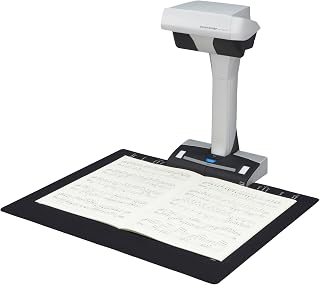
ScanSnap Fujitsu SV600 Overhead Book and Document Scanner
Why We Love It

ScanSnap Fujitsu iX1600 Deluxe Color Duplex Document Scanner
Why We Love It
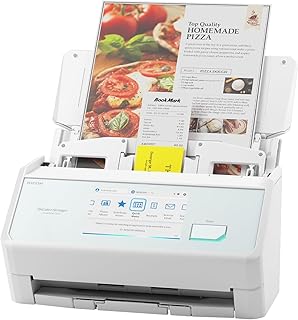
ScanSnap iX2500 Wireless or USB High-Speed Cloud Enabled
Why We Love It

ScanSnap iX1300 Wireless or USB Double-Sided Color Document
Why We Love It

ScanSnap Fujitsu Carrier Sheets
Why We Love It

ScanSnap iX2500 Wireless or USB High-Speed Document Scanner
Why We Love It

ScanSnap iX1300 Wireless or USB Double-Sided Color Document
Why We Love It

ScanSnap iX2500 Receipt Edition
Why We Love It

ScanSnap iX2500 Photo Edition Wireless or USB High-Speed
Why We Love It
Quick Pick
10 Best Scansnap Sv600 Successor Of 2026
Quick Pick
Fujitsu PA03641-B301 SV600 Scanner A3 Kontaktloser Overhead Scanner A8 bis A3 USB MacOS Win Nuance Power Pdf
ScanSnap Fujitsu SV600 Overhead Book and Document Scanner
ScanSnap Fujitsu iX1600 Deluxe Color Duplex Document Scanner with Adobe Acrobat DC Pro for Mac and PC, Black
ScanSnap iX2500 Wireless or USB High-Speed Cloud Enabled Document, Photo & Receipt Scanner with Large Touchscreen and 100 Page Auto Document Feeder for Mac or PC, White
ScanSnap iX1300 Wireless or USB Double-Sided Color Document Scanner, White | Compact | Photos & Receipts | Auto Document Feeder | Manual Feeder | Mac or PC
ScanSnap Fujitsu Carrier Sheets
ScanSnap iX2500 Wireless or USB High-Speed Document Scanner, Black | Cloud Enabled | Photos & Receipts | Large Touchscreen | 100 page Auto Document Feeder | Mac or PC
ScanSnap iX1300 Wireless or USB Double-Sided Color Document Scanner, Black | Compact | Photos & Receipts | Auto Document Feeder | Manual Feeder | Mac or PC
ScanSnap iX2500 Receipt Edition, Works with QuickBooks, Wireless or USB High-Speed Cloud Enabled Invoices & Receipts Scanner, 100 Page Auto Document Feeder for Mac or PC, Black
ScanSnap iX2500 Photo Edition Wireless or USB High-Speed Scanner, Black | Cloud Enabled | Photos, Documents & Receipts | Large 5" Touchscreen | Mac or PC
Buying Guide: Scansnap Sv600 Successor
📋 Table of Contents
1What resolution do I need for high-quality document scanning?
A minimum of 600 DPI (dots per inch) ensures sharp text and images for most books, while 1200 DPI or higher is better for detailed illustrations or older, faded pages. Higher resolution increases file size, so balance quality with storage needs.
2How does lighting affect scan quality in overhead scanners?
Even, shadow-free LED lighting is essential to avoid glare and dark spots. Look for models with adjustable brightness or anti-glare features, especially for scanning glossy or reflective pages under different ambient light conditions.
3What file formats should the scanner support?
Support for PDF, TIFF, and JPEG is standard, but TIFF is best for archival due to lossless compression. Some models also offer OCR (optical character recognition) to make scanned text searchable and editable in documents.
4Can I scan large or thick books easily with an overhead scanner?
Yes, but check the maximum book thickness and page weight the scanner can handle. A sturdy, adjustable stand and a flatbed or flexible platen help prevent page curling or damage when scanning large or delicate books.
5Are wireless or cloud features worth the extra cost?
Wireless connectivity (Wi-Fi or Bluetooth) and cloud integration streamline workflow, especially for frequent scanning. However, if you scan infrequently or prefer local storage, a basic wired model may be more cost-effective and reliable.
How we choose
Our editors are people who genuinely love testing and writing about products. We compare each product's real-world usability and strengths, then distill what matters most into our own "Why We Love It" points — so you get an honest, at-a-glance sense of what counts before you buy.