10 Best Satechi Laptop Docking Station Of 2026
Satechi Laptop Docking Station — Reviews, Recommendations & Updated Buying Guide November 2026


SATECHI USB-C Stand Hub
Why We Love It


Satechi 4-in-1 USB-C Hub
Why We Love It

SATECHI Thunderbolt 4 Dock - 11-in-1 - Thunderbolt 4 Host
Why We Love It

Satechi 8-in-1 USB-C Hub V3
Why We Love It

SATECHI Thunderbolt 5 CubeDock™ Dock Station
Why We Love It

Satechi OntheGo 7-in-1 USB-C Hub
Why We Love It

SATECHI 7 in 1 USB C Hub Multiport Adapter Pro Slim
Why We Love It

Satechi 8-in-1 USB-C Hub V3
Why We Love It

Satechi Dual USB C Hub 6-in-1 for Surface Pro 11/10/9
Why We Love It
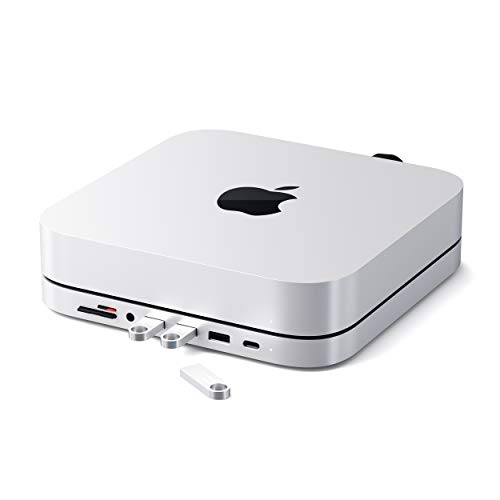
SATECHI 7-in-1 USB-C Hub Stand for Mac Mini M2/M1
Why We Love It
Quick Pick
10 Best Satechi Laptop Docking Station Of 2026
Quick Pick
SATECHI USB-C Stand Hub, Foldable Workstation with 4K@60Hz HDMI Display Expansion and 100W Power Delivery Charging, Designed for Tablets, Laptops & Smartphones, Up to 13-inch, Space Black
Satechi 4-in-1 USB-C Hub, 100W PD Pass-Through Charging, Multiport Adapter
SATECHI Thunderbolt 4 Dock - 11-in-1 - Thunderbolt 4 Host, 3 Thunderbolt & 3 USB-A 3.2 Ports, USB-A 2.0, SD Card Reader, GbE, Audio Jack - Compatible with M2 & M1 MacBook
Satechi 8-in-1 USB-C Hub V3, 8K HDMI, Multiport Adapter, Ethernet, Midnight
SATECHI Thunderbolt 5 CubeDock™ Dock Station, 80Gbps/120Gbps (USB4 v2 Compatible), Built-in NVMe SSD Enclosure, 140W Charging, Multi-Displays up to 8K, 2.5GbE, USB-C/A 10Gbps, Active Cooling, Silver
Satechi OntheGo 7-in-1 USB-C Hub, 4K@60Hz HDMI, 100W PD, Multiport Adapter
SATECHI 7 in 1 USB C Hub Multiport Adapter Pro Slim, USB C Dongle, 100W Charging, 4K HDMI, USB 4, USB 3.2 Gen 2, SD/Micro Card Reader for Mac, MacBook Air/Pro - Silver
Satechi 8-in-1 USB-C Hub V3, 8K HDMI, Multiport Adapter, Space Grey
Satechi Dual USB C Hub 6-in-1 for Surface Pro 11/10/9, USB4 Pass-Through 100W with 40 Gbps Data Transfer, 6K@60Hz, HDMI Port 4K@60Hz, USB-C & USB-A 3.2 10 Gbps, SD/microSD UHS-I Card Readers
SATECHI 7-in-1 USB-C Hub Stand for Mac Mini M2/M1, Silver
Buying Guide: Satechi Laptop Docking Station
📋 Table of Contents
1Will a Satechi docking station work with my laptop?
Check your laptop's ports first—Satechi makes USB-C and Thunderbolt docking stations, so your device needs at least one of these connectors. Most modern MacBooks, Dell XPS, and other premium laptops have these ports, but older models or budget devices might not.
2What's the difference between Satechi's USB-C and Thunderbolt docking stations?
Thunderbolt docks offer faster data transfer speeds (up to 40Gbps) and better power delivery, making them ideal if you transfer large files or use demanding external drives. USB-C docks are slower but more affordable and work with a wider range of laptops.
3How much power delivery do I need from a docking station?
Match it to your laptop's charger—check your original charger's wattage and pick a dock that delivers the same or higher. Underpowered docks will charge slowly or drain battery while you work, especially with power-hungry laptops like 16-inch MacBook Pros.
4What ports should I prioritize when choosing a Satechi dock?
Pick based on what you actually use: HDMI or DisplayPort for external displays, USB-A ports for older peripherals, SD card readers if you work with photos, and enough charging ports for your devices. Don't pay for ports you won't use.
5Is spending more on a premium Satechi dock worth it?
Go for a pricier model if you need multiple high-speed ports, daisy-chaining support, or a second display connection, especially if you hot-swap between devices daily. For basic charging and one external monitor, a mid-range option does the job fine.
How we choose
Our editors are people who genuinely love testing and writing about products. We compare each product's real-world usability and strengths, then distill what matters most into our own "Why We Love It" points — so you get an honest, at-a-glance sense of what counts before you buy.