10 Best Samsung Gaming Monitor 2k Qhd Of 2026
Samsung Gaming Monitor 2k Qhd — Reviews, Recommendations & Updated Buying Guide November 2026


Samsung Odyssey G5 G53F 27" QHD 200Hz Refresh Rate
Why We Love It


Samsung 32" Odyssey G5 G55C QHD Curved Gaming Monitor
Why We Love It

Samsung Odyssey G5 Series 27-Inch WQHD Curved Gaming Monitor
Why We Love It

Samsung ODYSSEY GAMING MONITOR G50D
Why We Love It

ViewSonic VX3218C-2K 32-inch QHD 1440p Curved Gaming Monitor
Why We Love It

Samsung 27-Inch QHD VA Curved Gaming Monitor 240hz
Why We Love It

GAMEON GOAE24QHD180IPS 24 Inch Gaming Monitor QHD 2K 180Hz
Why We Love It
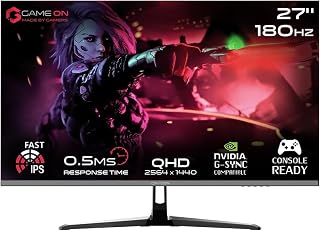
GAMEON GOPS27QHD180IPS 27 Inch Gaming Monitor QHD 2K 180Hz
Why We Love It

Xiaomi 2K Gaming Monitor G27Qi
Why We Love It

Samsung 27" Odyssey G5 (G51F) Series QHD (1440P) Gaming
Why We Love It
Quick Pick
10 Best Samsung Gaming Monitor 2k Qhd Of 2026
Quick Pick
Samsung Odyssey G5 G53F 27" QHD 200Hz Refresh Rate, 1Ms Response Time Gaming Monitor, LS27FG532EMXUE
Samsung 32" Odyssey G5 G55C QHD Curved Gaming Monitor, 165Hz refresh rate and 1ms response time (MPRT), 1000R Curved Screen, AMD FreeSync, Middle East Version (New Launch) - LS32CG552EMXUE
Samsung Odyssey G5 Series 27-Inch WQHD Curved Gaming Monitor 144Hz 1ms HDMI Display Port FreeSync Premium
Samsung ODYSSEY GAMING MONITOR G50D,IPS FLAT,QHD,180HZ,1MS, IPS PANEL, HDR10, FreeSYNC (27" inch)
ViewSonic VX3218C-2K 32-inch QHD 1440p Curved Gaming Monitor, 165Hz, 1ms, AMD FreeSync Premium, Integrated Speakers, HDMI, DisplayPort
Samsung 27-Inch QHD VA Curved Gaming Monitor 240hz,1ms,Wireless,HDMI,Display Port,USB Hub,Ethernet,Bluetooth
GAMEON GOAE24QHD180IPS 24 Inch Gaming Monitor QHD 2K 180Hz Fast IPS Computer Monitor, 0.5ms MPRT, HDMI 2.1, HDR, 99% sRGB, G-Sync & FreeSync Compatible, Built-in Speakers, PS5 & Console Ready, Black
GAMEON GOPS27QHD180IPS 27 Inch Gaming Monitor QHD 2K 180Hz Fast IPS Computer Monitor, 0.5ms MPRT, HDMI 2.1, HDR, 99% sRGB, G-Sync & FreeSync Compatible, Built-in Speakers, PS5 & Console Ready, Black
Xiaomi 2K Gaming Monitor G27Qi, QHD 2560×1440, Fast IPS, 180Hz 1ms, AMD Freesync, 100% sRGB, 178 Viewing Angle, 2× HDMI2.0 DP 1.4×2, Black
Samsung 27" Odyssey G5 (G51F) Series QHD (1440P) Gaming Monitor | 180Hz, 1ms, AMD FreeSync, HDR10, Height Adj Stand, Black Equalizer, Virtual Aim Point, Auto Source Switch+ (LS27FG512ENXZA)
Buying Guide: Samsung Gaming Monitor 2k Qhd
📋 Table of Contents
1What refresh rate should I look for in a Samsung 2K gaming monitor?
For competitive gaming, aim for at least 144Hz, though 165Hz or 240Hz offers smoother motion if your graphics card can handle it. For casual gaming or work, 60-75Hz is fine, but you'll miss out on the fluidity that makes 2K gaming more enjoyable.
2What's the difference between IPS and VA panels in Samsung gaming monitors?
IPS panels give better color accuracy and wider viewing angles, making them ideal if you do content creation alongside gaming. VA panels offer deeper blacks and higher contrast, which some gamers prefer for immersion, though they have slower response times than IPS.
3How do I know if my PC can handle a 2K gaming monitor at high frame rates?
Check if your GPU is a recent high-end card (RTX 4070 or better, RX 7800 XT or better) for 1440p at 144+ fps with high settings. For older or mid-range cards, you'll need to lower graphics settings or expect 60-100 fps at 2K, which is still smooth for most games.
4Is a 27-inch or 32-inch monitor better for 2K gaming?
27-inch is the sweet spot for 2K—the pixel density stays sharp without requiring your eyes to scan too much. A 32-inch at 2K looks slightly softer up close, though some prefer the extra screen real estate for competitive shooters or strategy games.
5What response time do I actually need for gaming?
1ms is ideal for competitive games, but 3-5ms is acceptable for most players and you won't notice the difference in casual gaming. Anything under 8ms works fine for single-player games where reaction time isn't critical.
How we choose
Our editors are people who genuinely love testing and writing about products. We compare each product's real-world usability and strengths, then distill what matters most into our own "Why We Love It" points — so you get an honest, at-a-glance sense of what counts before you buy.