10 Best Roku Tv Box Of 2026
Roku Tv Box — Reviews, Recommendations & Updated Buying Guide November 2026


Roku Streaming Stick Plus with Voice Remote - 4K & HDR10+
Why We Love It


Roku Streaming Stick 4K with Voice Remote
Why We Love It
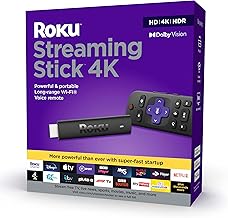
Roku 3820EU Streaming Stick 4K
Why We Love It
Quick Pick
10 Best Roku Tv Box Of 2026
Quick Pick
Roku Streaming Stick Plus with Voice Remote - 4K & HDR10+ | 4K & HDR Streaming Device for TV with Roku Voice Remote - Free & Live Local News, Sports
Roku Streaming Stick 4K with Voice Remote - HDR10+ & Dolby Vision | Compact 4K Streaming Device for TV with Roku Voice Remote & Long-Range Wi-Fi - Free & Live Local News, Sports
Roku 3820EU Streaming Stick 4K | HD/4K/HDR Streaming Media Player, Black
Buying Guide: Roku Tv Box
📋 Table of Contents
1What's the difference between Roku Express, Roku Streaming Stick, and Roku Ultra?
Express is the budget option with basic 1080p streaming, Streaming Stick offers portable 4K at mid-range pricing, and Ultra provides the fastest performance with advanced features like voice commands and spatial audio. Choose based on your TV resolution (1080p vs 4K) and how much you're willing to spend for extra speed and features.
2Do I need 4K support if my TV isn't 4K?
No, there's no benefit to paying extra for 4K streaming capabilities on a standard 1080p TV. Save your money and go with a basic Roku Express, which delivers excellent picture quality at lower resolution TVs.
3What internet speed do I need for Roku to work properly?
At least 5-10 Mbps is ideal for smooth 1080p streaming, while 4K content requires 25 Mbps or higher. Test your connection speed before buying to make sure your home Wi-Fi can handle it.
4Should I choose a stick model or a box model?
Stick models are more portable and hide behind your TV easily, while box models sit separately and often have better connectivity options like wired ethernet. Go with a stick if you value convenience and a box if you want maximum stability and connection choices.
5What apps and streaming services work on Roku?
Roku supports all major platforms including Netflix, Disney+, Prime Video, YouTube, and hundreds of others—the selection rivals most competitors. Check Roku's app store to confirm your favorite streaming services are available before purchasing.
How we choose
Our editors are people who genuinely love testing and writing about products. We compare each product's real-world usability and strengths, then distill what matters most into our own "Why We Love It" points — so you get an honest, at-a-glance sense of what counts before you buy.