10 Best Rgb Laptop Accessories Of 2026
Rgb Laptop Accessories — Reviews, Recommendations & Updated Buying Guide November 2026


TopMate C11 Laptop Cooling Pad RGB Gaming Notebook Cooler
Why We Love It

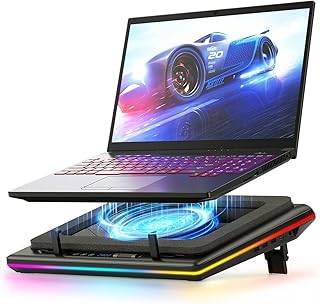
Llano V12 RGB Laptop Cooling Pad with Powerful Turbofan
Why We Love It

Atmosphere Light, RGB Desk Light
Why We Love It

Excefore RGB Gaming Mouse Pad
Why We Love It

Laptop Cooling Pad
Why We Love It

Llano V10 Gaming Laptop Cooling Pad
Why We Love It

MEETION CP2020 Cooler Pad
Why We Love It

Wireless Charging RGB Gaming Mouse Pad
Why We Love It

NALACAL Under Monitor Light Bar
Why We Love It

NEEWER ENTRY LEVEL VERSION LED RGB Selfie Light
Why We Love It
Quick Pick
10 Best Rgb Laptop Accessories Of 2026
Quick Pick
TopMate C11 Laptop Cooling Pad RGB Gaming Notebook Cooler, Laptop Fan Stand | Adjustable Height with 6 Quiet Fans and Phone Holder, Computer Chill Mat, for 15.6-17.3 Inch Laptops - Blue LED Light
llano V12 RGB Laptop Cooling Pad with Powerful Turbofan Gaming Cooler | Infinitely Variable Speed, Touch Control, LCD Screen, 3-Port USB Hub, Seal Foam for Notebook Computer 15-19in, Black
Atmosphere Light, RGB Desk Light, LED Strip Lights, PC Gaming Accessories Light, Cool Stuff for Room Ambient Lighting Sound Reactive Led Lights Lamp Mood Lighting Suitable for Tv Bedroom
Excefore RGB Gaming Mouse Pad, Extended Large Led Mousepads Non-Slip Rubber Base with 14 Lighting Modes Computer Keyboard Mat, Soft and Waterproof Surface, Enhance Your Computer Gaming Experience
Laptop Cooling Pad, RGB Lights Laptop Cooler 8 Fans for 12.1-17.3 Inch Laptops, Gaming Laptop Fan Cooling Pad with 5 Height Stands and Phone Holder
llano V10 Gaming Laptop Cooling Pad, RGB Laptop Cooler Stand | External Powerful Cooling Fan, Rapid Cooling Computer 13-17.3in, Action Button Control, 3 Adjustable Stand, 4-Port USB C&A
MEETION CP2020 Cooler Pad – Quiet Adjustable RGB Gaming Laptop Cooling Pad – With Dual Fans – Up to 14 Inch – 2*USB | MT-CP2020
Wireless Charging RGB Gaming Mouse Pad, LED Mouse Mat 31.5 * 11.8 In, 10 Light Modes Extra Large Mousepad, Non-Slip Rubber Base Computer Keyboard Mat For Gaming, MacBook, PC, Laptop, Desk
NALACAL Under Monitor Light Bar, RGB Screenbar Light Desk Lamp Computer, Dimmable LED with Dynamic Rainbow Effect, Gaming USB Powered, Remote Control Color Changing, Adjustable Brightness and Speed
NEEWER ENTRY LEVEL VERSION LED RGB Selfie Light, 91 LEDs Clip on Phone Fill Lighting Compatible with iPhone, 20 Effects CRI92 1000mAh, for Computer Webcam Laptop Zoom Video Conference Recording, N6C
Buying Guide: Rgb Laptop Accessories
📋 Table of Contents
1What RGB lighting features should I prioritize for customization?
Look for accessories with at least 16.8 million color options and support for software control. Syncing via a single app across multiple devices (like a keyboard and mouse) is ideal for a cohesive setup, while basic models may only offer preset lighting modes.
2Does USB-C or USB-A matter for RGB laptop accessories?
USB-C is better for modern laptops with limited ports, especially if you need a dual-function port for charging and data. USB-A is still common and reliable, but may require more cables if your laptop has few USB ports.
3How important is compatibility with my laptop’s OS?
Most RGB accessories work on Windows, but macOS support is often limited to basic functionality without full RGB control. Check the product specs to confirm compatibility, especially if you use a Mac and want full lighting customization.
4What’s the difference between wired and wireless RGB accessories?
Wired RGB accessories offer more stable lighting and faster response times, while wireless options (like RGB mice or keyboards) provide cleaner desk space but may have slight input lag and require regular charging. Battery life for wireless RGB gear typically ranges from 20 to 60 hours.
5Are RGB laptop accessories worth the extra cost?
It depends on your use case — RGB lighting adds visual flair and personalization, but doesn’t improve performance. If you’re a gamer or streamer, the aesthetic and mood benefits are worth it. For casual users, a non-RGB model may be more cost-effective.
How we choose
Our editors are people who genuinely love testing and writing about products. We compare each product's real-world usability and strengths, then distill what matters most into our own "Why We Love It" points — so you get an honest, at-a-glance sense of what counts before you buy.