10 Best Rgb Cooling Pads External Fans Of 2026
Rgb Cooling Pads External Fans — Reviews, Recommendations & Updated Buying Guide November 2026


TopMate C11 Laptop Cooling Pad RGB Gaming Notebook Cooler
Why We Love It


Llano V10 Gaming Laptop Cooling Pad
Why We Love It
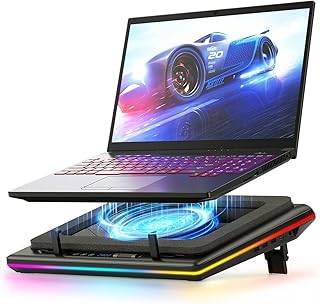
Llano V12 RGB Laptop Cooling Pad with Powerful Turbofan
Why We Love It

MEETION CP2020 Cooler Pad
Why We Love It

Llano Laptop Cooler
Why We Love It

Llano V10 Gaming Laptop Cooling Pad
Why We Love It

Rechargeable Magnetic Phone Cooler with Battery
Why We Love It

KLIM Ultimate Laptop Cooler + Gaming Cooling Pad + Stable
Why We Love It
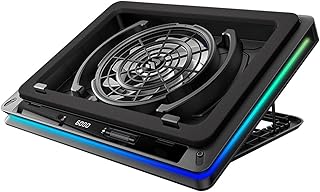
Exrp Gaming Laptop Cooling Pad
Why We Love It

Laptop Cooling Pad
Why We Love It
Quick Pick
10 Best Rgb Cooling Pads External Fans Of 2026
Quick Pick
TopMate C11 Laptop Cooling Pad RGB Gaming Notebook Cooler, Laptop Fan Stand | Adjustable Height with 6 Quiet Fans and Phone Holder, Computer Chill Mat, for 15.6-17.3 Inch Laptops - Blue LED Light
llano V10 Gaming Laptop Cooling Pad, RGB Laptop Cooler Stand | External Powerful Cooling Fan, Rapid Cooling Computer 13-17.3in, Action Button Control, 3 Adjustable Stand, 4-Port USB C&A
llano V12 RGB Laptop Cooling Pad with Powerful Turbofan Gaming Cooler | Infinitely Variable Speed, Touch Control, LCD Screen, 3-Port USB Hub, Seal Foam for Notebook Computer 15-19in, Black
MEETION CP2020 Cooler Pad – Quiet Adjustable RGB Gaming Laptop Cooling Pad – With Dual Fans – Up to 14 Inch – 2*USB | MT-CP2020
llano Laptop Cooler, Gaming Laptop Cooling Pad with 3500RPM Turbofan, 4.72 Inch External Fan Laptop Stand, Adjustable Variable Speed, Button Control, Seal Foam for Rapid Laptop13-17.3in, V10, Black | 4.72 inch turbo fan, button control, sealing foam, no USB ports, fast cooling for 13-17.3 inch laptop
llano V10 Gaming Laptop Cooling Pad, RGB Laptop Cooler Stand with 4.72 Inch External Powerful Cooling Fan, Rapid Cooling Computer 13-17.3in, Action Button Control, 3 Adjustable Stand, (White)
Rechargeable Magnetic Phone Cooler with Battery, RGB Gaming Cooling Fan for iPhone MagSafe Series, iPad, Samsung and Android Phones, Portable Smartphone Radiator
KLIM Ultimate Laptop Cooler + Gaming Cooling Pad + Stable RGB Stand with Fan + Compatible up to 17 Inches + USB Fan + For PC Mac PS5 PS4
Exrp Gaming Laptop Cooling Pad, Laptop Cooling Stand with 18cm External Cooling Fan, Rapid Cooling Laptop 15.6-19.3inch, Infinitely Variable Speed, 5 Height Stands, USB Ports
Laptop Cooling Pad, RGB Laptop Cooler Stand with 8 Quiet Fans | Gaming Notebook Cooler for 12-17in Laptops, Dual USB 7 Height Adjustable Computer Chill Mat with LED Light Lap Desk PC Cooler
Buying Guide: Rgb Cooling Pads External Fans
📋 Table of Contents
1How many RGB fans should a cooling pad have for optimal performance?
Most cooling pads come with 2-4 RGB fans, with 3 being a common sweet spot. More fans can improve airflow but may increase noise and power consumption. Look for models with at least 3 fans for balanced cooling in mid-range builds.
2What RPM range is ideal for RGB cooling pads with external fans?
Fans in the 1000-1500 RPM range offer a good balance of noise and airflow for most users. Higher RPMs (1600+ RPM) provide more cooling but can be louder. Check for variable-speed control to adjust based on your system's needs.
3Does RGB lighting affect the cooling performance of a pad?
No, RGB lighting does not impact cooling efficiency. However, some models use LED strips that may generate minor heat. Prioritize fans with high CFM ratings and good airflow design over lighting features for better thermal performance.
4What size cooling pad is best for a standard desktop tower?
A cooling pad with a footprint of 20-25 inches in length and 10-12 inches in width fits most standard desktop towers. Larger pads may not be necessary unless you have a high-end GPU or multiple GPUs that require extra airflow.
5Are USB-powered or AC-powered cooling pads better for RGB fans?
AC-powered cooling pads typically offer more powerful and consistent fan performance, while USB-powered models are more portable but may lack the same cooling capacity. Choose AC if you're using the pad for heavy-duty cooling; USB is better for light use or on-the-go setups.
How we choose
Our editors are people who genuinely love testing and writing about products. We compare each product's real-world usability and strengths, then distill what matters most into our own "Why We Love It" points — so you get an honest, at-a-glance sense of what counts before you buy.