10 Best Retro Mechanical Keyboards Of 2026
Retro Mechanical Keyboards — Reviews, Recommendations & Updated Buying Guide November 2026


8Bitdo Retro Mechanical Keyboard for Windows & Android
Why We Love It


Retro Typewriter Keyboard Wireless Mechanical Keyboard
Why We Love It

8Bitdo Retro 108 Mechanical Wireless Keyboard for PC &
Why We Love It

8BitDo 87 Keys Retro Mechanical Keyboard
Why We Love It

8BitDo Retro 87 Mechanical Keyboard with RGB Backlight
Why We Love It

8BitDo Retro Mechanical Keyboard
Why We Love It

8Bitdo Retro Mechanical Keyboard
Why We Love It

Perixx PERIBOARD-108M
Why We Love It
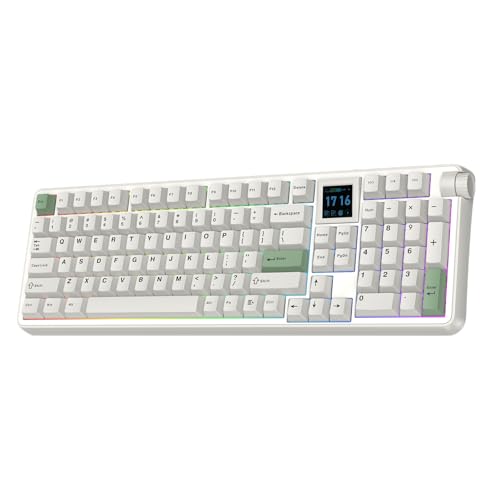
EPOMAKER RT100 PRO Tri-Mode Mechanical Keyboard
Why We Love It

EPOMAKER X AULA F108 PRO V2 Wireless Mechanical Keyboard
Why We Love It
Quick Pick
10 Best Retro Mechanical Keyboards Of 2026
Quick Pick
8Bitdo Retro Mechanical Keyboard for Windows & Android, C64 Edition
Retro Typewriter Keyboard Wireless Mechanical Keyboard, 83-Key Blue Switches Bluetooth 5.0 Vintage Punk Round Keycap, 14 Modes LED Backlight, Type-C, Compatible with PC/Laptop/Mac/Pad/Phone, Wood
8Bitdo Retro 108 Mechanical Wireless Keyboard for PC & Android, N Edition
8BitDo 87 Keys Retro Mechanical Keyboard Bluetooth/2.4G/USB-C, RGB Backlight, Hot Swappable, Dual Super Programmable Buttons, Volume Knob for PC and Android - Mecha BREAK: PANTHER
8BitDo Retro 87 Mechanical Keyboard with RGB Backlight, Bluetooth/2.4G/USB-C Hot Swappable Wireless Gaming Keyboard for Windows and Android - Xbox Edition (Officially Licensed)
8BitDo Retro Mechanical Keyboard, Bluetooth/2.4G/USB-C Hot Swappable Gaming Keyboard with 87 Keys, Dual Super Programmable Buttons for Windows and Android - Fami Edition - QWERTY ANSI US Layout
8Bitdo Retro Mechanical Keyboard, Bluetooth/2.4G/USB-C Hot Swappable Gaming Keyboard with 87 Keys, Dual Super Programmable Buttons for Windows and Android - M Edition
Perixx PERIBOARD-108M, Wired Mechanical Full-Size USB Keyboard - Brown Tactile Switch - Classic Retro Gray/White Color - US English
EPOMAKER RT100 PRO Tri-Mode Mechanical Keyboard, 1.54" Hot-Swap Screen, Knob, Retro PBT Keycap, Mac Keys, Thocky Gasket, Custom Driver, RGB, BT/2.4G Wireless Gaming Keyboard (White, Creamy Jade)
EPOMAKER X AULA F108 PRO V2 Wireless Mechanical Keyboard with Pixel Screen,10000mAh, Hot-Swap, RGB,Creamy Gasket,Full Sized Custom Keyboard for PC/Gaming (Retro White, Reaper Switch)
Buying Guide: Retro Mechanical Keyboards
📋 Table of Contents
1What switch type should I look for in a retro mechanical keyboard?
Retro mechanical keyboards often use tactile or clicky switches, like Cherry MX Brown or Blue. Tactile switches offer a bump for feedback, while clicky ones add an audible sound. Linear switches, like Red or Black, are smoother and quieter, better for fast typing or gaming.
2How many keycaps are typically included, and should I expect extras?
Most retro mechanical keyboards come with a full set of 87–104 keycaps, depending on the layout. Some include extra keycaps for customization, like WASD or arrow keys. Check if the set includes a spacebar and enter key in your preferred style.
3What cable type and connectivity options are common in retro models?
Retro mechanical keyboards often use USB Type-A cables, but newer versions may include USB-C for modern compatibility. Some models offer wired only, while a few may have Bluetooth for wireless use. Look for a stable connection and low input lag for typing or gaming.
4Are retro mechanical keyboards compatible with all operating systems?
Most retro mechanical keyboards work with Windows, macOS, and Linux out of the box. However, some may require driver installation for advanced features like macro keys or RGB lighting. Check if the keyboard supports your OS before buying.
5What are the most common mistakes when choosing a retro mechanical keyboard?
A common mistake is buying a keyboard with a layout that doesn’t fit your workspace or hand size. Also, ignoring keycap material can lead to wear over time—opt for PBT for durability. Lastly, not testing the switch type beforehand can result in a keyboard that feels uncomfortable for daily use.
How we choose
Our editors are people who genuinely love testing and writing about products. We compare each product's real-world usability and strengths, then distill what matters most into our own "Why We Love It" points — so you get an honest, at-a-glance sense of what counts before you buy.