10 Best Remote Kvm Switches Of 2026
Remote Kvm Switches — Reviews, Recommendations & Updated Buying Guide November 2026

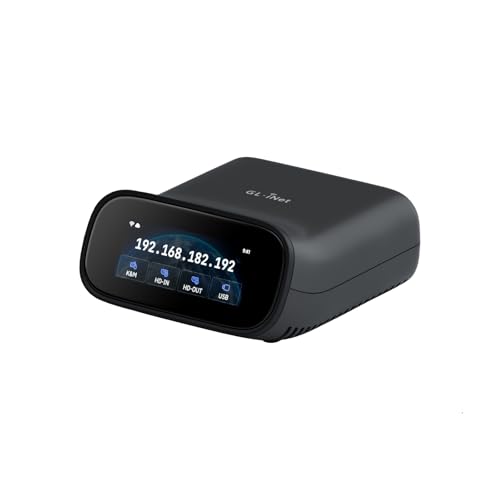
GL.iNet GL-RM10 Comet Pro Remote KVM Over Wi-Fi 6 Dual Band
Why We Love It


USB 3.0 Switch
Why We Love It
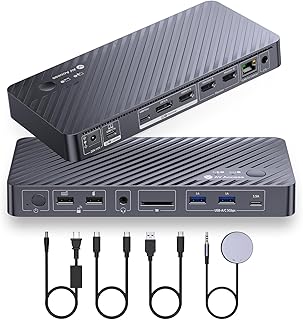
AV Access Docking Station Dual Monitor for Laptop & Desktop
Why We Love It

UGREEN HDMI KVM Switch 2 in 1 Out 4K@60Hz USB 3.0 Hub 1
Why We Love It

USB Printer Sharing Switch for 2 Computers
Why We Love It

NALACAL Dual Monitor KVM Switch HDMI+DisplayPort
Why We Love It

USB C KVM Switch 4K@60Hz
Why We Love It

Azonee KVM Switch, KVM Switch 1 Monitors 2 Computers
Why We Love It

16 Port KVM Switch
Why We Love It

UGREEN Displayport KVM Switch 2 Monitors 2 Computers Support
Why We Love It
Quick Pick
10 Best Remote Kvm Switches Of 2026
Quick Pick
GL.iNet GL-RM10 Comet Pro Remote KVM Over Wi-Fi 6 Dual Band 4K Passthrough
USB 3.0 Switch, USB Switcher 2 Computers Share 3*USB 3.0 and 1*USB C with Remote Control for PC Mouse Keyboard Printer Scanner, USB KVM Switch Selector Compatible with Windows, Mac, Linux
AV Access Docking Station Dual Monitor for Laptop & Desktop, KVM Switch 2 Monitors 2 Computers with Ethernet, EDID, 4K@60Hz Dual Display, 4xUSB, 1xUSB-C, Power Supply for Laptop, Audio, SD
UGREEN HDMI KVM Switch 2 in 1 Out 4K@60Hz USB 3.0 Hub 1 Keyboard Mouse Control 2 Computers with USB C Power Port for Windows Mac PC Laptop Desktop
USB Printer Sharing Switch for 2 Computers - Includes 2 x 5ft/1.5M USB Printer Cables, No Driver Needed, USB KVM Switch with Wired Remote for Switching, Ideal for Sharing USB Devices Between Two PCs
NALACAL Dual Monitor KVM Switch HDMI+DisplayPort 4K@60Hz/2K@120Hz - Switcher for Sharing 2 Monitors, 4 USB 2.0 Ports Among 2 Computers, Includes Wired Remote & 4 Cables
USB C KVM Switch 4K@60Hz,MLEEDA KVM Switch USB C for 2 Laptops Share Single HDMI Monitor and Keyboard Mouse,Compatible with Windows,Mac OS,Wired Remote and USB Power Cord Included
Azonee KVM Switch, KVM Switch 1 Monitors 2 Computers, KVM Switches HDMI for 2 Computers Share 1 Monitor, Supports 4K @60 Hz, 2 HDMI Cables and 2 USB Cables Included
16 Port KVM Switch, 1U Rack Mount KVM Console VGA 16x1, Included 16-pack KVM Cables, Rack Ears, Remote for 19'' Cabinet
UGREEN Displayport KVM Switch 2 Monitors 2 Computers Support 8K@60Hz | 4 Port USB3.0 KVM Switcher 4K@240Hz DP1.4 KVM Switches for 2 Computers Share Keyboard, Mouse, Hard Drive and 2 Monitors
Buying Guide: Remote Kvm Switches
📋 Table of Contents
1How many devices can a remote KVM switch manage effectively?
Most remote KVM switches support 4 to 32 devices, depending on your needs. Choose a model with enough ports to cover your current setup and allow for future expansion, especially if managing servers or workstations in a data center or home lab.
2What connection types are essential for remote access?
Look for a KVM switch with IP-based remote access (IP KVM) for secure, out-of-band control. USB, PS/2, and HDMI/DisplayPort support are also important for local and direct device connectivity, ensuring compatibility with a wide range of hardware.
3Is audio support necessary in a KVM switch?
Audio support is optional but useful if you need to monitor or control sound from connected devices. If your use case involves media servers or VoIP systems, choose a KVM with integrated audio routing and volume control for full functionality.
4What security features should I prioritize?
Prioritize KVM switches with encryption (like AES-256), role-based access control, and secure authentication methods (e.g., LDAP, RADIUS). These features prevent unauthorized access and protect sensitive systems, especially in shared or enterprise environments.
5Can I manage the KVM switch without a dedicated console?
Yes — many remote KVM switches offer web-based or software interfaces for configuration and control. Ensure the model you choose supports your preferred management method, whether through a browser, mobile app, or third-party system monitoring tools.
How we choose
Our editors are people who genuinely love testing and writing about products. We compare each product's real-world usability and strengths, then distill what matters most into our own "Why We Love It" points — so you get an honest, at-a-glance sense of what counts before you buy.