10 Best Rechargeable Wireless Keyboard Of 2026
Rechargeable Wireless Keyboard — Reviews, Recommendations & Updated Buying Guide November 2026


UGREEN Slim Wireless Keyboard BT5.4/2.4G 99-Key Rechargeable
Why We Love It


TECKNET 2.4G Wireless Keyboard For Windows/Chrome OS
Why We Love It

Seenda Wireless Keyboard and Mouse Combo
Why We Love It

JOYACCESS Wireless Keyboard Rechargeable with Number Pad
Why We Love It

Rii [Arabic layout]RK802 Wireless Gaming keyboard
Why We Love It

FREEWOLF T96 Wireless Keyboard and Mouse Combo
Why We Love It

Arabic/English Wireless Keyboard and Mouse Combo
Why We Love It

IClever Bluetooth Keyboard BK10
Why We Love It

AULA 99 Keys Keyboard
Why We Love It
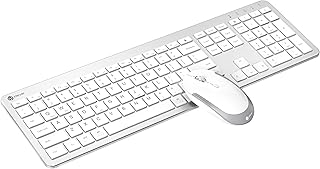
IClever GK08 Wireless Keyboard and Mouse Combo
Why We Love It
Quick Pick
10 Best Rechargeable Wireless Keyboard Of 2026
Quick Pick
UGREEN Slim Wireless Keyboard BT5.4/2.4G 99-Key Rechargeable Stand | Slim wireless keyboard, 99-key compact, Bluetooth5.4/2.4G, rechargeable USB-C, 7°-10° stand, 3 devices, for PC Mac
TECKNET 2.4G Wireless Keyboard For Windows/Chrome OS, UK Layout Compact Mini Keyboards, Small Silent Whisper-Quiet Keyboard with 12 months Battery Life (Black)
seenda Wireless Keyboard and Mouse Combo, Rechargeable Quiet Keyboard Mouse, Sleek and Ultra Thin Design, Full-Size with Number Pad for Laptop, PC, Notebook, Desktop, Silver & White- English Layout
JOYACCESS Wireless Keyboard Rechargeable with Number Pad Silent Slim Black
Rii [Arabic layout]RK802 Wireless Gaming keyboard, 3 Modes(Bluetooth/2.4G/Wired), 60% Rechargeable RGB Backlit Gaming Keyboard Red Switch for PC Windows Laptop(Black)
FREEWOLF T96 Wireless Keyboard and Mouse Combo, Retro, BT & 2.4G Modes, PBT Keycaps, Media Knob, Display Screen, Silent Keys, 26-Key Anti-ghosting, American QWERTY, for Mac/Windows/Linux
Arabic/English Wireless Keyboard and Mouse Combo,3 IN 1 Bluetooth 3.0 &5.0 & 2.4 GHz,Xkimos Large Rechargeable Silent Bluetooth Mouse and Keyboard,Single USB Port,for PC/Laptop/Desktop/Phone,Grey
iClever Bluetooth Keyboard BK10, Multi Device Keyboard Rechargeable with Number Pad Ergonomic Design Full Size Stable Connection Keyboard for iPad, iPhone, Mac, iOS, Android, Windows
AULA 99 Keys Keyboard, Pink Wireless Gaming Keyboard Creamy with | Membrane Keyboard, RGB Backlit, Tri-Mode BT/2.4GHz/USB-C, 2000mAh Rechargeable Thocky Clicky Creamy Sound
iClever GK08 Wireless Keyboard and Mouse Combo - Full-Size Ergonomic Keyboard with Number Pad, 2.4G USB, Quiet Click, 3-Level DPI, Rechargeable, Slim Design for Windows/Mac, Silver
Buying Guide: Rechargeable Wireless Keyboard
📋 Table of Contents
1What battery life should I look for in a rechargeable wireless keyboard?
Opt for models with at least 24 hours of battery life on a single charge. Some high-end models offer 40-60 hours, which is ideal for heavy use. Look for keyboards with low-power Bluetooth or sleep modes to extend battery life between charges.
2Does the type of connectivity matter for performance?
Bluetooth 5.0 or higher offers better range, faster pairing, and lower latency than older versions. If you need a stable connection for gaming or video editing, prioritize Bluetooth 5.1 or newer. Avoid keyboards with proprietary wireless tech unless you're using a specific ecosystem.
3What’s the difference between membrane and mechanical switches in wireless keyboards?
Membrane keyboards are quieter, lighter, and more affordable, making them great for casual use. Mechanical switches offer tactile feedback and durability, ideal for typing-heavy tasks. However, they are usually bulkier and more expensive, so consider your usage before choosing.
4How important is the keyboard layout and size for different users?
Full-size keyboards with a numeric keypad suit office or data-entry work, while compact or tenkeyless designs are better for portability. Ergonomic split or curved layouts can reduce strain during long sessions, especially for frequent typists or gamers.
5Are extra features like backlighting or multimedia keys worth the cost?
Backlighting improves usability in low-light environments but drains battery faster. Multimedia keys can be handy for quick volume or playback control, but most modern keyboards use software or shortcut keys for similar functions. Prioritize these features only if they align with your specific needs.
How we choose
Our editors are people who genuinely love testing and writing about products. We compare each product's real-world usability and strengths, then distill what matters most into our own "Why We Love It" points — so you get an honest, at-a-glance sense of what counts before you buy.