10 Best Qhd Ips Computer Monitor Of 2026
Qhd Ips Computer Monitor — Reviews, Recommendations & Updated Buying Guide November 2026


KOORUI 27" QHD IPS Gaming Monitor: Immerse in 95% DCI-P3
Why We Love It


27 Inch Curved Gaming Monitor
Why We Love It

KOORUI 27-inch QHD 260Hz 1ms IPS Gaming Monitor
Why We Love It

BenQ EW270Q 27" 2K QHD 200Hz IPS Gaming Monitor with USB-C
Why We Love It

KTC 24 inch 1440p Gaming Monitor
Why We Love It

Z-EDGE 27inch Gaming Monitor
Why We Love It
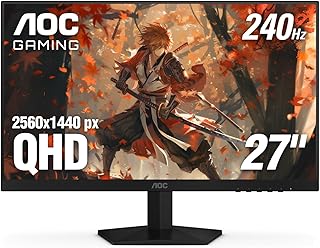
AOC Gaming Q27G41ZE QHD IPS Gaming Monitor 27" 2560x1440
Why We Love It

GAMEON GOAE24QHD180IPS 24 Inch Gaming Monitor QHD 2K 180Hz
Why We Love It

KTC 24 inch 1440p Gaming Monitor
Why We Love It

KTC 24 Inch QHD 100Hz Computer Monitor IPS 2K
Why We Love It
Quick Pick
10 Best Qhd Ips Computer Monitor Of 2026
Quick Pick
KOORUI 27" QHD IPS Gaming Monitor: Immerse in 95% DCI-P3 Color | 200Hz, 1ms, 350 Nits, HDR400, FreeSync Premium,Tilt Adjustable,Black
27 Inch Curved Gaming Monitor,180Hz, VA Display, QHD 1440P Computer Monitor, 1ms, HDR10,90% DCI-P3, Adaptive Sync, VESA Compatible,Tilt Adjustable
KOORUI 27-inch QHD 260Hz 1ms IPS Gaming Monitor, Flat PC Screen, HDR400, 99% sRGB, HDMI/DP, Black - Ideal for Competitive Gaming & Home Office
BenQ EW270Q 27" 2K QHD 200Hz IPS Gaming Monitor with USB-C (65W) HDRi | 1200:1 Contrast | 90% P3 Gamut | 350 Nits | Built-in Speakers (5W x2) | AMD FreeSync Premium | HDMI | Game Color Mode
KTC 24 inch 1440p Gaming Monitor, QHD 180Hz Monitor with 185Hz Overlocked, 1ms, Fast IPS, Adaptive Sync, HDR400, Height Adjustable, Low Blue Light, Flicker-Free, 2 x HDMI, 1 x DP H24T7
Z-EDGE 27inch Gaming Monitor,IPS,Max 180Hz,QHD 2560×1440,1ms,Black,UG27QF | FreeSync/Frameless/1ms/Brightness 350cd/m²/HDR/VESA Compatible/HDMI & DisplayPort/for Game,Office
AOC Gaming Q27G41ZE QHD IPS Gaming Monitor 27" 2560x1440 240Hz 0.3ms, Game Console Ready, 3 Sides, Frameless, 1 HDMI 2.0, 1 Display Port, 3 Year Zero Glow Spot
GAMEON GOAE24QHD180IPS 24 Inch Gaming Monitor QHD 2K 180Hz Fast IPS Computer Monitor, 0.5ms MPRT, HDMI 2.1, HDR, 99% sRGB, G-Sync & FreeSync Compatible, Built-in Speakers, PS5 & Console Ready, Black
KTC 24 inch 1440p Gaming Monitor, QHD 180Hz Monitor with 185Hz Overlocked, 1ms, Fast IPS, G-Sync & FreeSync, HDR400, Height Adjustable, Low Blue Light, Flicker-Free, 2 x HDMI, 1 x DP H24T7
KTC 24 Inch QHD 100Hz Computer Monitor IPS 2K, 1300:1 Contrast, Anti-Blue Light Screen, 122% sRGB, Support FreeSync and GSync, HDMI2.0/DP/Earphone for Gaming and Office Working H24T27
Buying Guide: Qhd Ips Computer Monitor
📋 Table of Contents
1What resolution should I look for in a QHD IPS computer monitor?
QHD (Quad High Definition) refers to a resolution of 2560x1440 pixels, offering sharper text and more detailed visuals than Full HD. Look for monitors with this exact resolution for a balance between clarity and performance, especially for tasks like graphic design, video editing, or multitasking with multiple windows.
2How does IPS panel technology affect the viewing experience?
IPS (In-Plane Switching) panels provide wider viewing angles and more accurate color reproduction compared to TN panels. This makes them ideal for creative work and extended use, as colors remain consistent even when viewed from the side, and the screen appears more vibrant and lifelike.
3What refresh rate is best for a QHD IPS monitor?
For general use and office work, a 60Hz refresh rate is sufficient. However, if you're into gaming or video editing, look for at least 144Hz to ensure smoother motion and reduce input lag. Higher refresh rates may require more powerful graphics hardware to drive the QHD resolution effectively.
4What size QHD IPS monitor is most suitable for different uses?
For productivity and multitasking, 27-inch QHD monitors are ideal, offering a good balance of screen real estate and clarity. Gamers or media creators might prefer 32-inch models for immersive experiences, though larger sizes can strain the eyes if not used with proper ergonomics and distance.
5Are there any common mistakes to avoid when buying a QHD IPS monitor?
Avoid monitors with low brightness levels (under 250 nits) as they may struggle in well-lit environments. Also, ensure the monitor has good color accuracy with sRGB or Adobe RGB coverage, and check for features like adjustable stands or built-in speakers if you need a more ergonomic or all-in-one setup.
How we choose
Our editors are people who genuinely love testing and writing about products. We compare each product's real-world usability and strengths, then distill what matters most into our own "Why We Love It" points — so you get an honest, at-a-glance sense of what counts before you buy.