10 Best Portable External Memory Card Reader Of 2026
Portable External Memory Card Reader — Reviews, Recommendations & Updated Buying Guide November 2026


UGREEN SD Card Reader
Why We Love It


3 in 1 SD Card Reader for iPhone
Why We Love It

Acer SD Card Reader
Why We Love It

Micro SD Card Reader 4 In 1 Multi-Port Card Reader Universal
Why We Love It

Card Reader
Why We Love It

External CD DVD Drive Player for Laptop USB-C CD/DVD Burner
Why We Love It
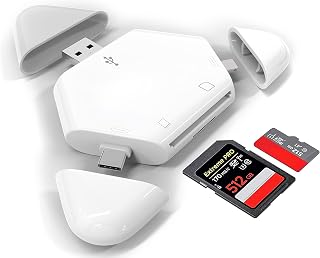
SD Card Reader
Why We Love It

Portable SD Card Reader for phone PC
Why We Love It
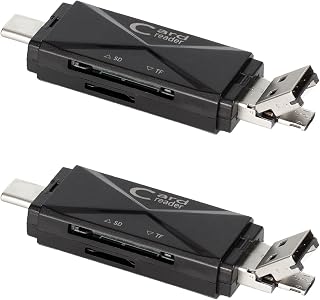
5 in 1 SD Card Reader for Android
Why We Love It

UGREEN USB 3.0 SD Card Reader 4-in-1 Micro SD Card Memory
Why We Love It
Quick Pick
10 Best Portable External Memory Card Reader Of 2026
Quick Pick
UGREEN SD Card Reader, 4-IN-1 USB C 3.0 to SD CF TF MS Card Adapter, 5Gbps | Camera Memory Card Reader Simultaneously Read & Write 4 Cards for SD CF TF MS, for iPad,MacBook Pro/Air, Plug and Play
3 in 1 SD Card Reader for iPhone, for iPad, Micro SD Memory USB C Card Reader with Magnetic Cover, USB 3.0 External Memory Card Readers, SD Card Reader for Mac, PC, Macbook
Acer SD Card Reader, USB C & USB 3.0 Memory Card Reader Adapter | Supports SD/Micro SD/SDHC/SDXC/MMC, Compatible with iPhone 17 16 Series, MacBook Pro/Air, iPad Pro, Galaxy S26, XPS 13, etc.
Micro SD Card Reader 4 In 1 Multi-Port Card Reader Universal Portable Memory Card Reader Trail Camera Viewer Micro SD Card Adapter Compatible with iPhone/iPad/Android/Macbook/Computer/Samsung
Card Reader, Multi-Port 4 in1 Universal SD TF Card Reader, USB C SD TF Memory Card Reader, USB 2.0 External Memory Card Readers, 4-in-1 Type C Camera Adapter Compatible Plug and Play
External CD DVD Drive Player for Laptop USB-C CD/DVD Burner +/-RW Reader Writer Portable Disk Drive with USB 3.0 Hub and SD Card Slot for Apple Mac Windows 11/10/8/7 Linux PC Laptop Computer
SD Card Reader, Triangle Memory Card Reader for Mobile Computer Tablet with Apple and Type-c Interface, OTG Adapter / Portable Magnetic SD / TF 3 in 1 Card Reader for PC and Smartphone (White & Grey)
Portable SD Card Reader for phone PC, SD & TF Card Adapter with Trail Camera Viewer Support, Fast Data Transfer Memory Card Reader Compatible with Cameras and Smartphones
5 in 1 SD Card Reader for Android, USB C and USB 2.0, Micro SD Card to USB Adapter, Portable Memory Card Reader for PC Phone Pads (Black 2 Pack)
UGREEN USB 3.0 SD Card Reader 4-in-1 Micro SD Card Memory Card Reader 5Gbps | Plug 7 Play,OC&SC protection,For laptops & outdoor,Reads CF/CFI/TF/SDXC/SDHC/MMC/RS-MMC/SDXC/Micro SDHC/UHS-II Cards
Buying Guide: Portable External Memory Card Reader
📋 Table of Contents
1What speed and interface type should I look for in a portable card reader?
Opt for USB 3.0 or USB-C interfaces for faster data transfer, typically 5-10x faster than USB 2.0. Look for readers that support multiple card types like SD, microSD, and CF, ensuring compatibility with your devices and storage needs.
2How important is the build quality for a portable card reader?
A durable, compact plastic or metal body with a secure latch or flap is essential for protecting the card slots and ports during travel. Avoid flimsy plastic that may crack or break with regular use, especially if you carry it in a pocket or bag.
3What’s the difference between a single-slot and multi-slot card reader?
Single-slot readers are more compact and ideal for users with one primary card type, while multi-slot models offer versatility for different card formats. Multi-slot readers may be bulkier but are worth it if you frequently switch between SD, microSD, and other card types.
4What size and weight should a portable card reader be for on-the-go use?
Look for a reader that’s no larger than 50mm x 30mm and weighs under 20 grams for easy portability. Smaller sizes are better for carrying in a pocket or attaching to a keychain, while heavier models may be more suited for desktop use.
5Are there any common mistakes to avoid when buying a portable card reader?
Avoid models that don’t support the latest card standards like UHS-II or SDXC, which can limit performance and capacity. Also, ensure the reader is compatible with your operating system, and check for built-in LED indicators to confirm data transfer status and card insertion.
How we choose
Our editors are people who genuinely love testing and writing about products. We compare each product's real-world usability and strengths, then distill what matters most into our own "Why We Love It" points — so you get an honest, at-a-glance sense of what counts before you buy.