10 Best Poe Wireless Access Point Of 2026
Poe Wireless Access Point — Reviews, Recommendations & Updated Buying Guide November 2026


TP-Link EAP615-Wall
Why We Love It


Omada EAP225 AC1350 Dual Band Ceiling Mount Access Point
Why We Love It

TP-Link TL-WA1201 AC1200 Dual Band Extender
Why We Love It

TP-Link EAP653 AX3000 WiFi 6 Wireless Access Point
Why We Love It

TP-Link TL-WA801N 300 Mbps Wireless N Access Point
Why We Love It

TP-Link TL-WA1201
Why We Love It

TP-Link EAP110-Outdoor V3
Why We Love It

Omada 7 BE5000 WiFi Access Point
Why We Love It
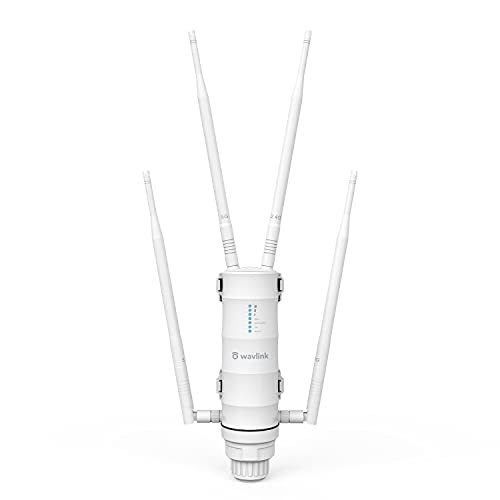
WAVLINK AC1200 Outdoor Wireless Access Point with Coverage
Why We Love It

TP-Link EAP225-Outdoor
Why We Love It
Quick Pick
10 Best Poe Wireless Access Point Of 2026
Quick Pick
TP-Link EAP615-Wall | Omada Business WiFi 6 AX1800 in-Wall Wireless Gigabit Access Point | Support OFDMA, MU-MIMO & Beamforming | PoE Powered | Support Omada SDN | Cloud Access & Omada app
Omada EAP225 AC1350 Dual Band Ceiling Mount Access Point, w/Injector | 2x2 MU-MIMO, Seamless Roaming & Beamforming, PoE Powered w/PoE Injector Included, Cloud Access & Free Omada App
TP-Link TL-WA1201 AC1200 Dual Band Extender, PoE, EasyMesh, Gigabit Port
TP-Link EAP653 AX3000 WiFi 6 Wireless Access Point, Dual Band Gigabit, PoE+ Powered, 160MHz Channel, Seamless Roaming, Ceiling Mount Wi-Fi Access points, Omada Mesh, Cloud Centralized Management
TP-Link TL-WA801N 300 Mbps Wireless N Access Point, Passive PoE Power Injector, Supports Multiple Operation Modes Access Point, Multi-SSID, Client, and Range Extender Modes, 10/100M Ethernet Port
TP-Link TL-WA1201, AC1200 Dual Band Wireless Gigabit Access Point | Desktop WiFi Bridge, MU-MIMO Beamforming, Support Multi SSID Client Range Extender Mode, 4 Fixed Antennas
TP-Link EAP110-Outdoor V3 | Omada N300 Wireless Outdoor Access Point | WiFi Coverage up to 200 meters| Passive PoE w/Free PoE Injector | SDN Integrated | Cloud Access & Omada App
Omada 7 BE5000 WiFi Access Point, 2.5G Port, w/o DC Adapter(EAP723) | WiFi 7 Dual Band, 5yr Warranty, PoE+/DC Powered, Mesh/WPA3/Roaming Supported, Omada Managed, Business Level WiFi Experience
WAVLINK AC1200 Outdoor Wireless Access Point with Coverage Long Range Repeater WiFi Dual Band 2.4+5G with PoE, Gigabit Ethernet Port
TP-Link EAP225-Outdoor | Omada AC1200 Wireless Gigabit Outdoor Access Point | Business WiFi Solution w/Mesh Support, Seamless Roaming & MU-MIMO | PoE Powered | SDN Integrated | Cloud Access & App | Dual Band, IP65 Weatherproof, Remote Managed
Buying Guide: Poe Wireless Access Point
📋 Table of Contents
1What POE standard should I look for in a wireless access point?
Look for at least IEEE 802.3af (PoE) or the newer 802.3bt standard for higher power delivery. 802.3af supports up to 15.4W, while 802.3bt can deliver up to 90W, which is essential for powering high-performance access points or devices with integrated cameras or sensors.
2How many gigabit ports are typically needed for a POE wireless access point?
Most enterprise setups require at least 4 to 8 gigabit POE ports to support multiple devices like IP cameras, VoIP phones, or IoT sensors. More ports may be needed in larger spaces or for redundancy, depending on your network density and future expansion plans.
3What is the ideal range and coverage for a POE wireless access point?
A typical POE access point covers 500–1,500 square feet, depending on the environment. For larger spaces or areas with walls and obstructions, look for models with dual-band (2.4 GHz and 5 GHz) support and beamforming technology to ensure consistent coverage and reduced interference.
4Should I prioritize wired or wireless backhaul for a POE access point?
For stability and speed, prioritize a wired backhaul connection (Ethernet) to the main router or switch. Wireless backhaul can be useful in hard-to-wire locations but may introduce latency or signal degradation, especially in high-traffic environments.
5What security features should I look for in a POE wireless access point?
Ensure the access point supports WPA3 encryption, VLAN segmentation, and guest network isolation. Features like automatic firmware updates, intrusion detection, and support for RADIUS authentication add layers of security, especially in business or public settings.
How we choose
Our editors are people who genuinely love testing and writing about products. We compare each product's real-world usability and strengths, then distill what matters most into our own "Why We Love It" points — so you get an honest, at-a-glance sense of what counts before you buy.