10 Best Personal Cloud Network Attached Storage Of 2026
Personal Cloud Network Attached Storage — Reviews, Recommendations & Updated Buying Guide November 2026


UGREEN DH2300 2 Bay Desktop NAS
Why We Love It


UGREEN NASync DH4300 Plus 4-Bay Desktop NAS
Why We Love It
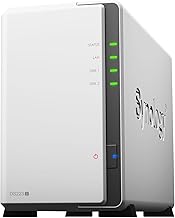
Synology 2-Bay DiskStation DS223j (Diskless)
Why We Love It

Synology BeeStation Plus 4TB Personal Cloud Storage Device
Why We Love It

Synology BeeStation 4TB Personal Cloud Storage Device
Why We Love It

Buffalo LinkStation 210 2TB 1-Bay NAS Network Attached
Why We Love It

BUFFALO LinkStation 210 4TB 1-Bay NAS Network Attached
Why We Love It

Zimaboard 432 Single Board Server Router X86 Single Board
Why We Love It

TERRAMASTER F2-425 2-Bay NAS
Why We Love It

TERRAMASTER F4 SSD 4-Bay All-Flash NAS
Why We Love It
Quick Pick
10 Best Personal Cloud Network Attached Storage Of 2026
Quick Pick
UGREEN DH2300 2 Bay Desktop NAS, Cloud Backup, 4K HDMI,AI Album NAS Server | 1GbE Port, 4GB RAM, Cloud Backup, Remote Access, NFC, Multi-Device Connectivity, Versatile Expansion Ports (Diskless)
UGREEN NASync DH4300 Plus 4-Bay Desktop NAS, 4K HDMI NAS Server for Home | 2.5 GbE Port, 8GB LPDDR4X RAM, A76+A55 8 Cores SoC, Cloud Backup, Remote Access, NFC, Multi-Device Connectivity (Diskless)
Synology 2-Bay DiskStation DS223j (Diskless)
Synology BeeStation Plus 4TB Personal Cloud Storage Device (BST151-4T)
Synology BeeStation 4TB Personal Cloud Storage Device (BST150-4T) Black
Buffalo LinkStation 210 2TB 1-Bay NAS Network Attached Storage with HDD Hard Drives Included NAS Storage That Works as Home Cloud or Network Storage Device for Home
BUFFALO LinkStation 210 4TB 1-Bay NAS Network Attached Storage with HDD Hard Drives Included NAS Storage that Works as Home Cloud or Network Storage Device for Home
zimaboard 432 Single Board Server Router X86 Single Board Computer Personal Cloud Network Attached Storage 4K Media Server Dual Gigabit Gateway - PCIe x4 SATA 6.0 Gb/s for HDD/SSD (ZMB432)
TERRAMASTER F2-425 2-Bay NAS, N5095, 4GB DDR4, 2.5GbE, Diskless | Auto-back up phones and PCs, organize photos with local AI, and stream 4K media via Plex or Emby from one home NAS.
TERRAMASTER F4 SSD 4-Bay All-Flash NAS, N95, 8GB DDR5, 5GbE, Diskless | Four M.2 NVMe SSDs deliver compact, quiet, high-speed storage with 5GbE for photo, video, and large-file management.
Buying Guide: Personal Cloud Network Attached Storage
📋 Table of Contents
1What storage capacity should I look for in a personal cloud NAS?
For most home users, 4–12 TB of usable storage is ideal, depending on how much data you need to back up. Look for expandable models with support for additional drives, as 20–40 TB is common for heavy users like photographers or video editors who need long-term archival.
2What’s the difference between a personal cloud NAS and a regular network storage device?
A personal cloud NAS includes built-in cloud services, remote access, and often backup automation, while regular network storage typically lacks these features. Personal cloud NAS devices are designed for seamless integration with mobile apps and cloud sync, making them better for offsite access and centralized management.
3How important is RAID configuration for a personal cloud NAS?
RAID is crucial for data redundancy and protection. RAID 1 or RAID 5 configurations offer good balance between performance and fault tolerance. Avoid RAID 0 for personal use, as it provides no redundancy and risks total data loss if a drive fails.
4What should I look for in terms of performance and speed?
Look for NAS devices with at least dual-core processors and 2–4 GB of RAM for smooth operation. For faster file transfers, prioritize models with Gigabit Ethernet or 10GbE support. USB 3.2 or Thunderbolt 3 ports also help when connecting external drives or peripherals.
5Are there any common mistakes to avoid when setting up a personal cloud NAS?
Avoid underestimating your storage needs or skipping regular backups. Also, don’t neglect security by not enabling encryption or strong passwords. Many users overlook the importance of firmware updates, which are essential for maintaining performance and protecting against vulnerabilities.
How we choose
Our editors are people who genuinely love testing and writing about products. We compare each product's real-world usability and strengths, then distill what matters most into our own "Why We Love It" points — so you get an honest, at-a-glance sense of what counts before you buy.