10 Best Pen Display Drawing Tablet Of 2026
Pen Display Drawing Tablet — Reviews, Recommendations & Updated Buying Guide November 2026


XP-Pen Artist12 11.6 Inch FHD Drawing Monitor Pen Display
Why We Love It


XP-Pen Artist15.6 Pro v2 Drawing Tablet Pen Display Graphics
Why We Love It

XP-Pen Deco 01 V3 Drawing Tablet
Why We Love It

XPPen 6 * 4 inch Drawing Tablet with 16384 Pressure Levels
Why We Love It

XP-Pen®G640 6 x 4 inch Graphic Drawing Tablet for OSU!
Why We Love It

XP-Pen G430S OSU Tablet Ultrathin Graphic Tablet 4 x 3 inch
Why We Love It

HUION HS64 Graphics Drawing Tablet Battery-Free Stylus
Why We Love It
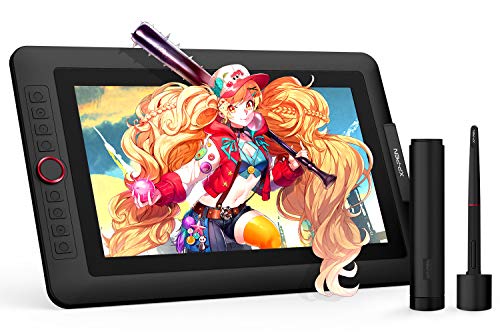
XP-PEN Artist13.3 Pro 13.3 Inch IPS Drawing Monitor Pen
Why We Love It

XP-PEN Artist Pro (Gen 2) Drawing Display Computer Digital
Why We Love It
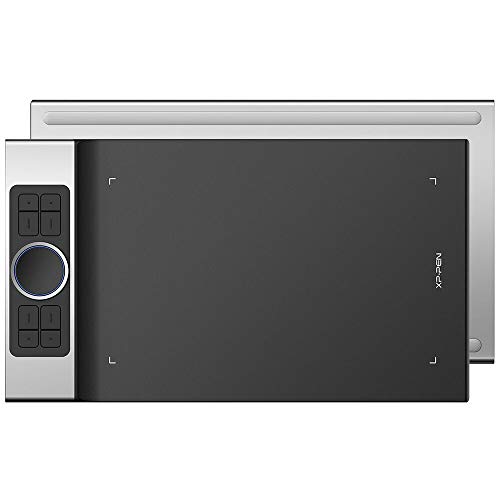
XP-PEN Deco Pro Medium Graphics Drawing Tablet Ultrathin
Why We Love It
Quick Pick
10 Best Pen Display Drawing Tablet Of 2026
Quick Pick
XP-Pen Artist12 11.6 Inch FHD Drawing Monitor Pen Display Graphic Monitor with PN06 Battery-Free Multi-Function Pen Holder and Glove 8192 Pressure Sensitivity
XP-Pen Artist15.6 Pro v2 Drawing Tablet Pen Display Graphics Monitor with Screen, 16384 Levels Pen Pressure Full-Laminated Technology, 8 Shortcut Keys Work for PC Mac Linux Android
XP-Pen Deco 01 V3 Drawing Tablet, 10x6.25 Inch, 16384 Levels Pressure | Graphic Tablet, Battery-Free Stylus with Tilt Function, 8 Shortcut Keys, Compatible with PC, Chromebook, Android, MAC
XPPen 6 * 4 inch Drawing Tablet with 16384 Pressure Levels IT640 Digital Graphic Art Tablet Battery-Free Stylus 60° Tilt Support OSU Drawing Pad for Beginner Compatible with Android Windows macOS
XP-Pen®G640 6 x 4 inch Graphic Drawing Tablet for OSU! Digital Tablet Gameplay with Our Battery-Free Stylus Design
XP-Pen G430S OSU Tablet Ultrathin Graphic Tablet 4 x 3 inch Digital Tablet Drawing Pen Tablet for OSU!8192 Levels 266RPS (Rev A)
HUION HS64 Graphics Drawing Tablet Battery-Free Stylus Android Windows macOS with 6.3 x 4 in Working Area Pen Tablet for Linux, Mac, Windows PC and Android
XP-PEN Artist13.3 Pro 13.3 Inch IPS Drawing Monitor Pen Display Full-Laminated Graphics Drawing Monitor with Tilt Function and 8 Shortcut Keys (8192 Levels Pen Pressure, 123% sRGB)
XP-PEN Artist Pro (Gen 2) Drawing Display Computer Digital Graphic Tablet with Battery-Free Stylus Supports 16K Pressure (16 Inch)
XP-PEN Deco Pro Medium Graphics Drawing Tablet Ultrathin Digital Pen Tablet with Tilt Function Double Wheel and 8 Shortcut Keys 8192 Levels Pressure 11x6 Inch Working Area
Buying Guide: Pen Display Drawing Tablet
📋 Table of Contents
1What screen size and resolution should I look for in a pen display drawing tablet?
Opt for a 10-16 inch display with at least 1080p resolution for clarity and comfort. Larger screens offer more workspace, while higher resolutions ensure crisp lines and color accuracy, especially for detailed digital art or design work.
2What stylus pressure sensitivity is ideal for professional use?
Look for at least 4096 levels of pressure sensitivity for precise control and natural brush strokes. Higher sensitivity allows for more nuanced shading and detail, which is essential for illustrators, designers, and artists working digitally.
3Should I choose a pen display with a built-in camera or microphone?
A built-in camera is useful for video calls or live streaming, while a microphone can be handy for voice notes or tutorials. However, these features are optional and depend on your workflow — prioritize screen quality and stylus performance first.
4What connectivity options are important for a pen display drawing tablet?
USB-C or HDMI connectivity is standard and preferred for fast data transfer and power delivery. Wireless options like Bluetooth are convenient but may introduce latency, so ensure your tablet supports low-latency wireless if needed for animation or real-time drawing.
5What are the key differences between a pen display and a traditional drawing tablet?
A pen display has a built-in screen, allowing you to see your work as you draw, while traditional tablets require a separate monitor. Pen displays are more immersive and ideal for digital artists, but they are typically more expensive and bulkier to transport.
How we choose
Our editors are people who genuinely love testing and writing about products. We compare each product's real-world usability and strengths, then distill what matters most into our own "Why We Love It" points — so you get an honest, at-a-glance sense of what counts before you buy.