10 Best Pcie Wireless Adapters Of 2026
Pcie Wireless Adapters — Reviews, Recommendations & Updated Buying Guide November 2026


TP-Link WiFi 6 PCIe WiFi Card for Desktop PC- AX3000 Dual
Why We Love It


TP-Link PCIe WiFi Card AC600 for Desktop PC
Why We Love It

TP-Link WiFi 6 AX3000 PCIe WiFi Card (Archer TX3000E)
Why We Love It
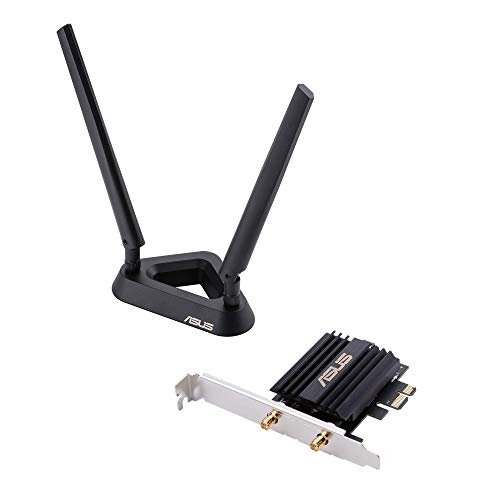
Asus AX3000 (Pce-AX58BT) Next-Gen WiFi 6 Dual Band PCIe
Why We Love It

TP-Link AC1200 PCIe WiFi Card(Archer T4E)- 2.4G/5G Dual Band
Why We Love It

D-Link DWA-582 High-Gain Wi-Fi AC1200 PCIe Wireless Adapter
Why We Love It

TP-Link Archer TXE72E
Why We Love It

ASHATA Mini Network Card
Why We Love It
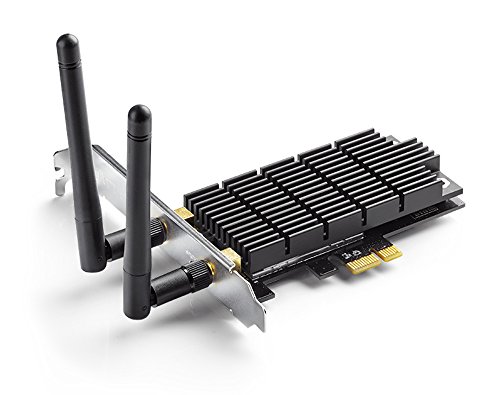
TP-Link AC1300 PCIe WiFi PCIe Card(Archer T6E)- 2.4G/5G Dual
Why We Love It

WiFi Antenna 2.4GHz 5GHz Dual Band Frequency Magnetic 6dBi
Why We Love It
Quick Pick
10 Best Pcie Wireless Adapters Of 2026
Quick Pick
TP-Link WiFi 6 PCIe WiFi Card for Desktop PC- AX3000 Dual Band Network Card | Bluetooth 5.2, WPA3, 2.4/5Ghz, 802.11ax Wireless Adapter, MU-MIMO, Low Latency, Support Win11,10 (64bit) Only - Archer TX55E
TP-Link PCIe WiFi Card AC600 for Desktop PC, Dual Band Wireless Internal Network Card(Archer T2E) High-Gain Antenna, MU-MIMO, WPA3, Low Profile, Supports Windows 10/11
TP-Link WiFi 6 AX3000 PCIe WiFi Card (Archer TX3000E), Up to 2400Mbps, Bluetooth 5.2, 802.11AX Dual Band Wireless Adapter with MU-MIMO,OFDMA,Ultra-Low Latency, Supports Windows 11, 10 (64bit) only | Up to 2400Mbps, Bluetooth 5.3, 802.11 AX Wireless Adapter, MU-MIMO, Low Latency, Support Win11,10 (64bit) - Archer TX3000E
Asus AX3000 (Pce-AX58BT) Next-Gen WiFi 6 Dual Band PCIe Wireless Adapter with Bluetooth 5.0 - Ofdma, 2x2 MU-Mimo and Wpa3 Security,Black
TP-Link AC1200 PCIe WiFi Card(Archer T4E)- 2.4G/5G Dual Band Wireless PCI Express Adapter, Low Profile, Long Range Beamforming, Heat Sink Technology, Supports Windows 11/10/8.1/8/7/XP
D-Link DWA-582 High-Gain Wi-Fi AC1200 PCIe Wireless Adapter with 2 External Antennas, Black
TP-Link Archer TXE72E, WiFi 6E AXE5400 Tri-Band PCIe WiFi Card | Bluetooth 5.3, WPA3, 802.11axe Tri-Band, MU-MIMO, OFDMA, Ultra-Low Latency, Supports Windows 11, 10 (64bit)
ASHATA Mini Network Card,2.4G Bluetooth 3.0 Wireless PCI-e Network Card,RT3290 Wi-Fi Wireless Network Adapter Card,Support 802.11N up to 150Mbps,for Mini PCI-E Port Computer
TP-Link AC1300 PCIe WiFi PCIe Card(Archer T6E)- 2.4G/5G Dual Band Wireless PCI Express Adapter, Low Profile, Long Range, Heat Sink Technology, Supports Windows 10/8.1/8/7/XP
WiFi Antenna 2.4GHz 5GHz Dual Band Frequency Magnetic 6dBi RP-SMA Adapter for WLAN Cards Wireless Router Bluetooth Dlink PCI-E WiFi Network Card USB Adapter Wireless Router
Buying Guide: Pcie Wireless Adapters
📋 Table of Contents
1What PCIe version should I look for in a wireless adapter?
Opt for PCIe 3.0 or newer for faster data transfer speeds and better compatibility with modern motherboards. PCIe 3.0 supports up to 1 GB/s per lane, which is ideal for Wi-Fi 6 or Wi-Fi 6E adapters that require higher bandwidth for optimal performance.
2Does the number of antennas matter for performance?
Yes — adapters with two or three antennas typically offer better signal strength and range, especially in larger homes or areas with interference. More antennas support MIMO (Multiple Input, Multiple Output) technology, which improves data throughput and reliability.
3What’s the difference between 2.4 GHz and 5 GHz Wi-Fi support?
2.4 GHz offers better range but slower speeds, while 5 GHz provides faster speeds with less interference but shorter range. Look for dual-band adapters if you need both, especially for streaming or gaming where speed matters more than distance.
4Should I prioritize Wi-Fi 6 or Wi-Fi 5 support?
Wi-Fi 6 (802.11ax) is better for crowded networks and faster speeds, especially with multiple devices connected. If your router supports Wi-Fi 6, choose an adapter with that standard for future-proofing and improved efficiency in high-traffic environments.
5What should I check about driver support and compatibility?
Ensure the adapter is compatible with your operating system (Windows, macOS, or Linux) and check for regular driver updates from the manufacturer. Adapters with built-in firmware updates and good user reviews for driver stability are less likely to cause connectivity issues or conflicts with other hardware.
How we choose
Our editors are people who genuinely love testing and writing about products. We compare each product's real-world usability and strengths, then distill what matters most into our own "Why We Love It" points — so you get an honest, at-a-glance sense of what counts before you buy.