10 Best Pc Wireless Gamepads Of 2026
Pc Wireless Gamepads — Reviews, Recommendations & Updated Buying Guide November 2026


GameSir Nova Lite Wireless Controller for PC
Why We Love It


Angju USB Wireless Gaming Controller Gamepad for PC/Laptop
Why We Love It

Begally Switch Controller Wireless for Switch/Lite/OLED
Why We Love It

Logitech G F710 Wireless Gamepad
Why We Love It

EasySMX X05 2.4g Wireless Controller for
Why We Love It

Steam Controller Valve Wireless Gamepad for PC and Steam
Why We Love It
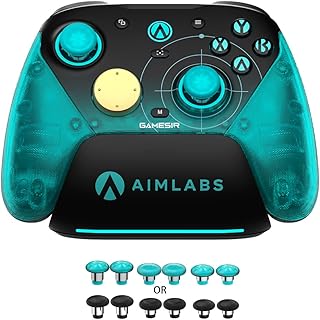
GameSir G7 Pro 8K PC Wireless Controller for Windows with
Why We Love It

AceGamer 2 Pack Controller for PS4,Wireless Controller for
Why We Love It

Wireless Gamepad Remote Controller Compatible with PS4
Why We Love It

GameSir Nova Lite Wireless Controller
Why We Love It
Quick Pick
10 Best Pc Wireless Gamepads Of 2026
Quick Pick
GameSir Nova Lite Wireless Controller for PC, Hall Effect Sticks & Trigger | Bluetooth Controller Gamepad with Hall Effect Trigger,Turbo,Rumble Vibration, Android, Switch & Steam Deck
Angju USB Wireless Gaming Controller Gamepad for PC/Laptop Computer(Windows XP/7/8/10) & PS3 & Android & Steam - [Black] (Black)
Begally Switch Controller Wireless for Switch/Lite/OLED Wireless Gamepad for PC/iOS/Android with RGB/Programmable/Motion Control/Vibration/Turbo/Wakeup
Logitech G F710 Wireless Gamepad, 2.4 GHz Wireless with USB Nano-Receiver, Controller Dual Vibration Feedback, 4 Switch D-Pad, PC - Grey/Black
EasySMX X05 2.4g Wireless Controller for PC/iPhone/Android/Switch & Steam Deck- Bluetooth Controller Gamepad with Hall Effect Joysticks and Trigger,Turbo,Rumble Vibration and RGB Lighting,Ideal for Mainstream Football Games and Other Types of Games on the Market.
Steam Controller Valve Wireless Gamepad for PC and Steam Deck, Original Hardware with Dual Trackpads and Haptic Feedback
GameSir G7 Pro 8K PC Wireless Controller for Windows with TMR Joysticks, Dual-Mode Trigger Stops, Four Remappable Macro Buttons, 3.5mm Audio Support - Aimlabs Edition
AceGamer 2 Pack Controller for PS4,Wireless Controller for PS4/Pro/Slim/PC,Gamepad Joystick with Turbo/Back Button/Dual Vibration/6-Axis Gyro Sensor/Touch Panel (Black & White)
Wireless Gamepad Remote Controller Compatible with PS4 Console/Pro/Slim and PC has 6 Axis motion sensor, Dual Vibration Motor, Audio Jack (Black Alpha)
GameSir Nova Lite Wireless Controller – 2.4G & Bluetooth Gamepad for Windows PC, iPhone, Android, Switch & Steam Deck – Hall Effect Triggers, Turbo Function, Rumble Vibration (Pink)
Buying Guide: Pc Wireless Gamepads
📋 Table of Contents
1What connection type offers the best performance for PC use?
Look for gamepads with Bluetooth 5.0 or higher for stable, low-latency wireless play, or a 2.4GHz dongle for even faster response times. Bluetooth is more versatile for multi-device use, while dongles often provide a more direct connection for competitive gaming.
2How important is haptic feedback and rumble?
Advanced haptics and adaptive triggers (found in premium models) enhance immersion, especially in action and racing games. Basic rumble is sufficient for casual play, but more nuanced feedback can improve gameplay feel and realism.
3What battery life should I expect from a wireless gamepad?
Most models offer 20-40 hours of playtime on a single charge, depending on usage intensity. Look for a model with a USB-C port for faster charging and a built-in battery indicator to avoid unexpected shutdowns during long sessions.
4Are PC compatibility and driver support reliable?
Ensure the gamepad is explicitly labeled as 'PC compatible' and check for plug-and-play support or downloadable drivers. Some models may require additional software for full feature access, especially for custom button mapping or LED settings.
5What accessories are worth buying with a wireless gamepad?
A spare battery or charging stand is useful for uninterrupted play, while a protective case prevents wear and tear. For multiplayer setups, a charging dock that holds multiple controllers can be a convenient investment.
How we choose
Our editors are people who genuinely love testing and writing about products. We compare each product's real-world usability and strengths, then distill what matters most into our own "Why We Love It" points — so you get an honest, at-a-glance sense of what counts before you buy.