10 Best Pc Audio Mixers For Streaming Of 2026
Pc Audio Mixers For Streaming — Reviews, Recommendations & Updated Buying Guide November 2026

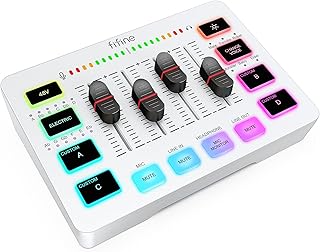
FIFINE AmpliGame SC3 White Audio Mixer for
Why We Love It


FIFINE Gaming Audio Mixer
Why We Love It

FIFINE AmpliGame KS5W Streaming Equipment Bundle
Why We Love It

FIFINE Gaming Equipment Bundle
Why We Love It

Azonee Gaming Audio Mixer
Why We Love It

FIFINE AmpliGame AM8 USB/XLR Dynamic Microphone for Gaming
Why We Love It

Nalacal V8S Podcast Recording Equipment
Why We Love It

Elgato Stream Deck +
Why We Love It

NALACAL Gaming Audio Mixer
Why We Love It

KASTWAVE 4 Channel Mixer for Streaming
Why We Love It
Quick Pick
10 Best Pc Audio Mixers For Streaming Of 2026
Quick Pick
FIFINE AmpliGame SC3 White Audio Mixer for Gaming/Video/Podcast Recording | Streaming RGB PC Mixer, XLR Microphone Interface, Individual Control, Volume Fader, Mute Button, 48V Phantom Power
FIFINE Gaming Audio Mixer, Streaming RGB PC Mixer with XLR Microphone Interface, Individual Control, Volume Fader, Mute Button, 48V Phantom Power, for Podcast/Recording/Vocal/Game Voice-AmpliGame SC3 | USB PnP For PC,Mute Button,XLR Preamp,RGB,Voice change,48V Phantom Power,Monitoring,Podcast,Recording,Vocal,Streaming
FIFINE AmpliGame KS5W Streaming Equipment Bundle, XLR/USB Microphone Set
FIFINE Gaming Equipment Bundle, Dynamic XLR/USB Gaming Microphone Set with Streaming Audio Mixer for Podcast Recording Video Vocal, RGB Gamer Set with Volume Fader/XLR Interface for PC-AmpliGame KS5
Azonee Gaming Audio Mixer, Streaming RGB PC Mixer with XLR Microphone Interface, Voice Changer, Volume Fader, 48V Phantom Power, and Mute Button for Podcasting, Recording, Gaming
FIFINE AmpliGame AM8 USB/XLR Dynamic Microphone for Gaming Streaming | Podcast Mic with RGB Light, Mute Button, Headphones Jack, Desktop Stand, for Vocal Recording Singing YouTube, Metal
Nalacal V8S Podcast Recording Equipment, Audio Interface Equipment Bundle, With Voice Changer Mixer Sound Card Dj For Pc Game Live Streaming Phone Etc
Elgato Stream Deck +, Audio Mixer, Production Console and Studio Controller for Content Creators, Streaming, Gaming, with customizable touch strip dials and LCD keys, works with Mac and PC
NALACAL Gaming Audio Mixer, Streaming RGB PC Mixer with XLR Microphone Interface, Individual Control Volume Fader/Mute Button/48V Phantom Power for Podcast/Recording/Vocal/Game Voice, PC, Guitar, F11
KASTWAVE 4 Channel Mixer for Streaming, Professional Mini 4 Stereo Audio Mixer, Low Noise DJ Mixer, 48V Phantom Power, USB Audio Interface for Podcasting, Live Performance, Recording, DJ, PC
Buying Guide: Pc Audio Mixers For Streaming
📋 Table of Contents
1How many input channels do I actually need for streaming?
For solo streamers, 2-4 inputs (1 for mic, 1 for game audio, 1 for background music) are usually enough. If you plan to host co-streams or use multiple mics, look for at least 6 inputs to avoid signal routing workarounds.
2What's the difference between USB and XLR connections on a mixer?
XLR ports offer balanced audio and are ideal for professional microphones, while USB is convenient for plug-and-play with computers. For high-quality streaming, use XLR for your mic and USB for connecting the mixer to your PC.
3Is a built-in audio interface necessary for streaming?
Yes — a mixer with a built-in audio interface allows you to route your mic, game audio, and background music directly into your streaming software. This avoids latency issues and simplifies your setup compared to using a separate sound card.
4What gain control features should I look for in a mixer for streaming?
Look for individual gain knobs for each input and a master output level. This lets you fine-tune your mic and audio levels in real time, ensuring consistent volume without overloading your signal or causing distortion.
5Are effects like reverb or EQ useful for streaming?
Basic EQ controls help you shape your voice and reduce background noise, while reverb can add depth. However, for most streamers, software-based effects in your DAW or streaming platform are more flexible and worth prioritizing over hardware effects.
How we choose
Our editors are people who genuinely love testing and writing about products. We compare each product's real-world usability and strengths, then distill what matters most into our own "Why We Love It" points — so you get an honest, at-a-glance sense of what counts before you buy.