10 Best Otg Memory Card Adapters Of 2026
Otg Memory Card Adapters — Reviews, Recommendations & Updated Buying Guide November 2026


Acer SD Card Reader
Why We Love It


UGREEN SD Card Reader
Why We Love It

UGREEN Card Reader High Speed USB C and USB3.0 Micro SD
Why We Love It

Acer SD Card Reader USB C
Why We Love It

SD Card Reader for iPhone iPad
Why We Love It
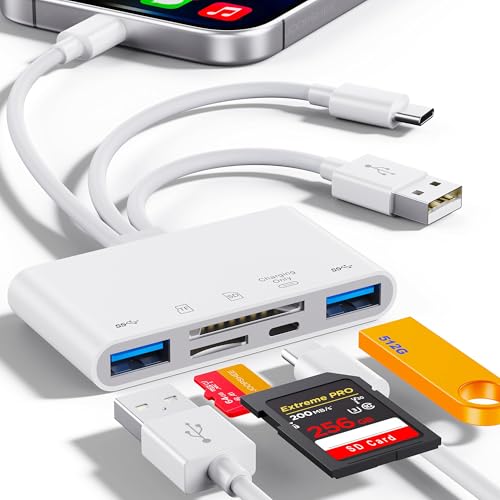
5-in-1 Memory SD Card Readers
Why We Love It

Acer USB-C SD Card Reader 170MB/s
Why We Love It

TweTech Micro SD Card Reader
Why We Love It

Loydia SD Card Reader for iPhone
Why We Love It

UGREEN SD Card Reader USB 3.0/USB C OTG Dual Slot Memory
Why We Love It
Quick Pick
10 Best Otg Memory Card Adapters Of 2026
Quick Pick
Acer SD Card Reader, USB C & USB 3.0 Memory Card Reader Adapter | Supports SD/Micro SD/SDHC/SDXC/MMC, Compatible with iPhone 17 16 Series, MacBook Pro/Air, iPad Pro, Galaxy S26, XPS 13, etc.
UGREEN SD Card Reader, USB C 170MB/s Adapter with Dual-Slot for TF/SD | 170MB/s Super Speed SD Card Reader Simultaneous Read and Write Compatible with iPhone 17 Pro Max Air 16 Galaxy S25 MacBook
UGREEN Card Reader High Speed USB C and USB3.0 Micro SD Memory Card Adapter | Dual Slots, Memory Card Reader, for SD/Micro SD/SDHC/SDXC/MMC UHS II, for iPhone, Mac, iPad, Android, Galaxy, Up to 312 MB/s
Acer SD Card Reader USB C, 3 in 1 Memory Card Reader with Dual Slots/USB3.0 | Aluminum Micro SD Card Adapter for iPhone 17/16/15 Compatible with Camera, Android, MacBook Neo/Pro/Air, Laptop
SD Card Reader for iPhone iPad, Portable USB Camera Adapter 3 in 1 USB Female OTG Adapter Compatible SD/TF Card, Portable Memory Card Reader for iPhone iPad
5-in-1 Memory SD Card Readers, USB OTG Adapter & SD Card Reader Adapters for i-Phone 17 16 15 Pro Max/i-Pad, USB-C and USB-A Devices with Micro SD & SD Card Slots, Support SD/Micro SD/SDHC/SDXC/MMC
acer USB-C SD Card Reader 170MB/s, Type-C Micro SD Card Adapter Aluminium | External Memory Card Reader for SD/Micro SD/SDHC/SDXC/MMC, iPhone 15 16 17,MacBook iPad Pro/Air,Galaxy S26, Surface Pro,etc.
TweTech Micro SD Card Reader, SD Card Adapter, USB C Card Reader Adaptor OTG, Memory SD/Micro SD/TF/SDXC/SDHC/MMC, for USB & Type C Phone Tablet Laptop, iPhone iPad iMac MacBook, Samsung Android
Loydia SD Card Reader for iPhone, 3-in-2 USB C MicroSD Card Reader, Micro SD to Type C Adapter Memory Card reader with SD/TF Card Slot, Camera Card Viewer SD Card reader for iPad/Huawei/iPhone 15
UGREEN SD Card Reader USB 3.0/USB C OTG Dual Slot Memory Card Adapter for iPhone 17 Series,MacBook Pro, M1 M2 Mac Air, iPad, Surface, Dell XPS, Samsung, Huawei
Buying Guide: Otg Memory Card Adapters
📋 Table of Contents
1What speed class should I look for in an OTG memory card adapter?
Opt for adapters that support at least UHS-I (Ultra High Speed) for faster data transfer, especially if you're using high-resolution media. UHS-II or UHS-III can be beneficial for 4K video or large file transfers, but UHS-I is standard and widely compatible with most devices.
2Does the type of memory card matter for OTG performance?
Yes — microSD cards are the most common for OTG adapters, but SD, CF, or M.2 cards may require specific adapters. MicroSD cards with UHS-I or U3 ratings offer better speed for everyday use, while higher-end cards like V30 or V60 are ideal for 4K video recording and playback.
3What’s the difference between a USB OTG card reader and a built-in OTG port?
A USB OTG card reader is a separate device that connects to your phone or tablet via USB-C or microUSB, while a built-in OTG port allows direct insertion of a card. Readers are more versatile for different card types, but built-in ports are more convenient for frequent use.
4How important is the number of supported file systems?
It’s important for compatibility — look for adapters that support FAT32, exFAT, and NTFS for broad use with phones, computers, and cameras. exFAT is ideal for large files over 4GB, while FAT32 is better for smaller, widely supported transfers.
5Are there any common mistakes to avoid when buying an OTG memory card adapter?
Avoid adapters that don’t specify their speed class or file system support, as this can lead to slow performance or incompatibility. Also, ensure the adapter is compatible with your device’s port type (USB-C, microUSB, etc.) and that it doesn’t require extra drivers for basic use.
How we choose
Our editors are people who genuinely love testing and writing about products. We compare each product's real-world usability and strengths, then distill what matters most into our own "Why We Love It" points — so you get an honest, at-a-glance sense of what counts before you buy.