10 Best Otg External Memory Card Reader Of 2026
Otg External Memory Card Reader — Reviews, Recommendations & Updated Buying Guide November 2026


Acer SD Card Reader
Why We Love It


UGREEN SD Card Reader
Why We Love It

UGREEN Card Reader High Speed USB C and USB3.0 Micro SD
Why We Love It

Sabrent USB 3.0 and USB Type-C OTG Card Reader Supports SD
Why We Love It

UGREEN SD Card Reader
Why We Love It

SD Card Reader
Why We Love It

UGREEN USB C SD Card Reader with Storage
Why We Love It
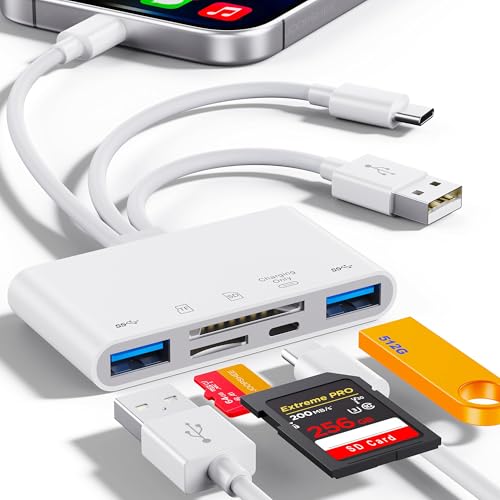
5-in-1 Memory SD Card Readers
Why We Love It

3-in-1 Dual Interface SD & Micro SD Card Reader for iPhone
Why We Love It

UGREEN USB 3.0 SD Card Reader 4-in-1 Micro SD Card Memory
Why We Love It
Quick Pick
10 Best Otg External Memory Card Reader Of 2026
Quick Pick
Acer SD Card Reader, USB C & USB 3.0 Memory Card Reader Adapter | Supports SD/Micro SD/SDHC/SDXC/MMC, Compatible with iPhone 17 16 Series, MacBook Pro/Air, iPad Pro, Galaxy S26, XPS 13, etc.
UGREEN SD Card Reader, USB C 170MB/s Adapter with Dual-Slot for TF/SD | 170MB/s Super Speed SD Card Reader Simultaneous Read and Write Compatible with iPhone 17 Pro Max Air 16 Galaxy S25 MacBook
UGREEN Card Reader High Speed USB C and USB3.0 Micro SD Memory Card Adapter | Dual Slots, Memory Card Reader, for SD/Micro SD/SDHC/SDXC/MMC UHS II, for iPhone, Mac, iPad, Android, Galaxy, Up to 312 MB/s
Sabrent USB 3.0 and USB Type-C OTG Card Reader Supports SD, SDHC, SDXC, MMC/MicroSD, T-Flash (CR-BCA2) | Dual-slot SD & microSD; USB 3.0; USB-C and USB-A connectors; laptop, PC, Android
UGREEN SD Card Reader, 4-IN-1 USB C 3.0 to SD CF TF MS Card Adapter, 5Gbps | Camera Memory Card Reader Simultaneously Read & Write 4 Cards for SD CF TF MS, for iPad,MacBook Pro/Air, Plug and Play
SD Card Reader, 6 in 1 OTG Memory Card Reader, USB 3.0 USB-C SD Card Reader Supports SD/Micro SD/SDXC/SDHC/MMC/RS-MMC/UHS-I, Compatible with MacBook, iPad Pro, Android Phone, PC, Laptop
UGREEN USB C SD Card Reader with Storage, High-Speed Memory Card Reader | with 4 Card Storage Case Holder for Cameras SD/Micro SD Card Compatible with iPhone 17 16, Galaxy S26 S25, Ideal for Travel
5-in-1 Memory SD Card Readers, USB OTG Adapter & SD Card Reader Adapters for i-Phone 17 16 15 Pro Max/i-Pad, USB-C and USB-A Devices with Micro SD & SD Card Slots, Support SD/Micro SD/SDHC/SDXC/MMC
3-in-1 Dual Interface SD & Micro SD Card Reader for iPhone, iPad USB-C & Lightning Adapter, Fast Data Transfer USB OTG Memory Card Reader, Plug and Play External Storage Access
UGREEN USB 3.0 SD Card Reader 4-in-1 Micro SD Card Memory Card Reader 5Gbps | Plug 7 Play,OC&SC protection,For laptops & outdoor,Reads CF/CFI/TF/SDXC/SDHC/MMC/RS-MMC/SDXC/Micro SDHC/UHS-II Cards
Buying Guide: Otg External Memory Card Reader
📋 Table of Contents
1What USB version should I look for in an OTG external memory card reader?
Opt for USB 3.0 or USB-C for faster data transfer speeds, typically up to 5 Gbps. USB 2.0 is slower and better suited for basic file access, but not ideal for large media files or frequent use.
2Which memory card formats are most commonly supported?
Look for readers that support SD, microSD, and TF cards, as these are the most widely used. Some models also include support for CF, MMC, or M2 cards, which are less common but useful for specific devices.
3How important is the read/write speed for an OTG card reader?
For transferring large files like videos or backups, a reader with UHS-I or UHS-II support is ideal, offering speeds up to 100 MB/s or more. Slower readers may cause delays, especially when working with high-resolution media.
4Should I choose a single-slot or multi-slot OTG card reader?
A single-slot reader is more compact and portable, while multi-slot models offer flexibility for different card types. Choose based on your primary use — single-slot for simplicity, multi-slot for versatility across devices.
5What should I check for compatibility with my phone or tablet?
Ensure the reader is OTG-enabled and compatible with your device’s USB port type (microUSB, USB-C, or Lightning). Some phones require a specific OTG file or driver, so check your device’s specifications or manufacturer guidelines.
How we choose
Our editors are people who genuinely love testing and writing about products. We compare each product's real-world usability and strengths, then distill what matters most into our own "Why We Love It" points — so you get an honest, at-a-glance sense of what counts before you buy.