10 Best Optical Headphone Amplifiers For Pc Of 2026
Optical Headphone Amplifiers For Pc — Reviews, Recommendations & Updated Buying Guide November 2026


Creative SOUND BLASTERX G6 USB-C 7.1 HD External Console
Why We Love It


Fosi Audio Q4 Headphone Amplifier DAC Converter
Why We Love It

Fosi Audio K5 Pro DAC Amp Headphone Amplifier
Why We Love It

FIIO K11 Desktop 1400W Power Balanced Headphone DAC &
Why We Love It

Sound Blaster G8 DAC Headphone Amplifier
Why We Love It
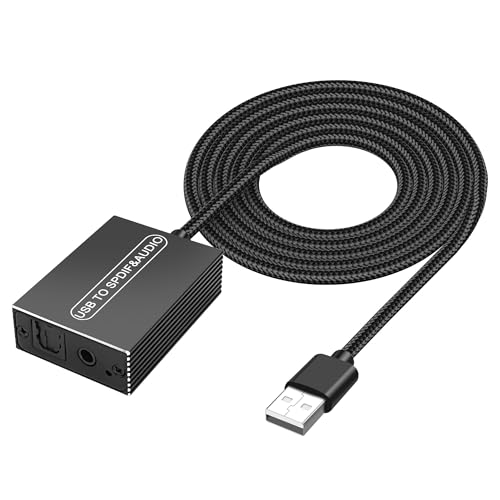
USB to Optical SPDIF Toslink & 3.5mm Jack Audio Adapter
Why We Love It
FIIO K11 Desktop 1400W Power Balanced Headphone DAC &
Why We Love It

Creative Sound Blaster X5 Hi-Res Dual DAC USB Headphone
Why We Love It

Creative Sound Blaster X4 Hi-Res 24bit/192kHz External USB
Why We Love It

FiiO K11 Desktop 1400mW Power Balanced Headphone DAC &
Why We Love It
Quick Pick
10 Best Optical Headphone Amplifiers For Pc Of 2026
Quick Pick
Creative SOUND BLASTERX G6 USB-C 7.1 HD External Console Gaming DAC Amp with Xamp Discrete Headphone Bi-amp for PS4™, PS5™,Xbox One, Nintendo Switch/Switch2, and PC
Fosi Audio Q4 Headphone Amplifier DAC Converter, Mini Stereo Digital-to-Analog DAC Amp, USB Coaxial Optical to 3.5MM AUX RCA Jack, for Computer Desktop Powered Active Speakers Up to 24 bit/192 kHz
Fosi Audio K5 Pro DAC Amp Headphone Amplifier, Mini Hifi Stereo Digital-to-Analog Converter, USB Type-C/Coaxial/Optical to 3.5MM AUX/RCA Jack, for Gaming PS5/ PC/Active Speakers Up to 24 bit/192 kHz
FIIO K11 Desktop 1400W Power Balanced Headphone DAC & Amplifier 384kHz/24Bit DSD256 for Home Audio/PC 6.35mm/4.4mm/RCA/Coaxial/Optical (Silver)
Sound Blaster G8 DAC Headphone Amplifier, Gaming DAC for PC/PS5/Desktop Audio, Dual USB-C/Optical/HDMI Arc/Microphone/Line input, 3.5mm/Optical/Line output
USB to Optical SPDIF Toslink & 3.5mm Jack Audio Adapter Converter for TV, PS5, PS4, PC, Laptop, Smartphone to Sound Box Amplifier (1.2M/3.9FT, 1 Pcs)
FIIO K11 Desktop 1400W Power Balanced Headphone DAC & Amplifier 384kHz/24Bit DSD256 for Home Audio/PC 6.35mm/4.4mm/RCA/Coaxial/Optical (Black)
Creative Sound Blaster X5 Hi-Res Dual DAC USB Headphone Bi-amplifier
Creative Sound Blaster X4 Hi-Res 24bit/192kHz External USB DAC and Amp Sound Card, Super X-Fi, Multi-Channel, 7.1 Discrete Surround, Optical-in, Optical-out, Line-in, Mic-in, Headset-in for PC and Mac
FiiO K11 Desktop 1400mW Power Balanced Headphone DAC & Amplifier 384kHz/24Bit DSD256 for Home Audio/PC 6.35mm/4.4mm/RCA/Coaxial/Optical (Titanium)
Buying Guide: Optical Headphone Amplifiers For Pc
📋 Table of Contents
1What is the minimum output power I should look for in an optical headphone amplifier?
Aim for at least 1-2 watts per channel for most high-impedance headphones. For power-hungry models (300 ohms or more), 3-5 watts per channel ensures full, distortion-free sound without strain on the amplifier.
2Does the amplifier support both optical and analog inputs?
Yes — dual input options (TOSLINK and 3.5mm/6.3mm) let you connect your PC via optical for digital clarity or analog for older devices. This flexibility is especially useful if your PC has limited port space or you use multiple audio sources.
3What headphone impedance range should I match the amplifier to?
Look for an amplifier with a variable gain or a wide impedance range (16–600 ohms) to work with both low- and high-impedance headphones. A mismatch can lead to weak volume or distortion, especially with sensitive in-ear monitors or power-hungry over-ear models.
4Is a dedicated DAC necessary in an optical headphone amplifier?
If your PC’s built-in DAC is low quality, a high-resolution DAC in the amplifier improves sound clarity and detail. For optical connections, the DAC must support at least 24-bit/192kHz to preserve the full fidelity of high-resolution audio files.
5What accessories are essential for setup and use?
A TOSLINK optical cable is a must for connecting to your PC, and a 3.5mm to 6.3mm adapter is useful for universal headphone compatibility. A remote control or volume knob on the unit itself adds convenience for adjusting levels without reaching for your PC.
How we choose
Our editors are people who genuinely love testing and writing about products. We compare each product's real-world usability and strengths, then distill what matters most into our own "Why We Love It" points — so you get an honest, at-a-glance sense of what counts before you buy.