10 Best Omnidirectional Computer Microphones Of 2026
Omnidirectional Computer Microphones — Reviews, Recommendations & Updated Buying Guide November 2026


MAYBESTA Professional Wireless Lavalier Lapel Microphone for
Why We Love It


USB Computer Microphone
Why We Love It

Boya-20809 BY-M1 Omnidirectional Lavalier Microphone
Why We Love It

NEEWER LM1 USB A Lapel Microphone Mini Omnidirectional Clip
Why We Love It

AIRHUG USB Microphone No Speaker
Why We Love It

NEEWER UM04 USB Microphone
Why We Love It

Tukzer USB Computer Microphone
Why We Love It
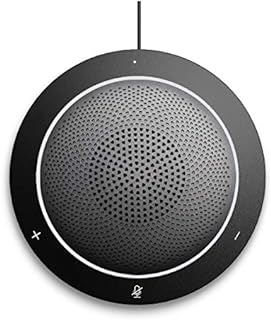
SP300U USB Speaker Phone 360 degree Omnidirectional
Why We Love It

Neewer USB Lapel Microphone
Why We Love It

TONOR Conference USB Microphone
Why We Love It
Quick Pick
10 Best Omnidirectional Computer Microphones Of 2026
Quick Pick
MAYBESTA Professional Wireless Lavalier Lapel Microphone for Android Computer - Cordless Omnidirectional Condenser Recording Mic with USB C Interface for Interview Video Podcast Vlog YouTube, Black
USB Computer Microphone, Omnidirectional Condenser Podcast Mic for Recording and Streaming, Desktop Microphone with Mute Button and Volume Control, Plug & Play Stand for PC, Laptop, Mac, YouTube
Boya-20809 BY-M1 Omnidirectional Lavalier Microphone
NEEWER LM1 USB A Lapel Microphone Mini Omnidirectional Clip On Lavalier Mic | Plug & Play, 2m Cable, for USB 2.0 Mac Windows PC Laptop Computer YouTube Skype, Podcast, Gaming, Vlog, Video Conferencing
AIRHUG USB Microphone No Speaker, Desktop Computer Mic for Laptop | Mute Button with LED Indicator, AI Noise Reduction, Plug & Play Omnidirectional Microphone, Ideal for Online Calls, Recording
NEEWER UM04 USB Microphone, Desktop Omnidirectional Condenser Mic with 48KHz/24Bit Mute Noise Canceling for Online Meeting Recording Skype Teaching Compatible with Windows PC Mac Computer & Phone | 48KHz/24Bit, Mute, Mic for Online Meeting Recording Skype Teaching, for Mac Windows Computer Laptop PC Phone (Not Speaker)
Tukzer USB Computer Microphone, RGB Mic, Omnidirectional Condenser Noise-Cancelling with On-Off Button, Plug & Play Desktop Laptop Mic, for Windows/Mac/Podcast/Gaming/YouTube/Zoom/Skype/Recording
SP300U USB Speaker Phone 360 degree Omnidirectional Microphone Portable Conference Speakerphone Echo Cancellation for Teams, Zooms, Webinar
Neewer USB Lapel Microphone, Plug & Play Mini Omnidirectional Clip On Lavalier Mic with 3.5mm Monitoring Headphones Jack for USB 2.0 Mac Windows PC Laptop Computer YouTube Skype Podcast Gaming, LM2
TONOR Conference USB Microphone, Omnidirectional Condenser PC Mic G11 | Condenser Mic, Compatible with 190 cm/74inch Cable, Windows and Mac, Desktop PC & Laptop for Teleconference, Court Reporter
Buying Guide: Omnidirectional Computer Microphones
📋 Table of Contents
1What sensitivity level do I need for my use case?
Look for a sensitivity range of -30dB to -45dB for clear voice capture in most home or office settings. If you're recording in a noisy environment, a slightly lower sensitivity (e.g., -45dB to -50dB) can help reduce background noise and improve speech clarity.
2How does polar pattern affect my recording quality?
Omnidirectional mics pick up sound from all directions, making them great for group calls or podcasting in a quiet room. However, they're less effective in noisy environments compared to directional mics, which focus on sound from one direction and reduce ambient noise.
3What sample rate and bit depth should I look for?
A sample rate of 44.1kHz or 48kHz and a bit depth of 16-bit or 24-bit are standard for high-quality audio. These specs ensure clear, detailed sound and are suitable for both voice calls and basic voice recordings without noticeable distortion or loss of fidelity.
4Is a USB or 3.5mm connection better for my setup?
USB mics are plug-and-play and ideal for most computers, especially if you want built-in amplification and noise reduction. 3.5mm mics are more affordable and work well with laptops or devices that have a mic jack, but may require an external preamp for optimal sound quality.
5What accessories are worth investing in for better performance?
A shock mount or foam windscreen can reduce handling noise and plosives, especially if you're recording close to the mic. A desk stand or boom arm helps position the mic for consistent audio, and a pop filter is essential for smoother vocal recordings in podcasting or voiceover work.
How we choose
Our editors are people who genuinely love testing and writing about products. We compare each product's real-world usability and strengths, then distill what matters most into our own "Why We Love It" points — so you get an honest, at-a-glance sense of what counts before you buy.