10 Best Oled Monitor Of 2026
Oled Monitor — Reviews, Recommendations & Updated Buying Guide November 2026


ASUS ROG Strix XG27AQDMGR
Why We Love It


ASUS ROG Strix OLED XG27AQDMES gaming monitor ― 27-inch
Why We Love It

ASUS ROG Strix OLED XG27AQWMG gaming monitor
Why We Love It

UPERFECT Touchscreen OLED Portable Monitor 14"
Why We Love It

Samsung Odyssey 27" OLED Gaming Monitor G6 G61SH QHD 240Hz
Why We Love It

MSI MAG 273QP QD-OLED X24 26.5 Inch WQHD Gaming Monitor
Why We Love It

Samsung 49" Gaming Monitor G9 (G91SD) Odyssey OLED Dual QHD
Why We Love It

ASUS ROG Strix XG27ACDNG 27" QD-OLED QHD 360Hz 0.03ms
Why We Love It

UPERFECT 4K OLED Portable Monitor
Why We Love It
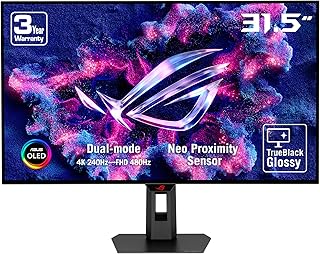
ASUS ROG Strix XG32UCWMG Monitor ―32" TrueBlack Glossy
Why We Love It
Quick Pick
10 Best Oled Monitor Of 2026
Quick Pick
ASUS ROG Strix XG27AQDMGR - OLED-Monitor - Gaming - 68.6 cm (27")
ASUS ROG Strix OLED XG27AQDMES gaming monitor ― 27-inch (26.5-inch viewable) 1440p 240 Hz, 0.03ms, Care Pro, ELMB, G-SYNC® compatible, 99% DCI-P3, and DisplayWidget Center
ASUS ROG Strix OLED XG27AQWMG gaming monitor - 27-inch 1440p TrueBlack GlossyTandem, 280Hz, 0.03ms, Neo Proximity Sensor, OLED Care Pro, VESA DisplayHDR True Black 500, 99 percent DCI-P3 | TrueBlack Glossy, Neo Proximity Sensor, 0.03ms, DisplayHDR True Black 500, 99% DCI-P3, DP, HDMI, USB Hub, VESA, for PS5
UPERFECT Touchscreen OLED Portable Monitor 14", 3K 2880x1800 | 120Hz | 0.1ms Portable Gaming Monitor, 500 Nits |120% DCI-P3 | 500000:1 | Ultra-Slim Design for Laptop Mini PC Phone Game Consoles
Samsung Odyssey 27" OLED Gaming Monitor G6 G61SH QHD 240Hz Refresh Rate, 0.03Ms Response Time, Glare Free, Height Adjustable and Pivot, Safeguard+, FreeSync Premium Pro, LS27HG612SMXUE
MSI MAG 273QP QD-OLED X24 26.5 Inch WQHD Gaming Monitor - 2560 x 1440 Quantum Dot OLED Panel 240Hz / 0.03ms, 99% DCI-P3, ΔE≤2, DisplayHDR True Black 400, DP 1.4a, HDMI 2.1
Samsung 49" Gaming Monitor G9 (G91SD) Odyssey OLED Dual QHD (5120 x 1440) 144Hz Refresh Rate 0.03Ms Response Time, NVIDIA G-Sync Compatible, Height Adjustable, Silver(Amazon Exclusive)
ASUS ROG Strix XG27ACDNG 27" QD-OLED QHD 360Hz 0.03ms Freesync Premium Pro G-Sync USB-C Gaming monitor | OLED Care Plus, Heatsink, 0.03ms, G-SYNC Compatible, 99% DCI-P3, Anti-Flicker, DisplayWidget Center, for PS5
UPERFECT 4K OLED Portable Monitor, 13.3" UHD 3840x2160 Laptop Display, 100% DCI-P3, 500 Nits, 1ms Response, Ultra-Slim Aluminum Design, USB-C & HDMI Travel Monitor for PC, Phone, Game Console
ASUS ROG Strix XG32UCWMG Monitor ―32" TrueBlack Glossy, Dual Mode (4K@240Hz, FHD@480Hz), 0.03ms, heatsink, OLED Care Pro, Neo Proximity Sensor, VESA DisplayHDR 400 True Black, USB-C, HDMI 2.1 | Dual Mode 4K@240Hz FHD @ 480Hz, 0.03ms, Sync-Tech, HDR 400 TrueBlack, USB-C, DP, HDMI. USB Hub
Buying Guide: Oled Monitor
📋 Table of Contents
1What should I look for in an OLED monitor?
Look for high contrast ratio, wide color gamut, and low input lag. OLEDs offer deep blacks and vibrant colors, making them ideal for media and gaming.
2What are the key specifications to consider?
Key specs include resolution (4K is common), refresh rate (120Hz or higher for gaming), response time (ideally 0.1ms), and HDR support for better dynamic range.
3How do I ensure the monitor is compatible with my setup?
Check the monitor's input ports (HDMI, DisplayPort) to ensure they match your graphics card or console. Also, confirm the required power source and mounting options if needed.
4When should I pay more for an OLED monitor?
Pay more for models with higher refresh rates, better color accuracy, and additional features like built-in speakers or USB-C connectivity, especially if you use the monitor for gaming or professional work.
5What are common mistakes when buying an OLED monitor?
Common mistakes include ignoring burn-in risks with static images, not checking for proper calibration, and overlooking the need for a high-quality graphics card to fully utilize the monitor's capabilities.
How we choose
Our editors are people who genuinely love testing and writing about products. We compare each product's real-world usability and strengths, then distill what matters most into our own "Why We Love It" points — so you get an honest, at-a-glance sense of what counts before you buy.