10 Best Nvme Internal Solid State Drives Of 2026
Nvme Internal Solid State Drives — Reviews, Recommendations & Updated Buying Guide November 2026


PNY CS2230 500GB M.2 NVMe Internal Solid State Drive (SSD)
Why We Love It

PNY CS2230 1TB M.2 NVMe Gen3 Internal Solid State Drive
Why We Love It

Acer FA100 PCIe 3.0 NVMe SSD 512GB: up to 3300MB/s Read
Why We Love It

Acer 256GB FA100 M.2 PCI Express 3.0 3D NAND NVMe Internal
Why We Love It
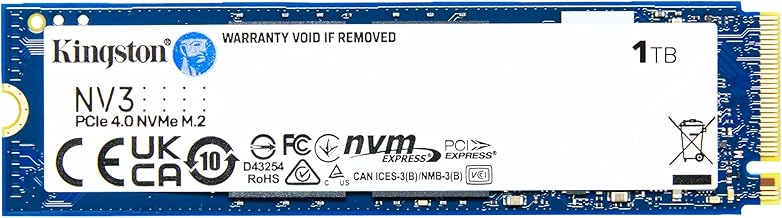
Kingston NV3 1TB M.2 2280 NVMe SSD
Why We Love It

WD Blue SN5100 2TB NVMe SSD - M.2 2280
Why We Love It

Acer Predator GM7 2TB SSD
Why We Love It

Samsung 990 EVO Plus NVMe M.2 SSD 2TB
Why We Love It

DATO 2TB M.2 2230 SSD
Why We Love It

Lexar NM620 512GB SSD
Why We Love It
Quick Pick
10 Best Nvme Internal Solid State Drives Of 2026
Quick Pick
PNY CS2230 500GB M.2 NVMe Internal Solid State Drive (SSD) - M280CS2230-500-RB
PNY CS2230 1TB M.2 NVMe Gen3 Internal Solid State Drive (SSD), up to 3300MB/s - M280CS2230-1TB-RB
Acer FA100 PCIe 3.0 NVMe SSD 512GB: up to 3300MB/s Read Speed, Gen3x4 M.2 2280 Internal Hard Drive with HMB & SLC - Gaming Solid State Drive for Laptop/Desktop PC
Acer 256GB FA100 M.2 PCI Express 3.0 3D NAND NVMe Internal Solid State Drive
Kingston NV3 1TB M.2 2280 NVMe SSD | PCIe 4.0 Gen 4x4 | Up to 6000 MB/s | SNV3S/1000G
WD Blue SN5100 2TB NVMe SSD - M.2 2280, PCIe Gen 4.0, Internal Solid State Drive - Read Speeds Up to 7,100MB/s, Upgrade Storage for PC/Laptops - WDS200T5B0E
acer Predator GM7 2TB SSD, M.2 2280 PCIe Gen4 x4 NVMe 2.0, Up to 7200 MB/s, HMB+SLC, Internal PC Solid State Drive for Laptop, Desktop and PS5 - BL.9BWWR.119
Samsung 990 EVO Plus NVMe M.2 SSD 2TB, PCIe 4.0 x4 / PCIe 5.0 x2, NVMe 2.0 (2280), 7250MB/s Read, 6300MB/s Write, Internal SSD for Gaming and Graphics Editing, MZ-V9S2T0BW
DATO 2TB M.2 2230 SSD, PCIe Gen 4x4 NVMe Internal Solid State Drive with Heatsink, Up to 5000/3200 MB/s, Compatible with Steam Deck, ROG Ally, Surface Pro, Mini PCs, Ultrabook, ARES ARS430
Lexar NM620 512GB SSD, M.2 2280 PCIe Gen3x4 NVMe 1.4 Internal SSD, Up to 3500MB/s Read, 2400MB/s Write, 3D NAND Flash Internal Solid State Drive for PC Enthusiasts and Gamers (LNM620X512G-RNNNG)
Buying Guide: Nvme Internal Solid State Drives
📋 Table of Contents
1What NVMe interface version should I look for in 2024?
NVMe 1.4 or 2.0 is ideal for modern drives, with 2.0 offering better performance and features like end-to-end data protection. Ensure your motherboard supports the version you choose, as older systems may only support 1.4 or earlier.
2How much sequential read/write speed do I actually need?
For most users, 3,000–3,500 MB/s read and 2,000–3,000 MB/s write is sufficient for fast boot times and app loading. Gamers and video editors may benefit from 5,000+ MB/s drives, but they cost significantly more and require a compatible PCIe 4.0 or 5.0 system.
3Is PCIe 3.0 or 4.0 worth the extra cost?
PCIe 4.0 doubles the bandwidth of PCIe 3.0, enabling faster data transfer, but only if your motherboard and CPU support it. For daily use, PCIe 3.0 drives are still fast and more affordable. PCIe 4.0 is best for high-end workstations or content creation workflows.
4What capacity should I choose for my needs?
250–500GB is enough for an OS and basic apps, while 1TB–2TB is better for heavy users with large software or media files. If you need even more space, consider a 4TB+ drive or pair an NVMe with a secondary SATA SSD or HDD for bulk storage.
5What are the key differences between M.2 2280 and 2242 drives?
2280 drives (80mm) are the most common and offer more space for cooling and performance. 2242 drives (42mm) are shorter and thinner, making them better for compact builds like mini-ITX or laptops. Check your motherboard’s slot size before purchasing to avoid compatibility issues.
How we choose
Our editors are people who genuinely love testing and writing about products. We compare each product's real-world usability and strengths, then distill what matters most into our own "Why We Love It" points — so you get an honest, at-a-glance sense of what counts before you buy.