10 Best Nova Lite Game Controllers Of 2026
Nova Lite Game Controllers — Reviews, Recommendations & Updated Buying Guide November 2026


GameSir Nova Lite Wireless Controller for PC
Why We Love It


GameSir Nova Lite Wireless Controller for PC
Why We Love It
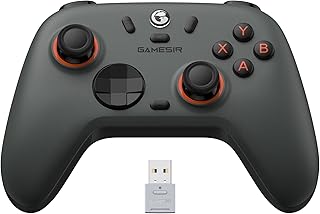
GameSir Nova 2 Lite Wireless Controller with Hall Effect
Why We Love It

GuliKit Elves 2 Black | Hall-Effect Joysticks (Anti-Drift)
Why We Love It

GameSir Nova Lite Game Controller Wireless Bluetooth
Why We Love It

GuliKit Elves 2 Pro Black | Hall-Effect Joysticks
Why We Love It
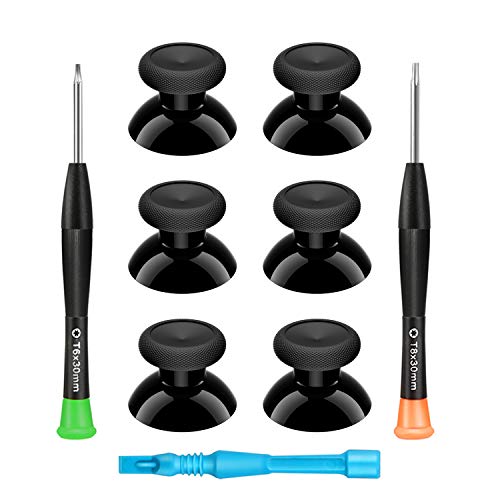
Oritikur Xbox One Joystick Replacement (6 Pieces)
Why We Love It

GameSir Nova Lite Wireless Controller
Why We Love It

GameSir Nova Lite 2.4g Controller for PC
Why We Love It

Bukela RivalPlay Wired Controller for PC with 2 Mapping
Why We Love It
Quick Pick
10 Best Nova Lite Game Controllers Of 2026
Quick Pick
GameSir Nova Lite Wireless Controller for PC, Hall Effect Sticks & Trigger | Bluetooth Controller Gamepad with Hall Effect Trigger,Turbo,Rumble Vibration, Android, Switch & Steam Deck
GameSir Nova Lite Wireless Controller for PC, Hall Effect Sticks & Trigger | Bluetooth Controller Gamepad with Hall Effect Trigger,Turbo,Rumble Vibration, Android, Switch & Steam Deck
GameSir Nova 2 Lite Wireless Controller with Hall Effect Joysticks & Triggers, 2.4G & Wired 1000Hz Polling Rate, Macro Back Buttons, PC Gamepad Compatible with PC/Switch/Steam/iOS/Android (Grey)
GuliKit Elves 2 Black | Hall-Effect Joysticks (Anti-Drift) | Wireless Controller for Nintendo Switch 1/2,Windows PC & Mobile | 1000Hz Polling Rate | Gyro, Turbo, Carry Case
GameSir Nova Lite Game Controller Wireless Bluetooth Wireless Connection Controller PC/Steam/Switch/iOS/Android Compatible Gamepad Drift Prevention Hole Effect Joystick Turbo Function Controller
GuliKit Elves 2 Pro Black | Hall-Effect Joysticks | Wireless Controller for Nintendo Switch 1/2 Windows PC & Mobile | 1000Hz Wired on PC, 170Hz Low-Latency Bluetooth | Maglev HD Rumble, Gyro [windows]
Oritikur Xbox One Joystick Replacement (6 Pieces)
GameSir Nova Lite Wireless Controller – 2.4G & Bluetooth Gamepad for Windows PC, iPhone, Android, Switch & Steam Deck – Hall Effect Triggers, Turbo Function, Rumble Vibration (Pink)
GameSir Nova Lite 2.4g Controller for PC, Steam, Switch, iOS and Android devices, Wireless Gaming Gamepad with Hall Effect Joysticks, Turbo Function - Purple
Bukela RivalPlay Wired Controller for PC with 2 Mapping Button Adjustable Vibration and 3 Turbo Speeds Compatible for Win(11/10/8/7) Plug-and-Play Black
Buying Guide: Nova Lite Game Controllers
📋 Table of Contents
1What connection type should I prioritize for the best performance?
Wired controllers offer the lowest latency and are ideal for competitive play, while wireless models provide more freedom of movement. Look for Bluetooth 5.0 or higher for stable, long-range wireless performance without a dongle.
2How important is haptic feedback in a game controller?
Haptic feedback enhances immersion by simulating in-game actions through vibrations, but it's not essential for all games. If you play action or adventure titles, look for advanced haptics with variable intensity for a more responsive feel.
3What button layout is best for different types of games?
Standard layouts suit most games, but arcade-style buttons are better for fighting or rhythm games. Customizable button mappings can help tailor the controller to your playstyle, especially for complex genres like RPGs or strategy games.
4How long does a typical wireless controller battery last?
Most wireless controllers last 8–15 hours on a single charge, depending on usage and features like haptics. Look for models with a charging indicator and quick-charge support to avoid surprises during long gaming sessions.
5Are accessories like charging docks or skins worth buying?
Charging docks add convenience for wireless controllers, while skins protect the surface and personalize your device. Prioritize a dock if you play often, but skins are optional unless you want to prevent wear or add style.
How we choose
Our editors are people who genuinely love testing and writing about products. We compare each product's real-world usability and strengths, then distill what matters most into our own "Why We Love It" points — so you get an honest, at-a-glance sense of what counts before you buy.