10 Best Network Switches Of 2026
Network Switches — Reviews, Recommendations & Updated Buying Guide November 2026


TP-Link TL-SG108, 8 Port Gigabit Unmanaged Ethernet Switch
Why We Love It


UGREEN Ethernet Switch 5-Port Gigabit
Why We Love It

D-Link DGS-105, 5 Port Gigabit Ethernet Switch Unmanaged
Why We Love It

TP-Link TL-SG105 5-Port Gigabit Unmanaged Ethernet Network
Why We Love It

TP-Link TL-SG1008D, 8 Port Gigabit Ethernet Network Switch
Why We Love It
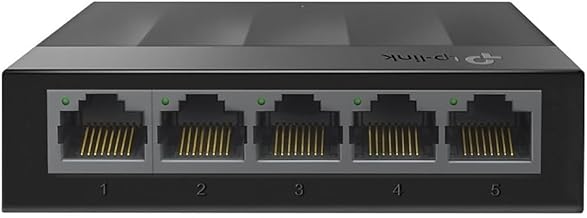
TP-Link LS1005G
Why We Love It

UGREEN Ethernet Switch 6 Port
Why We Love It

Gigabit Ethernet Splitter 1 to 3
Why We Love It

TP-Link TL-SG116P | 16 Port Gigabit PoE Switch
Why We Love It

TP-Link LS106LP PoE Switch
Why We Love It
Quick Pick
10 Best Network Switches Of 2026
Quick Pick
TP-Link TL-SG108, 8 Port Gigabit Unmanaged Ethernet Switch, Black | Fanless Metal Design, Plug & Play, Desktop/Wall Mount, Traffic Optimization, Limited Lifetime Protection
UGREEN Ethernet Switch 5-Port Gigabit,240W Desktop Network Splitter | 5*RJ45 Port Support 10/100/1000Mbps,Unmanaged Plug & Play Ethernet Adapter,Compatible with Router,TV,Game Console,Computer
D-Link DGS-105, 5 Port Gigabit Ethernet Switch Unmanaged, Network Splitter, Silent Fanless, Network Hub, Sturdy Metal with Shielded Ports, Desktop/Wall Mount, QoS, Energy Saving, Plug and Play
TP-Link TL-SG105 5-Port Gigabit Unmanaged Ethernet Network Switch, Fanless Metal Design, Black
TP-Link TL-SG1008D, 8 Port Gigabit Ethernet Network Switch | Plug and Play, Desktop or Wall Mount, Plastic Case Ethernet Splitter, Fanless, Traffic Optimization, Unmanaged
TP-Link LS1005G, Litewave 5 Port Gigabit Ethernet Unmanaged Switch | Desktop Ethernet Splitter, Unshielded Network Switch, Plug & Play, Fanless Quiet
UGREEN Ethernet Switch 6 Port,4 PoE+60W and 2 Gigabit Ethernet,Plug & Play | Auto/VLAN/Extend Mode, Sturdy Metal, Desktop or Wall Mount Network Splitter for Security Camera, IP Phone,250m Extend Range
Gigabit Ethernet Splitter 1 to 3, 1000Mbps RJ45 Port Multiplier with USB-C Power, Plug & Play Network Switch for Cat5/5e/6/7/8 Cables, High-Speed LAN Switch for PC, Laptop, Access Point, Smart TV
TP-Link TL-SG116P | 16 Port Gigabit PoE Switch | 16 PoE+ Ports @120W | Plug & Play | Extend, Priority & Isolation Mode | PoE Auto Recovery | Fanless | QoS & IGMP Snooping | 16 PoE+ Ports 120W, Plug & Play, Extend, Priority & Isolation Mode, PoE Auto Recovery, Fanless, QoS & IGMP Snooping
TP-Link LS106LP PoE Switch, 41 W PoE Budget, 6-Port, 4-Port, Plug & Play
Buying Guide: Network Switches
📋 Table of Contents
1How many ports do I actually need in a network switch?
Count your devices that need wired connections (computers, printers, servers, IP cameras) and add 2-3 extra ports for future expansion. Most homes and small offices work fine with 24-port switches, while larger setups might need 48 ports or multiple switches daisy-chained together.
2What's the difference between managed and unmanaged switches?
Unmanaged switches are plug-and-play with no configuration needed, ideal for basic home or small office use. Managed switches let you control traffic, set up VLANs, and monitor network activity, making them worth the extra cost if you need security or performance control.
3Does gigabit speed matter, or is fast ethernet enough?
Gigabit (1000 Mbps) is now standard and costs barely more than older fast ethernet, so always choose it. You'll benefit from faster file transfers and smoother streaming if you ever upgrade your devices, making it a future-proof choice.
4Should I buy a PoE switch or a regular one?
PoE (Power over Ethernet) switches power devices like IP cameras and access points through the same cable, eliminating extra power adapters and installation hassle. Get one if you're setting up multiple PoE devices; otherwise, a regular switch is fine and often cheaper.
5What's the difference between a switch and a router?
A switch connects devices on the same network together, while a router connects different networks (like your home network to the internet). You typically need both: the router connects to your internet, then you plug a switch into it to add more wired connections.
How we choose
Our editors are people who genuinely love testing and writing about products. We compare each product's real-world usability and strengths, then distill what matters most into our own "Why We Love It" points — so you get an honest, at-a-glance sense of what counts before you buy.